Every review answered. On brand. At every location.

  • Reads every review
  • Responds in your brand voice
  • Compliant
  • Acts on what it finds
  • Autonomously, or with a human in the loop
Review Response Agent

Turn reviews into resolved issues.

Responding is table stakes. AI coworkers go further — diagnosing and fixing underlying problems at every location.

Jay does more than Reviews

Reviews is one job. Jay orchestrates agents across every marketing job you need done — deep-link straight to any agent.

Search AI

Be the answer on AI search

Track and win visibility on Google, ChatGPT, and Perplexity at every location.


  • Search AI Optimization Agent
  • Listings Optimization Agent
Social

Publish & engage across locations

Create, schedule, and respond in your brand voice, on every channel.


  • Social Publishing Agent
  • Social Engagement Agent
Marketing Automation

Turn signals into campaigns

Nurture, win back, and convert - personalized for every location.


  • Template Agent
  • Segmentation Agent
  • Workflow Agent

Respond like your best location manager. Everywhere.

Only an agent built on your workflow — with your data, your context, and your controls — turns reviews into real business value across thousands of locations.

Review response agent replying autonomously (9)
Live
Publish
Review Response Agent
replying autonomously (9)
All Locations
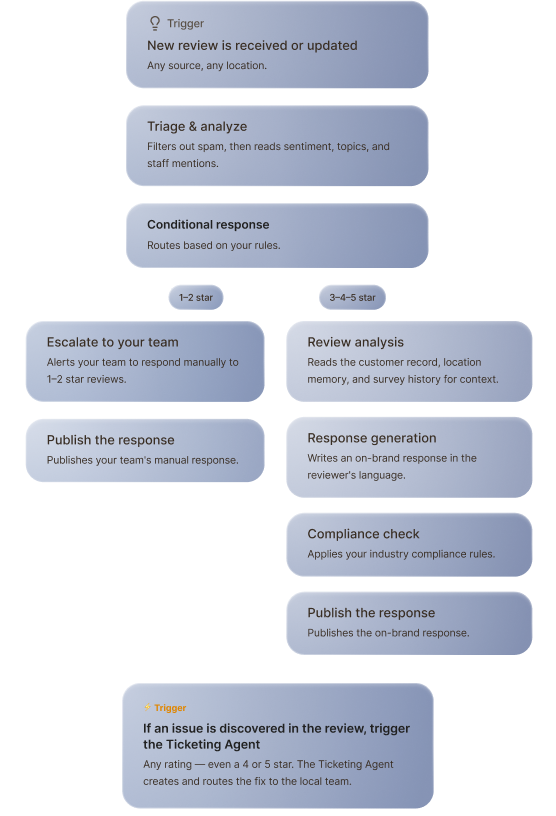
⚡ Trigger
1. New review is received or updated
Any new or updated review, any source, any location
✓ Task
2. Triage review
Filters spam, off-topic, and policy violations
⟆ Branch
3. Based on condition
Routes each review to two conditions
Review is Spam
Review is not Spam
✓ Task
4. Send an email alert
Alerts your team or flag it.
END_SESSION
✓ Task
5. Review analysis
Detects the real issue-topics, severity, staff mentions — then hands off to ticketing.
✓ Task
6. Response generation
Writes a personalized, on-brand reply in the reviewer's language
✓ Task
7. Publish responses
Posts autonomously, or holds for one-click approval.
1

Grounded in your context

Reads the customer record, location memory, survey history, and any of your 3,000+ integrations.

2

Configurable to your rules

Routes by your rules — auto on 5-star, approval-first on 1-star, response-plus-ticket, or delay by location.

3

Multi-agent orchestration

Surfaces the real issue, then hands off — ticketing the location, pausing win-back comms, closing the loop.

4

On brand, in any language

On-brand voice, inside your industry rules (HIPAA, financial), in the reviewer's language.

5

Autonomous or human‑in‑the‑loop

Posts on its own where you trust it, or holds for one-click approval — mix by rating and location.

6

Trust built into every step

Anonymize sensitive fields, set what's off-limits, and audit every drafted and posted reply.

Live
Publish
Review response agent replying autonomously (9)

Review Response Agent

replying autonomously (9)
All Locations
⚡ Trigger
1. New review is received or updated
Any new or updated review, any source, any location
✓ Task
2. Triage review
Filters spam, off-topic, and policy violations
⟆ Branch
3. Based on condition
Routes each review to two conditions
Review is Spam
Review is not Spam
✓ Task
4. Send an email alert
Alerts your team or flag it.
END_SESSION
✓ Task
5. Review analysis
Detects real issue-topics, severity, staff mentions — hands off to ticketing.
✓ Task
6. Response generation
Writes a personalized, on-brand reply in the reviewer's language
✓ Task
7. Publish responses
Posts autonomously, or holds for one-click approval.
Step 1 of 6

Grounded in your context

Reads the customer record, location memory, survey history, and any of your 3,000+ integrations.

Step 2 of 6

Configurable to your rules

Routes by your rules — auto on 5-star, approval-first on 1-star, response-plus-ticket, or delay by location.

Step 3 of 6

Multi-agent orchestration

Surfaces the real issue, then hands off — ticketing the location, pausing win-back comms, closing the loop.

Step 4 of 6

On brand, in any language

On-brand voice, inside your industry rules (HIPAA, financial), in the reviewer's language.

Step 5 of 6

Autonomous or human‑in‑the‑loop

Posts on its own where you trust it, or holds for one-click approval — mix by rating and location.

Step 6 of 6

Trust built into every step

Anonymize sensitive fields, set what's off-limits, and audit every drafted and posted reply.

Sun Auto Logo
“Birdeye allows our teams managing hundreds of locations to respond to reviews instantly while staying fully on-brand.”
Sun Auto banner

Frequently Asked Questions

What is an online reputation management software?

An online reputation management software, or review software, helps you build a strong online presence and boost credibility with your potential customers using reviews. A good review software should let you solicit reviews from your present and past customers, help you with customer review management across sites, and leverage reviews wherever they’re likely to be noticed by your customers.

Why is online reputation management important?

98% of customers read online reviews before buying a product. An online review management platform helps you build credibility with potential customers using reviews. It also boosts your SEO and helps you attract more customers on Google.

What are the key capabilities within Birdeye Reviews?

Birdeye Reviews lets you:

  • Generate and manage reviews from 200+ review sites
  • Manage all customer communication from one inbox
  • Respond to reviews easily with templates and rules
  • Amplify reviews to your website, social, paid ads, and search
  • Track reviews, NPS, response times, and more from one dashboard

How much does Birdeye Reviews cost?

Birdeye offers plans that are customized for your business based on the number of locations you operate and the solutions that you need. Take a look at our pricing page for more details.

What reporting capabilities do I have with Birdeye Reviews?

Birdeye gives you complete visibility into your online reputation management program. You can track reviews over time or by location, review sites, region, or country. You can also know the response times and response rates at a location or individual level. In addition, by adding Birdeye Insights, you can also uncover the customer sentiment and top themes in your customer feedback so that you can improve your products and services consistently.

Can I ask my customers to review my business?

Yes, you should. Customers talk about their brand experiences all the time - be it with family and friends, or on social media and online forums. Soliciting reviews helps you channel customer feedback to your brand’s advantage and build a strong online reputation. It also uncovers insights that can help you improve your products and services.

Can I exclude unhappy customers from my review campaigns?

We recommend that you send review requests to all your customers so that your online reputation is a true reflection of your brand’s customer experience. Consumers understand that no brand is perfect, and a couple of bad reviews actually make your business look genuine. Excluding unhappy customers from review campaigns can also amount to review gating, which might lead to Google penalties or other legal and financial consequences for your brand.

Should I offer incentives in exchange for reviews?

We strongly recommend that you don’t offer incentives in exchange for reviews. While this approach might seem appealing to get more positive reviews, it comes with inherent risks that might damage your brand in the long run. Firstly, consumers today are savvy and can easily see through such tactics, which might lead to an irreparable loss of trust. Secondly, Google is against review gating, which includes offering incentives for reviews. Upon detection, Google might suspend or terminate your business profile which can be detrimental for your brand.

Should I send my customers reminders to leave reviews?

Yes, you can. However, we recommend not being too pushy when asking for reviews. Birdeye allows you to automatically send a reminder email with a customizable delay in case customers don’t respond to your initial outreach.

What is the best time to respond to reviews?

You should respond to a review, whether good or bad, within 24 hours. This is important in preventing issues from blowing up on channels like social media and in building a reputation for your brand as one that cares for its customers' feedback. Birdeye offers you the ability to build custom templates and response rules, making sure no review goes unanswered.

How should I deal with negative reviews?

Getting an odd negative review is completely normal, as it’s not possible to satisfy each and every customer. The first thing you should do is respond to the negative review in a personalized and empathetic manner. Next, if the issue can be fixed, turn the negative review into a customer service ticket and resolve it the soonest you can. Once this is done, you can ask the reviewer for a second chance and request them to update their review.

How can I get rid of spam or defamatory reviews?

You can report slanderous or fake reviews to the respective review site like Google or Facebook. After running their own checks, these platforms can help you take down reviews that are not genuine.

Why should I market my reviews?

Online reviews are the currency of the modern customer experience. Featuring reviews wherever your potential customers are likely to look helps you build trust, improves your brand visibility, and wins you more customers.

Can I exclude negative reviews from showing up on my website?

We recommend that you feature all the latest reviews on your website, irrespective of the rating. This will help your brand look genuine and prevent penalties from Google against review gating practices.

See what Jay can do for your locations

Get a live look at the reviews Jay would generate, the replies he'd send, and what he'd surface for you.

homereview response agent