Google Maps’ “Know Before You Go” is an AI-generated summary that shows customers what to expect before visiting a location. Brands cannot control it directly, but they can influence it through accurate profile data, structured local content, and high-quality reviews. Read on to explore a 6-point checklist to help enterprise teams get their locations ready.
Summary
“Know Before You Go” summarizes multiple signals into a short, decision-shaping view of each location. For multi-location marketing teams, this creates both risk and opportunity across locations. Inconsistent data, unclear expectations, or recurring operational issues can surface immediately in these summaries.

At the same time, brands that actively monitor reviews, manage their listings, and create local content can ensure the summary reflects a consistent, accurate experience.

This blog outlines six practical readiness checklists to help enterprise teams align marketing, customer experience, and operations around the signals that shape how locations are represented in Maps.
Table of contents
- How “Know Before You Go” shapes location-level visibility
- How Google Maps is reshaping location-level performance
- How customers interpret “Know Before You Go” summary
- A “Know Before You Go” readiness checklist for managing location signals
- What not to do as this feature rolls out
- Who owns “Know Before You Go” readiness internally
- How enterprise teams should operationalize this
- FAQs about Google Maps “Know Before You Go”
- Drive consistent performance across every location with Birdeye
How “Know Before You Go” shapes location-level visibility
Google Maps introduced “Know Before You Go,” a feature that surfaces practical visit insights before customers arrive. Customers may see guidance such as:
- Where to park or how to find the entrance
- How booking or check-in typically works
- What first-time visitors should expect
- Common highlights or recurring issues mentioned by others
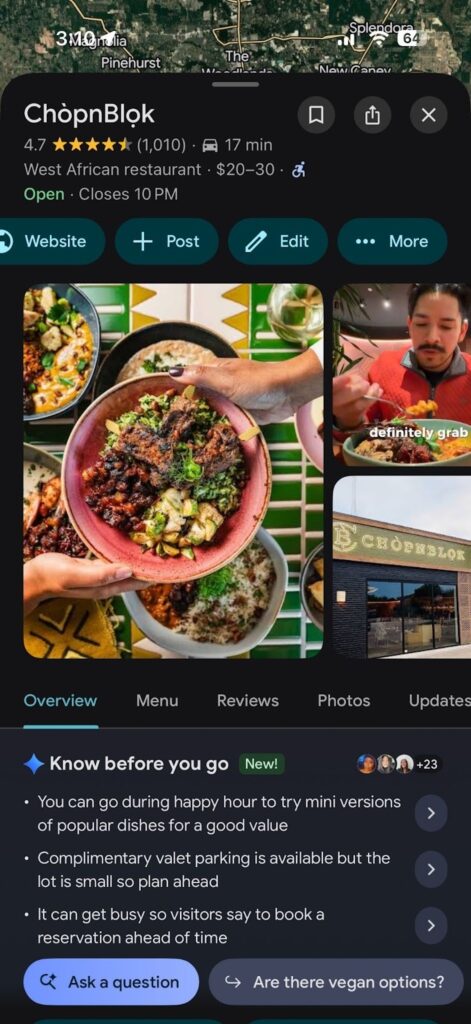
These summaries are generated using Google’s AI models, combining information from reviews and helpful information Google finds online, along with broader signals associated with the location. Google positions this as “insider tips” to help users make faster, more confident decisions within Maps.
Behind these summaries is a massive signal base. According to Google, Maps analyzes information from hundreds of millions of places and contributions from over 500 million users, which means even small patterns in reviews or content can quickly surface in what customers see.
What appears in this section is influenced by the quality of underlying inputs, including accurate listings, clear pre-visit content, and detailed, high-quality reviews that reflect the intended customer experience.
How Google Maps is reshaping location-level performance
“Know Before You Go” is part of a broader change in how Google Maps presents local businesses, alongside features like Ask Maps, which use AI to interpret and summarize location information. Customers see answers to practical questions such as parking, wait times, and check-in early in the decision process.
For multi-location brands, this creates greater visibility into how each location is experienced and described through available signals. As a result, customer perception is shaped less by brand messaging and more by consistently observed experiences.
This introduces three operational challenges for enterprise teams:
- Visibility: An AI summary can end a customer journey before it even begins. Imagine a patient looking for urgent care who sees “typically long wait times” or “confusing check-in” in the summary. They’ll likely keep scrolling.
- Variability: Each location has its own operational quirks. Picture a retail chain where the flagship store is praised for “expert staff,” but a suburban branch is flagged for “messy aisles.” Your brand is only as strong as your most inconsistent storefront.
- Velocity: AI summaries aren’t static. Think of a gym that just finished a massive renovation. If they aren’t driving a high velocity of new reviews, the AI might still surface “outdated equipment” based on two-year-old feedback.
The right response is not panic. It is a clear readiness checklist that aligns marketing, operations, and local teams around the signals Google is amplifying.
For enterprise teams, customer experience is reflected directly through customer feedback. The priority shifts to ensuring that the reality on the ground, and the signals that represent it, are consistently aligned across locations.
How customers interpret “Know Before You Go” summary
Customers use “Know Before You Go” to quickly assess whether a location fits their expectations.
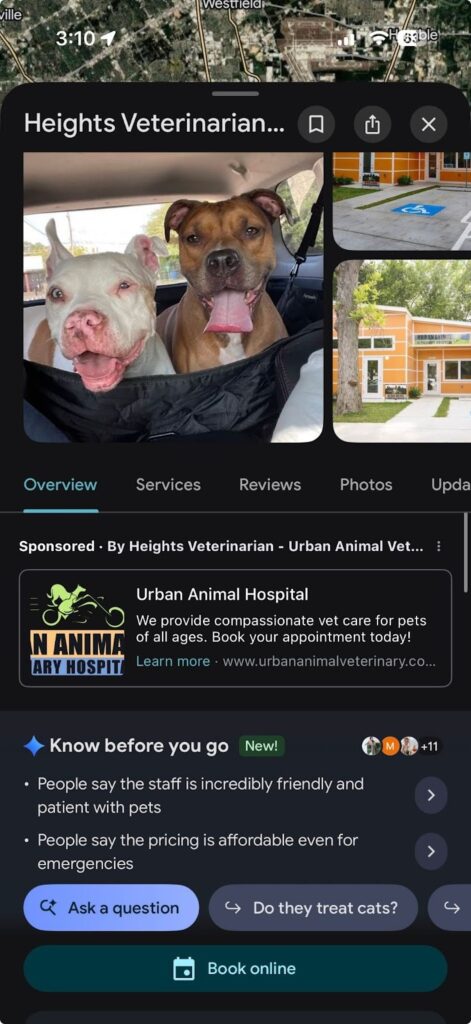
For example, in the screenshot above, the summary highlights themes such as:
- “Staff is incredibly friendly and patient with pets”
- “Pricing is affordable even for emergencies”
In just a few seconds, a customer can form a clear impression:
- This place is friendly
- It is reasonably priced
- It is safe to consider
Customers are not analyzing every detail. They are making quick judgments based on these summarized signals. They are evaluating:
✅Can I trust this location with my time and money?
✅Will getting there, parking, and checking in be simple or frustrating?
✅Does this feel consistent with what I expect from this brand everywhere else?
Small operational details such as signage, staff communication, and wait times can directly influence this perception before a visit. These signals help customers decide not just where to go, but whether the experience will meet their expectations.
A “Know Before You Go” readiness checklist for managing location signals
This checklist helps enterprise teams evaluate and improve those inputs across locations. It provides a simple way to align marketing, customer experience, and operations around what customers are actually seeing in Maps.
Use this as a simple scorecard to identify where locations are strong, where they are at risk, and where action is needed first.
1. Profile hygiene for every location
Accurate and complete profiles form the baseline for every summary. Inconsistent or missing data forces Google to rely more heavily on fragmented external signals.
Start with your Google Business Profiles. Every location should meet the same standard:
- Correct name, address, phone number, and hours, including holiday hours
- Right categories and attributes, such as parking, accessibility, payment methods, and amenities
- Clear, up-to-date descriptions that explain core services in simple terms
- Working links for booking, calls, directions, and website visits
- Recent photos that reflect the exterior, interior, and key services
For industries such as healthcare, hospitality, financial services, and franchises, it is especially important to include clear instructions on how customers should prepare for a visit.
For appointment-based businesses, the booking experience should be just as seamless as the rest of the profile. With booking requests from your Google Business Profile, customers can move from discovering a location in Google to requesting an appointment without navigating through multiple steps.
What this looks like in practice:
- Vague description: “We offer quality care with convenient service and a friendly team.”
- Clear, actionable description: “Free parking available in the rear lot. Enter through the main entrance on Elm Street and check in at the front desk. New patients should arrive 10 minutes early with ID and insurance details.”
Maintaining this level of consistency across thousands of locations and directories is difficult to manage manually. Birdeye Listings AI continuously monitors profiles, identifies gaps or inconsistencies, and recommends updates to keep location data accurate, complete, and competitive across the platforms that drive the most discovery.
When this information is complete and consistent, Google has a reliable foundation to understand what each location offers. When it is missing or outdated, summaries can reflect incomplete or misleading information.
👉 To make this actionable across locations, use a simple scoring system.

Score each location:
0 = Missing or outdated core details
1 = Accurate basics, but limited attributes and descriptions
2 = Fully complete and aligned with website and on-site experience

This creates a clear baseline for improving how each location is represented in Maps.
2. Define the visit experience clearly for each location
When first-visit expectations are not clearly explained on owned channels, summaries rely more on scattered review snippets.
Each location should make this explicit and easy to understand:
- A short “what to expect on your first visit” section
- Clear arrival instructions, including parking and entrance details
- Step-by-step guidance on check-in or booking
- Typical visit duration and any preparation required
- Location-specific details that matter to customers
For example, a clearly defined visit experience answers key questions upfront:

“Free parking is available in the building garage. Enter through the main lobby and check in at reception on the 2nd floor. First-time visitors should arrive 10 minutes early with ID and confirmation details. Appointments typically take 30-45 minutes.”
This content provides consistent, structured information, reducing the risk that unclear or outdated details dominate the summary.
3. Review quality, not just review volume
Reviews are one of the strongest inputs shaping what customers see. Volume alone is not enough. The detail and tone of reviews determine which themes surface.
High-quality reviews include specific, experience-based details rather than generic feedback. For example, reviews that mention wait times, staff interactions, ease of booking, or navigation are far more likely to influence how a location is summarized than vague comments such as “great service” or “nice place.”
A study of 3,269 local businesses found that review count and keyword relevance are among the strongest drivers of local ranking performance, reinforcing why detailed, specific reviews carry more weight than generic feedback.
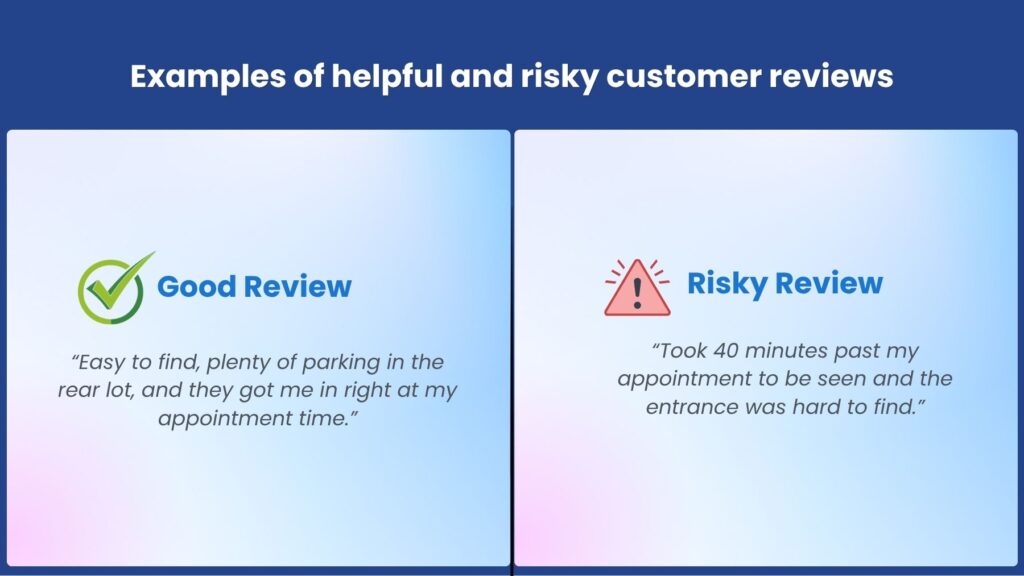
Across locations, look for patterns in what customers are saying:
- Do reviews mention how easy or difficult it is to get started?
- Are wait times aligned with what the brand intends to deliver?
- Do customers describe staff interactions clearly and positively?
- Are recurring issues showing up across multiple reviews?
This is not about controlling what customers say. It is about guiding the type of feedback that reflects the experience you want to deliver.
Enterprise teams should focus on encouraging specific, experience-based feedback. Customers should naturally mention details that matter to future visitors, such as ease of navigation, clarity of instructions, staff interactions, and wait times.
For large multi-location organizations, consistently generating and managing high-quality reviews across locations is difficult to handle manually. Birdeye Reviews uses AI agents to generate reviews, respond with context, and centralize feedback across platforms, making it easier to capture richer, more actionable customer insights. By using Reviews, Birdeye customers see an average 128% increase in review volume within the first 90 days, helping create stronger and more consistent signals for platforms like Google.
4. Review responses shape perception and trust
Review responses are a visible signal of how the brand handles issues and engages with customers.
When teams respond consistently and constructively, they show that feedback is acknowledged and acted on. This helps clarify situations where a review may reflect a one-off issue or an outdated experience.
Strong responses do three things:
- Acknowledge the concern clearly
- Provide clarity and, where needed, explain the corrective action taken
- Indicate what action has been taken or will be taken
A strong response might look like this:
“We’re sorry about the delay during your visit. We’ve since adjusted staffing during peak hours to reduce wait times. If you’re open to it, we’d love to make this right on your next visit.”
For large multi-location brands, maintaining this level of response quality consistently across locations is difficult to manage manually. The Review Response Agent monitors incoming reviews across platforms, analyzes sentiment and context, and drafts timely, on-brand replies, helping teams respond consistently while ensuring no feedback is missed.
Consistent responses across locations create a clear narrative. They show that issues are recognized, addressed, and resolved, which influences both customer perception and how platforms interpret the business.
These signals extend beyond Maps. Clear, thoughtful responses contribute to how the brand is understood across search and conversational discovery channels, where customer feedback is used to form summaries and recommendations.
5. Local consistency between Maps, web, and on-site reality.
Location details are published across multiple places, including Google Maps, your website, and local pages. If these do not match what customers actually encounter on-site, it creates confusion and erodes trust.
The biggest risk is not negative feedback. It’s the inconsistency between what customers are told and what they experience.
To prevent this, teams should regularly audit location information across channels.
Inconsistencies often show up in small but important details, such as parking instructions, entrance access, or check-in processes being described differently across channels.
A practical audit should cover:
- Compare the “Know Before You Go” section with the location’s website or local page
- Check whether photos and listed attributes reflect the current state of the location
- Verify that arrival details such as parking, entrance, and check-in match on-site processes
- Review recent customer feedback to identify repeated points of confusion or mismatch
In practice, these gaps are often subtle but impactful. For example, a location may describe “easy parking” online, while customers frequently mention difficulty finding a spot or unclear directions in reviews. This mismatch creates confusion before the visit even begins.
How often should teams run an audit?
A quarterly review across all locations, with monthly checks for high-traffic or higher-risk locations, is typically sufficient to identify and address issues early.
When gaps appear, the first step is to fix the operational issue. Updating profiles and content should follow so that improvements are consistently communicated across customer touchpoints.
6. Tracking and managing Know Before You Go across locations
It is not practical to continuously review every location individually. Enterprise teams need a structured way to identify where attention is required. Prioritize locations based on revenue, risk, and review trends.
Add a simple check into your reporting process:

✅ Does this location show a “Know Before You Go” section?

✅ What themes are being highlighted?

✅ Are those themes aligned with the intended experience?
The bigger challenge is not defining what to check, but maintaining consistent visibility into these signals across locations. Without a unified view, teams often rely on manual checks or fragmented data, making it difficult to spot emerging issues early.
Teams need a centralized view that brings together feedback, listings, and performance across locations.
Birdeye Insights AI does this by combining data from reviews, surveys, and local SEO signals into a single view, with AI-driven summaries, benchmarking, and recommendations to guide decision-making.

It also introduces standardized metrics such as Birdeye Score, Sentiment Score, Reputation Score, and Listing Score, helping teams measure performance, compare locations, and identify where improvements are needed.
Define clear criteria for flagging locations that need attention, such as:
- Missing or incomplete profile information
- Repeated complaints or negative themes in recent reviews
- Gaps between what is communicated and what customers report experiencing
Insights AI helps surface patterns in customer feedback and highlight locations where issues are emerging, making it easier for teams to investigate and act.
In practice, these patterns can shift quickly. For example, a sudden increase in mentions of “long wait times” or “confusing directions” can change how a location is perceived, but these trends are difficult to detect without a unified view.
A consistent, centralized approach makes it easier to identify risks early and prioritize where teams should focus next.
What not to do as this feature rolls out
As “Know Before You Go” becomes more visible, many enterprise teams try to control the output. This leads to wasted effort and unintended risk.
The more effective approach is to focus on the underlying inputs and avoid common missteps.
Do not try to manage the summary directly
The summary cannot be edited or turned off. Attempts to influence it through shortcuts, such as forcing specific language into reviews or over-optimizing profiles, do not create reliable results. The only sustainable approach is improving the inputs that shape it.
Do not overreact to a single summary
Look for consistent patterns across locations and over time before making changes. One snapshot does not represent the full picture.
Do not treat reviews as a volume exercise
Collecting more reviews without improving their quality limits their impact. At the same time, ignoring responses creates a visible gap. Customers expect acknowledgment, especially when issues are raised.
Do not separate marketing from operations
The themes that surface in summaries often reflect real operational issues, such as wait times or unclear processes. Addressing these requires coordination between marketing, CX, and field teams, not just content updates.
Do not treat this as a one-time cleanup
The signals behind these summaries continue to change. Profiles, reviews, and on-site experience need ongoing attention.
Enterprise teams need a continuous process that keeps profiles accurate, content relevant, and responses consistent. This ensures that new signals reinforce the experience the brand intends to deliver.
Who owns “Know Before You Go” readiness internally
The inputs that shape “Know Before You Go” cut across multiple teams. No single team controls what customers see.
Ownership typically sits with a coordinated group:
- Central marketing manages brand messaging, local pages, and business profile accuracy
- Customer experience or reputation teams handle reviews, feedback, and response quality
- Field or operations leaders ensure the on-site experience matches what is communicated
When these efforts are disconnected, gaps appear between what is promised and what is delivered. A shared framework helps keep teams aligned. Clear ownership, simple workflows, and consistent standards ensure that updates to data, content, and operations move together.
Who owns what across the readiness checklist
| Checklist area | Primary owner | Supporting teams |
|---|---|---|
| Profile hygiene (listings, attributes, hours) | Marketing | Operations |
| Visit experience clarity (arrival, check-in, expectations) | Marketing | Operations |
| Review quality (generation and content depth) | Customer Experience | Marketing |
| Review responses (timeliness and quality) | Customer Experience | Marketing |
| Cross-channel consistency (Maps, website, on-site reality) | Operations | Marketing |
| Performance monitoring and tracking | Marketing Analytics | CX/Operations |
This coordination keeps the experience aligned across locations.
How enterprise teams should operationalize this
To move from awareness to execution, leadership teams should focus on a simple rollout plan:
- Run this checklist on a pilot group of locations: Start with a small set of locations across different markets to identify gaps in data, reviews, and customer experience
- Define what needs attention first: Establish simple criteria to flag locations with incomplete profiles, recurring issues in reviews, or mismatched expectations
- Close the gaps across signals: Use Birdeye to improve profile accuracy, strengthen review quality, and ensure “what to expect” content reflects the real experience
- Expand across the full portfolio: Apply the same framework across all locations to maintain consistency and reduce variation
- Revisit regularly: Make this part of regular operations so updates in reviews, content, and experience are continuously reflected
A structured, repeatable approach helps teams stay aligned and ensures that improvements at the location level translate into better visibility and trust.
FAQs about Google Maps “Know Before You Go”
“Know Before You Go” is a Google Maps feature that uses AI to summarize practical tips about a location, such as parking, booking, first-visit expectations, and common highlights or issues. It is based on reviews and helpful information Google finds online.
No. Brands cannot directly edit or disable the summary. It can only be influenced by improving the underlying inputs, such as accurate profiles, clear “what to expect” content, and high-quality reviews.
Google is rolling this out across select categories and markets. Some locations may show the feature while others do not. Coverage is expected to expand over time.
There is no public update schedule. Summaries can change as new reviews, photos, and web content are incorporated. This makes ongoing management essential rather than a one-time update.
Birdeye helps large multi-location brands manage listings, reviews, and customer feedback in one place, improving the signals that shape “Know Before You Go.” It integrates with 100+ review sites and is a Google Premier Partner with SOC 2 and HIPAA compliance, making it suitable for enterprise and regulated industries.
You do not need a brand-new strategy, but you should sharpen your focus.
Keep generating more reviews, and coach teams to ask customers for specific, helpful details (ease of booking, clarity of instructions, parking, staff experience) that will improve what future visitors see in the summary.
It extends beyond Google. The same inputs influence how your brand is represented across search, social, and conversational discovery platforms. “Know Before You Go” is one visible outcome of a broader local experience and reputation management strategy.
Drive consistent performance across every location with Birdeye
Managing location signals across thousands of locations requires more than manual coordination. It requires a system that connects data, workflows, and customer feedback into a single operational layer.
Birdeye is purpose-built for this challenge. As the #1 Agentic Marketing Platform for multi-location brands, it unifies the inputs that shape how your locations are represented and understood on Google Maps.
- Accurate listings across every location: With Listings AI, keep hours, attributes, photos, and key location details accurate, consistent, and up to date.
- More detailed reviews and stronger response coverage: Use Reviews to grow review volume, improve response consistency, and reinforce trust with on-brand replies.
- Better visibility across answer engines: Search AI strengthens your Answer Engine Optimization (AEO) strategy by revealing how your brand appears across Google, ChatGPT, Gemini, and Perplexity, and where stronger reviews, richer content, or more complete listings can improve visibility.
- Actionable insights across locations: Use Birdeye’s unified customer data and insights to identify patterns in feedback across 100-10,000+ locations and uncover what is shaping how your locations are perceived.
- Execution with governance: Birdeye’s brand-trained AI agents handle execution, drafting high-quality, personalized responses while enterprise-grade approval workflows ensure you stay fully in control and on-brand.
When listings are accurate, reviews are detailed, and responses are consistent, what customers see reflects a clear, reliable, and on-brand experience across every location.
Ready to master your brand’s AI presence? See how Birdeye helps keep every location “Know Before You Go” ready. Watch a free demo.

About the Author

Shaifali Parihar
Originally published