Video testimonials are short customer story videos where satisfied customers explain their experience with a business, the problem they needed to solve, and the results they achieved. The best video testimonials feel authentic, follow a simple story, and focus on specific benefits rather than generic praise.
Summary
Video testimonials help businesses turn positive customer reviews into stronger social proof. Unlike written testimonials, video testimonials show the customer’s voice, expression, and story, which can make the message feel more personal and credible to prospective buyers.

A strong video testimonial should start with context, follow a clear storyline, and highlight the benefits of working with the business. The customer should remain the focus, while the business is positioned as the solution that helped them solve a specific problem or achieve a meaningful result.
In this blog, we’ll explain how to create effective video testimonials in three steps: start with context, build a strong storyline, and bring in the benefits. We’ll also cover why sharing testimonials across your website and social channels can help strengthen your online presence.
Here are 3 tips for creating great video testimonials:
- Start with a context
- Create a solid storyline
- Bring in the benefits
Also read: 72% customers say positive reviews and testimonials make them trust a business more.
Now, let’s dig in deeper!
1) Start with a context
Before beginning the video, it helps to provide an interesting background to your viewers. It does not make sense to just spurt out the selling points of your business directly to your prospective clients.
You can start off with a quick introduction of your client and explain their pain points or requirements. Then, slowly pitch in the idea of how your business solved their problem and delivered an amazing customer experience.

For example, if you’re a wedding planner, you could start off your video testimonial with an interesting introduction. Make sure that you highlight how you helped organize the dream wedding for your clients!
An exciting introduction will help you grab the attention of your viewers. It keeps them interested until the end of your promotional video.
2) Create a solid storyline
Make sure that your video testimonial has a clear storyline before you start shooting it. It should cover the key aspects of your success story, one after another, in a meaningful sequence.
Things to remember:
- Your client should be the focus of your video testimonial.
- Prepare a set of questions for them beforehand. This will give them some preparation time, which will help in bringing out the message you want to convey.
- Remember, this is a video testimonial so you don’t need to stick to a strict script.
- Make your video interactive and keep the mood light. This will make it look more genuine.
So, take some time to think through the aspects you want to highlight in your promotional video. Then, frame your questions accordingly. But make sure that you don’t include too many questions or problems for a single video testimonial. Rather than a one-size-fits-all approach, pick on a specific problem. Build your story around how you tackled that particular pain point efficiently.
Sticking to the wedding planning business example mentioned earlier, your storyline could be based on how you handled a multicultural wedding or a destination wedding with a huge number of guests.
Picking a specific point will make it easier for you to prepare a meaningful storyline.
Share this storyline with your client in advance so that they’re informed about the key points you want to bring to light in your promotional video. Sometimes, your clients may not be comfortable in answering all kinds of questions. That’s why it’s important to run them through the questions beforehand so that you can make the necessary revisions on time.
3) Bring in the benefits
Of course, highlighting your benefits is your primary focus! But like they say, save the best one for the last.

After you’ve mentioned the pain points of your client, think of a subtle way to link your services to your story. Remember to highlight why your business was the best solution for your client. Mention the benefits of your services in a phased manner such that it flows into your video as a part of the story.
For example, talk about how you helped handle the pressures of organizing a destination wedding with many guests. You can mention how you researched and contacted various local vendors, hotels, caterers, florists, cake bakers, etc. before picking the best guys in your team to do the job. This will showcase your business networking and management skills. It will also convey that you’re open to new challenges when it comes to ensuring the best experience for your clients.
Make sure that you follow these 3 tips while creating your client video testimonials. Keep the video duration to a maximum of 30 minutes to communicate your story effectively. But don’t worry too much about the video length if you have a good story to tell. Good stories always strike a chord with people. They help establish trust. Lastly, your video testimonials are no good if you don’t share it on your social media profiles or business website. They serve as great content for your business and help you grow a strong online presence.
Frequently asked questions about video testimonials
Video testimonials are effective because they combine customer feedback with visual storytelling. Prospective customers can see and hear real people talk about their experience, which can make the testimonial feel more authentic and persuasive.
Most video testimonials should be short and focused. Aim for a few minutes rather than a long interview. The video should be long enough to explain the customer’s challenge, experience, and outcome, but short enough to keep viewers engaged.
Ask questions that help the customer tell a clear story. For example: What problem were you trying to solve? Why did you choose this business? What was your experience like? What result did you see? Would you recommend the business to others?
Businesses can share video testimonials on their website, landing pages, Google Business Profile, social media channels, email campaigns, and sales materials. The best channels depend on where prospective customers research and compare businesses.
Birdeye helps businesses turn customer feedback into stronger social proof. Reviews AI supports review generation and review sharing, while Social AI helps teams publish testimonial content, manage social engagement, and keep social profiles active across locations.
Turn customer stories into social proof with Birdeye
Creating a strong video testimonial is only the first step. To get more value from customer stories, businesses need to share them across the channels where prospective customers are already researching, comparing, and deciding.
Birdeye helps businesses turn customer feedback into content that supports reputation and social engagement. As the #1 agentic marketing platform for multi-location brands, Birdeye is powered by BirdAI and a unified data platform that helps teams manage reviews, social content, and customer engagement from one connected platform.
Share customer proof across social channels
Social AI helps multi-location brands plan, create, publish, and manage social content across locations. Teams can use Birdeye Social to share customer stories, review highlights, and testimonials across channels such as Google Business Profile, Facebook, Instagram, and LinkedIn.
This helps brands keep social profiles active while turning real customer experiences into content that builds trust.
Create and publish with more consistency
The Social Publishing Agent helps teams plan, generate, and publish brand-aligned social content. For businesses using video testimonials, this can support the promotional workflow around each testimonial, from creating captions and post copy to keeping social calendars consistent across locations.
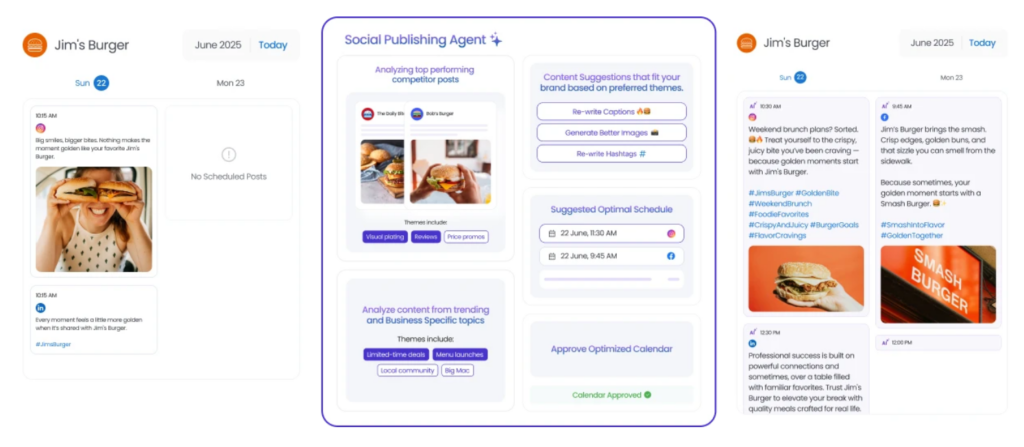
With optional approval workflows, teams can maintain control over messaging while reducing the manual effort required to publish testimonial content.
Engage with customers after you post
Video testimonials can spark comments, questions, and conversations. The Social Engagement Agents help teams manage social interactions by analyzing sentiment, suggesting context-aware replies, and routing important conversations to the right team.
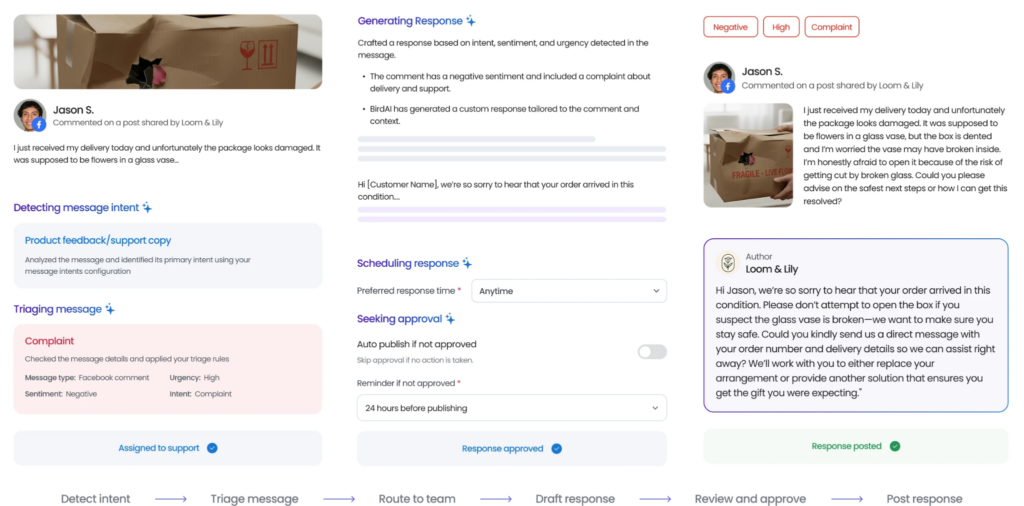
This helps businesses respond faster while keeping engagement professional and consistent.
Connect testimonials to reputation
Reviews AI helps brands generate, monitor, respond to, and share reviews across 200+ review sites. Together, Reviews AI and Social AI help businesses turn customer feedback into a stronger reputation engine: collect authentic feedback, identify stories worth sharing, publish customer proof, and engage with audiences across social channels.
Watch a free demo to see how Birdeye helps brands manage reviews, publish social content, and strengthen customer trust across channels.

About the Author

Shaifali Parihar
Originally published