
Foursquare business listings let local businesses manage their profile, showcase reviews, and provide accurate information to customers. Creating and updating your listing ensures your business appears in local searches and helps users easily find your location and services. Keeping your profile current also strengthens credibility and encourages customer engagement.
Summary
A fully optimized Foursquare business listing includes more than basic business details; it highlights photos, categories, and special offerings that make your profile engaging. Regularly monitoring reviews and updating content can increase interactions and drive repeat visits. Using analytics tools, you can track customer engagement and identify areas for improvement. By leveraging these strategies, your listing becomes a dynamic tool for attracting customers and supporting local growth.
This blog will guide you step by step on creating and updating your Foursquare listing, optimizing key elements, and leveraging features that make your business more discoverable and trusted by customers.
Table of contents
- What is Foursquare for business?
- How much does Foursquare for business cost?
- How to create a Foursquare business listing?
- Updating a business listing on Foursquare
- Five benefits of a Foursquare business listing
- Frequently asked questions about Foursquare business listings
- Control how customers find you with Birdeye Listings and Search AI
What is Foursquare for business?
Foursquare for Business is a listing site that helps businesses add important information such as the business name, address, phone number, hours of operation, and website URL. Your business can add photos, menus, and special deals to listings. A Foursquare business listing is a great way to attract new customers and promote your brand.
Most people know Foursquare as a social media platform that lets users check in to locations and share their experiences with friends through photos, tips, and comments. However, Foursquare’s listing service has also grown significantly in the past few years.
How much does Foursquare for business cost?
Starting a listing on Foursquare for business does not cost anything, if it is to claim a listing or create a free listing on the website. However, the website may charge you a one-time fee of $20 USD to give you access to instant management of that listing that includes a wide array of business tools.
The business tools include access to customer analytics and instant editing of the Foursquare business listings.
How to create a Foursquare business listing?
Joining the Foursquare business directory is easy and can be done in just five steps.
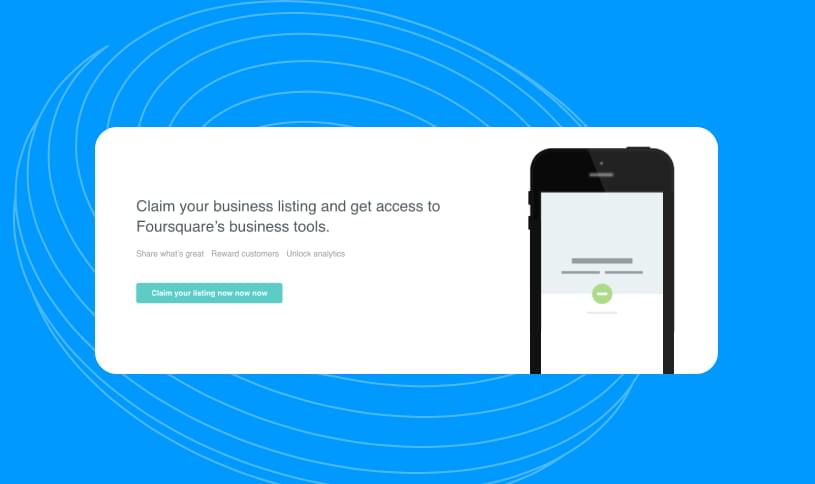
1. To start, head over to Foursquare’s business page and scroll down to the ‘Claim your business listing’ section. Click on the button and proceed to their search window to see if your business is already listed on the Foursquare network.
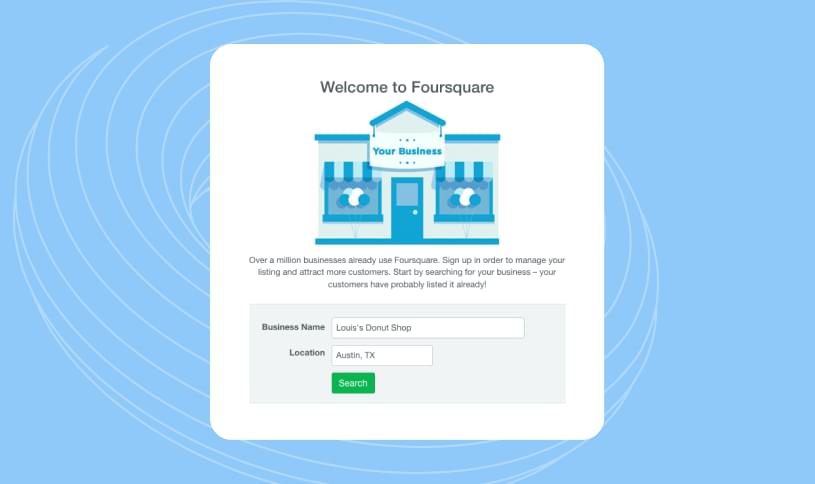
2. In the search window, type in your business name and location and then click ‘Search.’ If you’re already listed on Foursquare, claim it and proceed to your Foursquare page. There you can begin updating your business details. If your business isn’t listed, you’ll need to create a Foursquare account.
3. To create an account, you’ll need to enter your name, a working email address, a unique password, and your birthday information. Click “Sign up” and verify your details via the confirmation email.
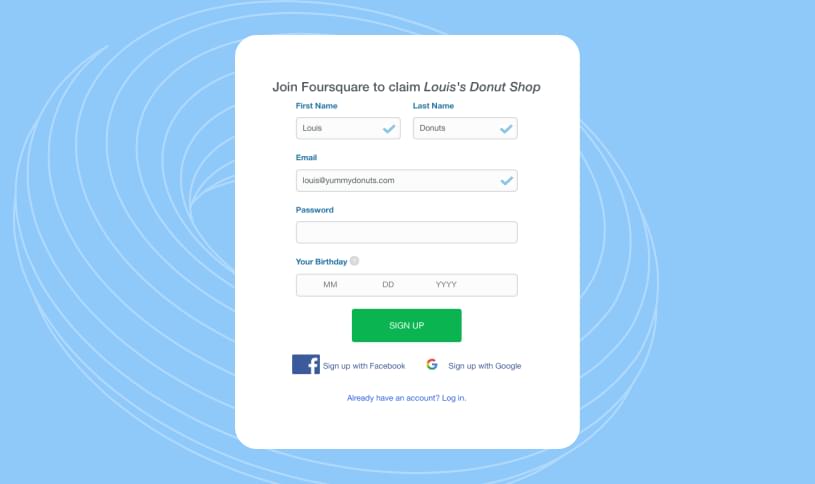
It's worth noting that Foursquare asks all users for their date of birth so that content access is age-appropriate. For instance, if you own a cannabis dispensary, Foursquare will block any users that are under the legal age from accessing announcements about upcoming events or promotions as an additional safeguard.
4. Next, you’ll be able to add your business. For those new to the platform, this is your first opportunity to provide your business details. This information includes your business’s name, address, and pin placement on the Foursquare map. You’ll also be able to add a business category, Twitter handle, and phone number. Verify you’re not a robot and then click ‘Save.’
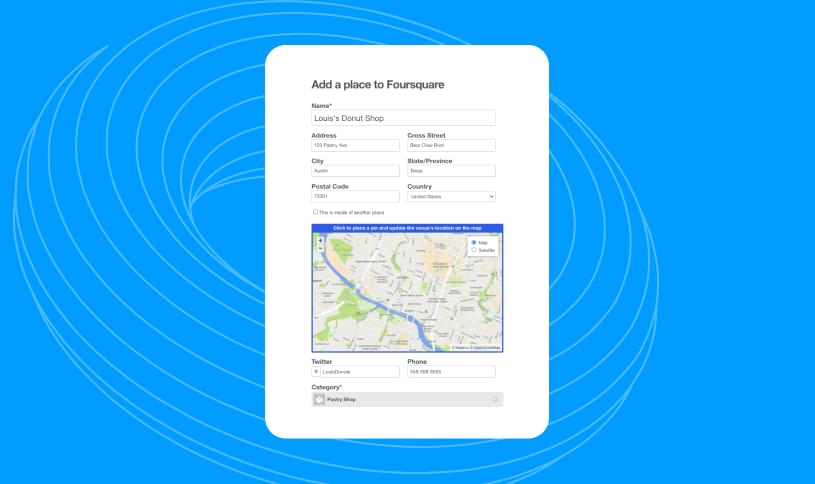
Having accurate business details on Foursquare and other prominent listing sites is crucial is establishing your authority on search engines, especially Google. And that accuracy begins with having your address - especially having your NAP (Name, Address, Phone number) in the right format.

The right NAP format ensures Google can identify your listing, verify it, and boost it as people search for your business online. Accurate local citations also make it easier for customers to leave reviews and ratings for the right business. This feedback can help your business attract new customers and spot potential product and service issues.
5. After adding your business information, it’s time to publish and make your Foursquare business listing live.
This is a three-step process:
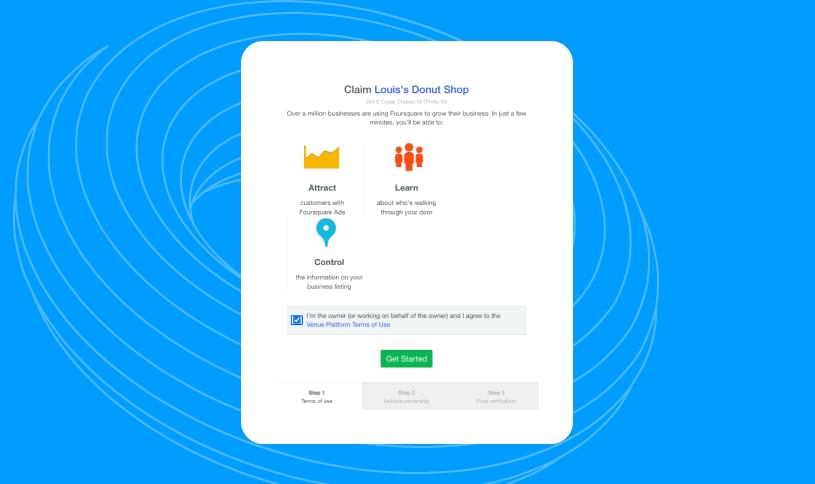
- First, you must accept Foursquare’s terms and conditions by checking the box and clicking the ‘Get Started’ button.
- After this step, your listing will technically be published, and you’ll have full access to your page.
- The remaining steps only apply to businesses interested in using Foursquare’s paid services.
Updating a business listing on Foursquare
There will likely be a time when you’ll need to update your Foursquare business listing. To update your information, head over to your business’s pages and click the Edit button within the map image on the right side of the screen.
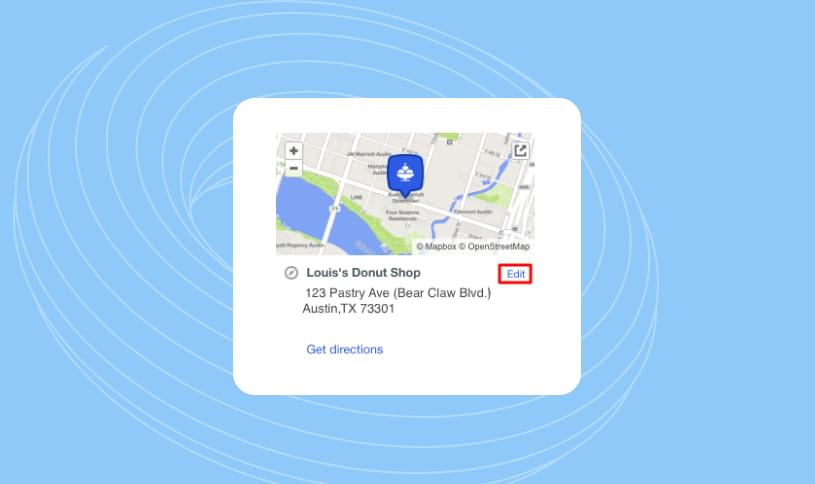
From there, you can add photos, change your hours of operation, and update your contact information. You’ll also have the opportunity to add more business categories and a brief description. Updating your listing regularly makes sure that customers can always find the most up-to-date information about your business.
Show up Where Your Customers Search
Want to see the impact of Birdeye on your business? Watch the Free Demo Now.
Five benefits of a Foursquare business listing
By creating your Foursquare business listing you are joining a network that includes over 50 million users. If that’s not reason enough, here are some more benefits for you to consider.
- Free to list – Setting up a Foursquare listing is quick and easy, and best of all, it’s free. There’s no reason you shouldn’t take advantage of this valuable marketing tool.
- Tips – Foursquare allows customers to leave tips and reviews about your business, which can help spread the word about your products.
- Analytics – Insights on customer behavior can be a game changer for your business. This feature provides detailed analytics about who is checking in to your business and when. That information can be used to understand your customer base more to make data-driven decisions about your marketing and operations.
- Swarm – Foursquare’s Swarm feature lets your business promote specials and offer discounts as incentives to entice customers to check in at your location. This is a great way to increase foot traffic, encourage repeat business, and build brand loyalty.
- Ads – If you have some extra money in your marketing budget, Foursquare Ads can be a great way to reach new customers. This paid feature is location-based, so your ad only appears to users when they are nearby. Also, you only pay a fee if customers click on your ad. It’s similar to a pay-per-click model. With Foursquare Ads, you can target specific demographics, interests, and even locations. These features make sure that your ad reaches the right people at the right time.
Frequently asked questions about Foursquare business listings
Yes, Foursquare business listings are free to create. There are no special requirements and you don’t need to be a Foursquare user to create a listing. You just need to start an account and provide your business information.
A Foursquare Superuser is a business or individual who has been designated as an expert in using Foursquare’s services. Superusers play a pivotal role in making sure information remains as accurate as possible on Foursquare.
To list your business on Foursquare, enter the site and type your business name in the search bar. If there is no existing listing, you can start by creating a new Foursquare account and adding the relevant details.
Control how customers find you with Birdeye Listings and Search AI
Creating and updating your Foursquare business listing helps customers discover your business and access accurate details. However, most customers don’t rely on a single platform when searching for local brands. They may check multiple directories, maps, and review sites before deciding where to go.
Birdeye Listings AI helps brands manage these listings from one centralized platform, so information stays consistent everywhere customers search.
Here’s how Listings AI supports your listing strategy:
- Centralized listing management: Listings AI lets you manage business profiles across key directories, including Google, Apple Business Connect, Yelp, and Foursquare, from a single dashboard. This reduces the need to log in to multiple platforms to update your details.
- Continuous monitoring and gap detection: Listings AI scans your profiles to identify missing information, broken links, or incomplete attributes that could affect your visibility. This helps maintain accurate business data across every location.
- Location-specific optimization insights: Each location can yield different search results. Listings AI analyzes local signals and highlights opportunities to improve categories, descriptions, photos, and other listing elements that influence discovery.
- Consistent and accurate business data: Maintaining the correct NAP (Name, Address, Phone number), hours, and service information across directories improves credibility and helps customers trust the information they see.
By keeping your Foursquare business listing and other profiles accurate and optimized, Listings AI helps brands strengthen their local presence and make it easier for customers to find them online.
Monitor AI search visibility with Birdeye Search AI
Listing accuracy alone is no longer enough. Customers are increasingly turning to AI tools for recommendations rather than browsing directories. When someone asks an AI assistant for the best place nearby, the system often provides a direct answer rather than a list of websites.
Birdeye Search AI helps brands understand how they appear in these AI-generated recommendations and identify ways to improve visibility.
Here’s how Search AI supports discovery across AI-driven search:
- AI visibility tracking: Search AI tracks how your brand appears in responses across engines such as ChatGPT, Gemini, and Perplexity. This helps you see which locations are recommended and where improvements may be needed.
- Competitor benchmarking: You can compare your brand’s presence with nearby competitors to understand where other businesses are appearing more frequently in AI answers.
- Sentiment monitoring in AI responses: Search AI analyzes how AI engines describe your business. This helps identify strengths, customer perceptions, and areas that may need attention.
- Source and data analysis: AI engines rely on information from directories, reviews, and other online sources. Search AI helps identify which sources influence those responses so you can focus on improving the most important signals.
Watch the demo to learn more

About the Author

Birdeye Staff Writer
Originally published