Apple Business Connect is now Apple Business. In April 2026, Apple combined Apple Business Connect, Apple Business Manager, and Apple Business Essentials into a single platform called Apple Business. Existing business listings, place cards, photos, and account settings migrated automatically, so organizations didn’t need to recreate their listings.
Summary of the blog:
The platform may have a new name, but the goal remains the same: helping customers find the right business at the right moment. For enterprise brands, that means treating Apple Business as an important part of a broader local search strategy rather than a standalone listing platform.
This guide explains how to set up and optimize Apple Business for multi-location brands, and how enterprise teams can manage Apple listings alongside Google, Bing, and AI search platforms.
Table of contents
- What is Apple Business Connect (now Apple Business)?
- What changed in the April 2026 Apple Business update?
- How Apple Business works for multi-location brands
- How Apple Business and Google Business Profile differ in local discovery
- How to set up Apple Business for multi-location brands
- How to delegate Apple Business to Birdeye
- Apple Business best practices for multi-location brands
- How do you manage Apple Business alongside Google and AI search?
- FAQs on Apple Business Connect
- Turn Apple Business into a managed asset with Birdeye
What is Apple Business Connect (now Apple Business)?
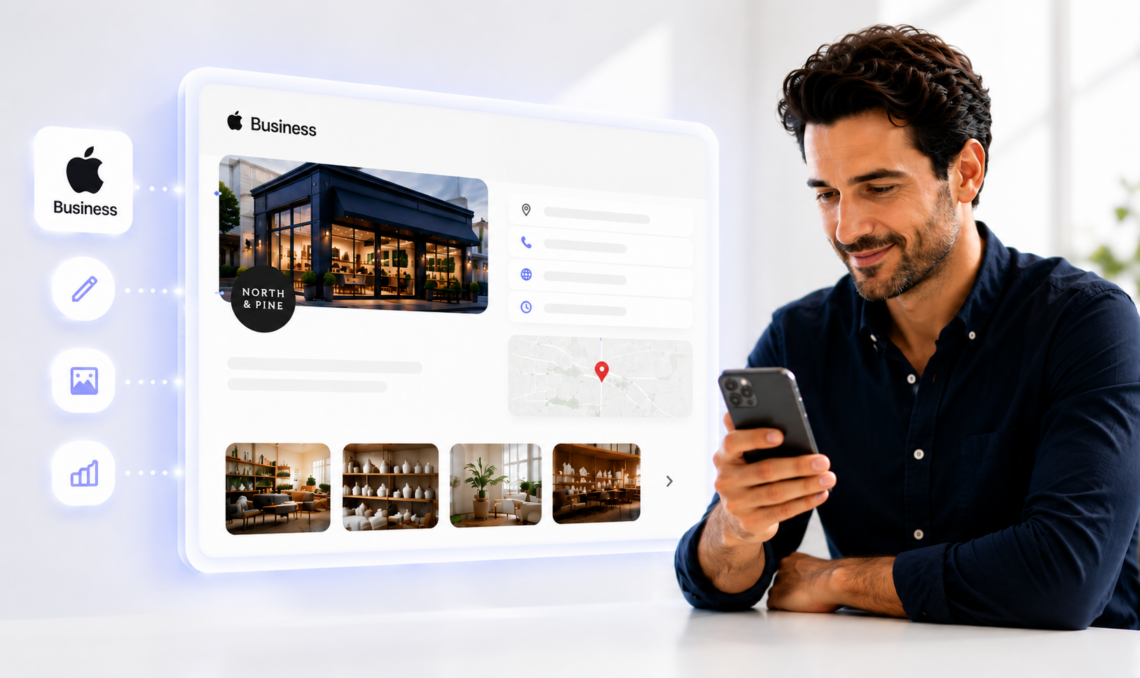
Apple Business helps businesses manage their appearance across Apple’s ecosystem. From a single dashboard, businesses can claim locations, update Apple Place Cards, manage business information, upload photos, publish Showcases, add Custom Action Links, and monitor Business Insights for every location.
For multi-location brands, Apple Business makes it easier to maintain accurate, consistent listings across hundreds or thousands of locations while giving customers the information they need to discover and choose your business.
Where do Apple Business listings appear?
Business information managed through Apple Business can appear across:
- Apple Maps
- Siri
- Spotlight
- Apple Wallet
- Apple CarPlay
- Safari Suggestions
Keeping listings complete and accurate across these touchpoints improves discoverability and provides a better customer experience.
Is Apple Business free?
Yes. Businesses can claim and manage their listings, Place Cards, photos, categories, business hours, and customer actions at no cost. Apple Maps Ads will be available separately as a paid advertising product.
What changed in the April 2026 Apple Business update?
Apple’s April 2026 update brought business identity, device management, and IT administration into a single platform, giving organizations one place to manage their business presence and Apple services.
What was consolidated?
The new Apple Business platform combines:
- Apple Business Connect for business listings and Place Cards
- Apple Business Manager for device and user management
- Apple Business Essentials for small business IT management
This consolidation provides organizations with a unified experience rather than managing separate Apple business products.
What migrated automatically?
Businesses that were already using Apple Business Connect didn’t need to recreate their listings. Existing Place Cards, photos, organization settings, team access, and claimed locations carried over automatically.
What should enterprise teams verify after migration?
Even though migration was automatic, multi-location brands should verify:
- Every business location is still claimed
- Team roles and permissions are correct
- Photos and logos display properly
- Business categories remain accurate
- Holiday and special hours are up to date
What’s new?
The unified platform also introduces:
- A single dashboard for business management
- Blueprints for device deployment and management
- Custom-domain business email
- Apple Maps Ads, expected to roll out in the US and Canada during summer 2026
Now that the platform has been consolidated, it's important to understand how Apple Business manages listings for enterprise brands. While the interface has changed, the underlying principles behind Apple listings remain largely the same.
How Apple Business works for multi-location brands
For enterprise brands, every location is managed independently within Apple Business. Each store, branch, or office has its own Apple Place Card containing business information, photos, categories, attributes, and customer actions. Apple evaluates every location separately, so incomplete or outdated information at one location doesn’t affect the others.
This makes ongoing listing management especially important for multi-location brands. Maintaining consistent, accurate information across hundreds of locations requires continuous monitoring rather than one-time updates.
What does Apple prioritize when displaying locations?
Apple places strong emphasis on:
- Complete Apple Place Cards
- Accurate categories and attributes
- High-quality logos and photos
- Correct business hours and contact details
- Relevant customer actions like booking, ordering, or directions
Listings that rely on generic descriptions, outdated media, or incomplete attributes are less likely to surface consistently, even when the core business information is present.
Why Apple listings behave differently from Google listings
Unlike Google Business Profile (GBP), Apple places greater emphasis on listing accuracy, structured business information, approved media, and complete Place Cards. Updates often go through stricter review processes, making ongoing optimization more important for enterprise brands managing hundreds or thousands of locations.
Although both platforms help customers discover local businesses, they prioritize different signals and require different optimization strategies.
How Apple Business and Google Business Profile differ in local discovery
Although Apple Business and Google Business Profile both help customers discover local businesses, they use different ranking signals and require different optimization strategies. Enterprise brands need to manage both consistently to maximize local visibility.
| Feature | Apple Business | Google Business Profile |
| Primary visibility | Apple Maps, Siri, Spotlight, Wallet, CarPlay | Google Search and Google Maps |
| Discovery model | Listing accuracy, Place Card completeness, structured business information | Search intent, relevance, proximity, reviews |
| Media | Logos, cover photos, albums, Showcases | Photos, videos, Google Posts |
| Customer actions | Custom Action Links for bookings, orders, appointments, and more | Calls, directions, website, bookings, messaging |
| Verification | Apple-managed verification | Google-managed verification |
| Insights | Business Insights | Performance Insights |
Why enterprise brands need both
Customers don’t rely on a single platform to discover local businesses. Someone may search on Google, ask Siri for directions, navigate using Apple Maps, or compare businesses across multiple platforms before making a decision. Optimizing a single platform creates visibility gaps that can affect customer acquisition.
For enterprise brands, the challenge isn’t managing Apple or Google independently. It maintains accurate, optimized listings across all platforms while keeping business information consistent at every location.
This matters because iPhones account for approximately 57% of the US smartphone market, making Apple Maps and Siri critical discovery channels for many multi-location brands.
Managing Apple and Google at scale
Managing hundreds or thousands of business listings manually becomes increasingly difficult as brands grow. Business hours change, photos become outdated, categories evolve, and new competitors emerge. Even small inconsistencies across locations can reduce visibility and create a poor customer experience.
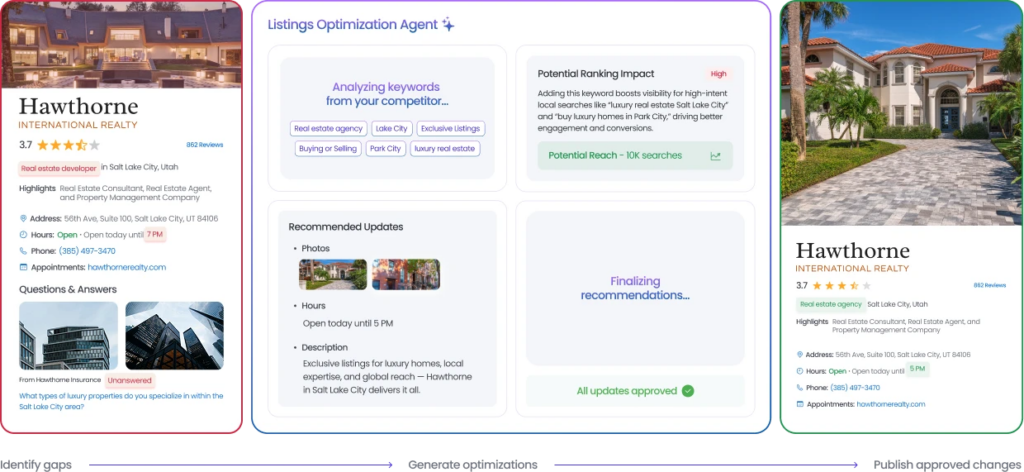
Birdeye’s Listings Optimization Agent continuously monitors business profiles across Apple, Google, Facebook, Yelp, and other 100+ high-impact platforms to identify missing information, outdated content, keyword opportunities, and competitive gaps. It recommends the highest-impact optimizations for every location and, once approved, automatically applies updates within your brand guardrails.
Rather than treating listings as a one-time setup, the Listings Optimization Agent helps enterprise teams continuously improve listing quality, maintain consistency, and stay competitive across the platforms that drive local discovery.
What the Listings Optimization Agent does
- Monitors listings across Apple, Google, Facebook, Yelp, and more
- Detects missing, outdated, or underperforming profile information
- Identifies keyword and competitor opportunities for every location
- Recommends high-impact improvements based on local search performance
- Applies approved updates automatically while maintaining brand consistency
Knowing how the two platforms differ is only the first step. The next challenge is implementing Apple Business in a way that scales across every location.
How to set up Apple Business for multi-location brands
Setting up Apple Business is straightforward for a single location. For enterprise brands managing dozens or hundreds of locations, the focus should be on establishing a scalable process that keeps listings accurate over time.
Before setting up a business, the following key information is required by Apple to create and verify listings:
- Legal name of the company and businesses
- Physical address
- Phone number
- D-U-N-S number (If you don’t know, you can find yours here)
- Brand logo
- High-quality photos
- Descriptions of your business, products & services
Here’s a step-by-step process on how to set up your Apple Business.
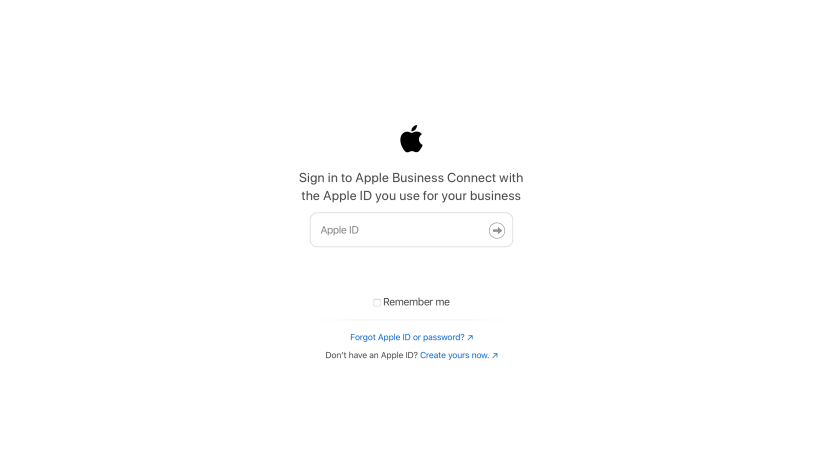
Step 1: Create your organization in Apple Business
Sign in with a business-managed Apple Account and create your organization in Apple Business.
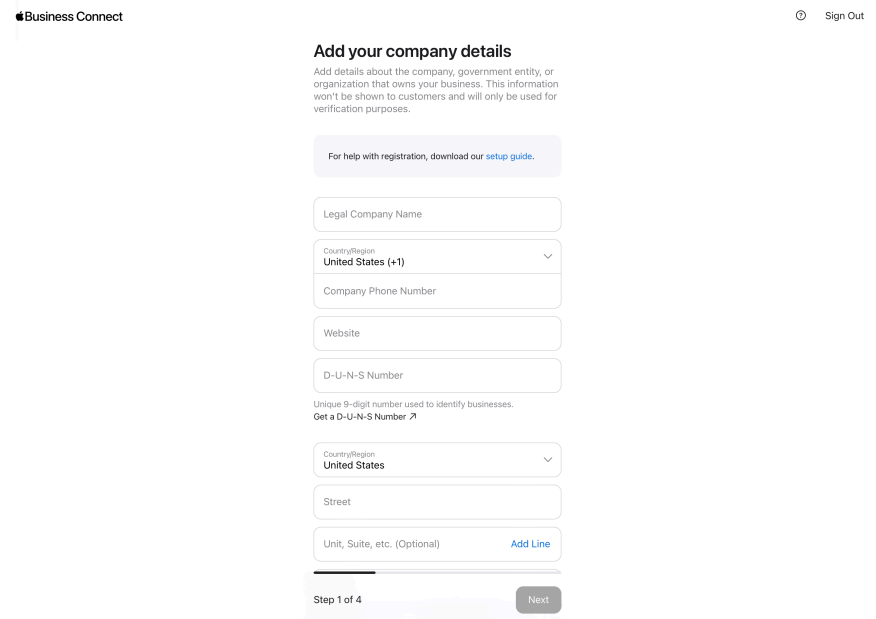
Step 2: Add and organize locations
Import your business locations and ensure each location has accurate business information, including name, address, phone number, website, categories, and operating hours.
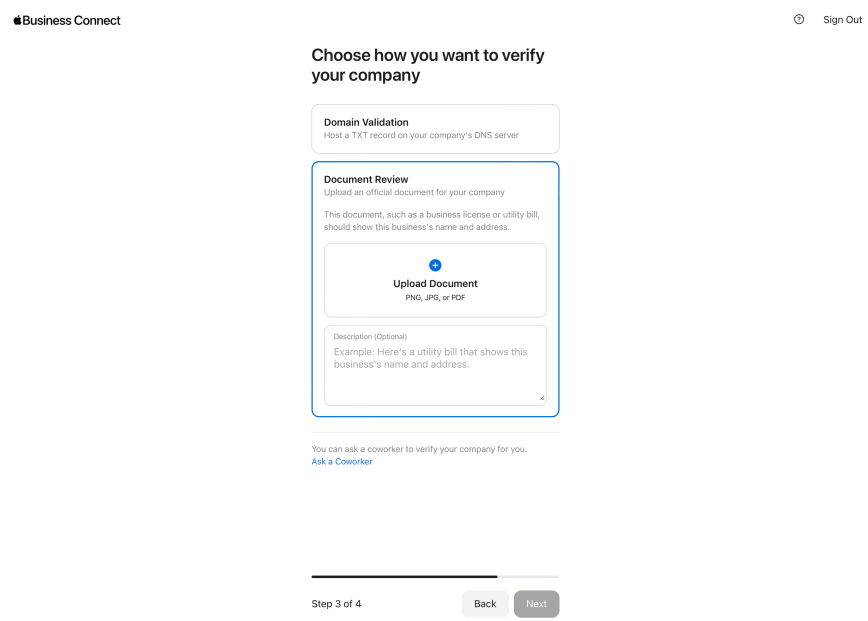
Step 3: Verify your business
Apple offers multiple verification methods depending on your business type and ownership structure.
Common verification methods include:
- Domain verification using a DNS TXT record
- Business document review
- App Store Connect verification (for eligible organizations)
Step 4: Complete every Apple Place Card
Populate each Place Card with:
- Business description
- Logo
- Cover photo
- Photo gallery
- Categories
- Attributes
- Custom Action Links
- Business hours
Complete Place Cards are more likely to appear prominently across Apple’s ecosystem.
Step 5: Publish Showcases and Custom Action Links
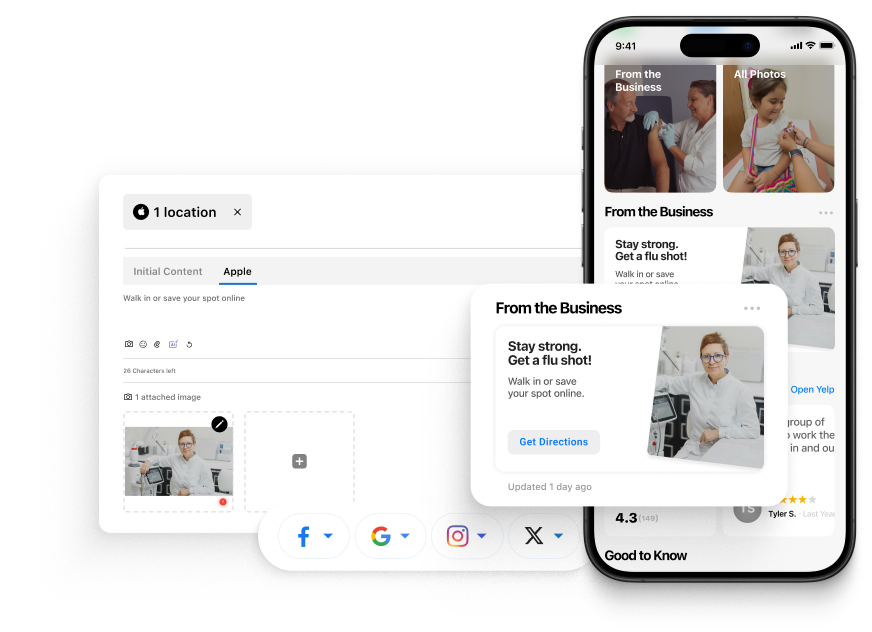
Keep listings fresh by highlighting promotions, seasonal offers, events, or announcements through Showcases. Add Custom Action Links so customers can book appointments, place orders, reserve tables, or complete other high-value actions directly from the Place Card.
Where enterprise verification usually slows down
Verification delays typically occur when business information is inconsistent across locations, ownership documents don’t match listing details, or duplicate locations already exist within Apple’s ecosystem.
Before submitting locations for verification, audit location data, standardize naming conventions, and remove duplicate listings. This reduces verification delays and creates a stronger foundation for long-term listing management.
Once your locations are verified and published, the focus shifts from setup to ongoing optimization. Consistent maintenance helps ensure your listings remain accurate, engaging, and competitive over time.
Simplify Apple listing management with Birdeye
Setting up Apple Business is only the beginning. As locations expand, keeping every Place Card accurate becomes an ongoing operational challenge.

Birdeye's Listings Optimization Agent continuously monitors Apple listings for missing information, outdated media, incomplete Place Cards, and optimization opportunities. It recommends improvements for every location and automatically applies approved updates, helping enterprise teams maintain accurate, consistent listings without manual effort.
Show up where your customers search
Want to see the impact of Birdeye on your business? Watch the Free Demo Now.
How to delegate Apple Business to Birdeye
Managing Apple Business across dozens or hundreds of locations often requires collaboration between internal teams and trusted technology partners. Apple allows businesses to delegate listing management to approved partners without transferring ownership of their account.
As an Apple-approved partner, Birdeye can help enterprise brands manage Apple Business listings at scale while you retain control over your account.
How to delegate access to Birdeye
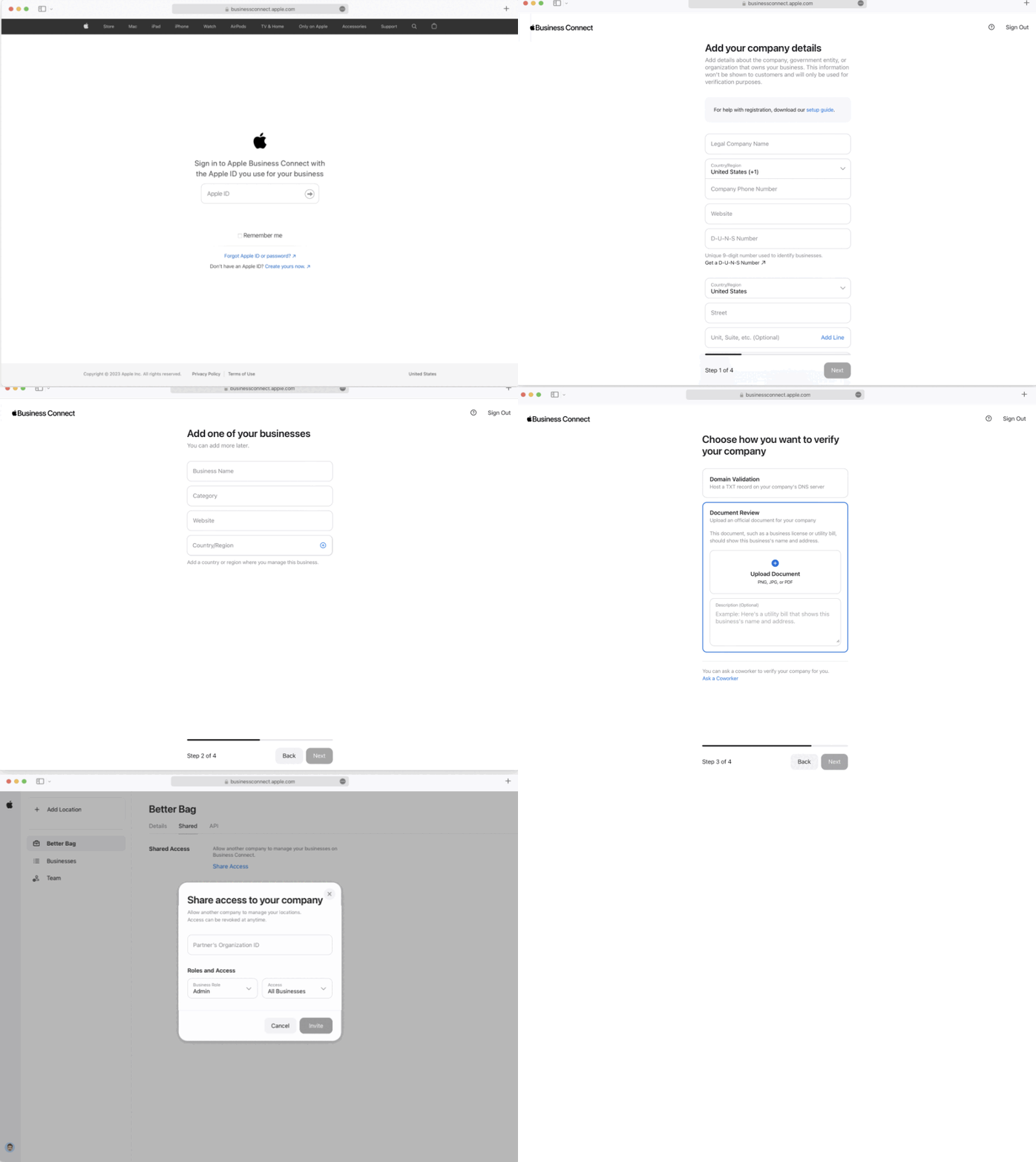
- Sign in to your Apple Business account.
- Go to Settings and select Share Access.
- Choose Add Organization.
- Enter Birdeye’s Apple Organization ID.
- Assign the Admin role.
- Review the permissions and confirm access.
Once access is granted, Birdeye can help manage Place Cards, business information, media, Showcases, and other listing updates across all your locations from a centralized platform.
It takes around 3-5 days for Apple to verify and delegate your business to Birdeye. Once these steps are completed, you can start managing your Apple place cards from Birdeye.
What changes when Apple Business is managed through Birdeye
Once Apple Business Connect is delegated to Birdeye, Apple place cards can be managed from the same environment used for broader listings governance. Location data, media, and attributes are handled within a centralized workflow rather than through individual Apple accounts.
This does not replace Apple’s controls. Instead, it provides a structured layer where enterprise teams can:
- Maintain consistency across 100-10,000+ locations
- Coordinate updates across Apple and other platforms
- Reduce lag between approved changes and live listings
For brands with dozens or hundreds of locations, this shift removes operational friction without sacrificing accuracy.
What do teams control versus what is automated?
Delegation does not mean giving up control. Enterprise teams retain authority over what changes are made and when they are applied. Apple’s approval standards still apply, and brand rules remain intact.
Birdeye acts as the management layer, not the owner of the listing. Teams decide which locations are updated, what content is approved, and how Apple Business Connect fits into their broader listings strategy.
This balance between centralized oversight and platform compliance enables Apple Business Connect to be managed at scale without becoming another disconnected system.
Apple Business best practices for multi-location brands
Managing Apple Business doesn’t end after setup. To maximize visibility across Apple Maps and other Apple services, enterprise brands should continuously optimize every location.
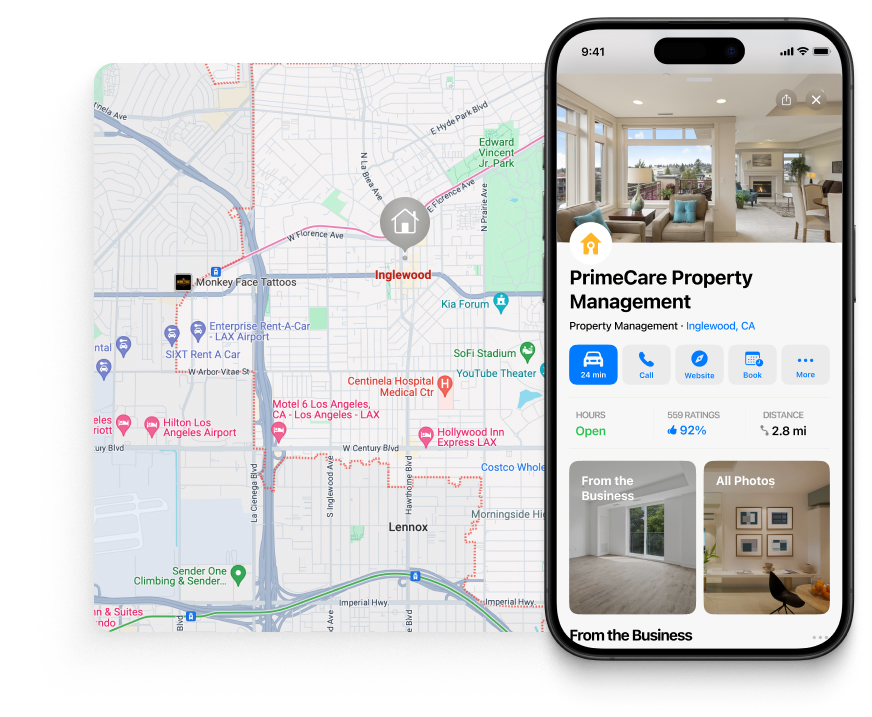
1. Complete every Apple Place Card
Every location should have accurate business information, categories, attributes, business hours, logos, cover photos, and a detailed photo gallery. Complete Place Cards provide customers with more information and improve the overall listing experience.
Why do static listings lose visibility on Apple surfaces?

Apple typically surfaces fewer results than Google and applies stricter quality controls. When place cards are incomplete, inconsistent, or outdated, Apple does not gradually reduce visibility. In many cases, locations are skipped entirely.
Static listings create several risks:
- Media becomes stale and less representative of the location
- Attributes no longer reflect services, amenities, or operating details
- Categories fall out of alignment with how customers search
- Competing locations present more complete or current place cards
Over time, these gaps compound, especially across dozens or hundreds of locations.
2. Upload high-quality, location-specific photos
Avoid using the same images for every location. Upload storefront photos, interiors, products, and team images that accurately represent each business location. Refresh photos regularly to keep listings current.
3. Keep categories and attributes up to date
Business categories, amenities, accessibility information, payment methods, and other attributes should reflect each location accurately. Even small inaccuracies can affect discoverability and customer experience.
4. Publish Showcases regularly
Use Showcases to promote seasonal campaigns, new products, limited-time offers, events, and important business updates. Regular updates help keep Place Cards relevant and engaging.
5. Add Custom Action Links
Reduce friction by letting customers complete high-value actions directly from your Place Card. Add links for reservations, appointments, food ordering, ticket purchases, consultations, or other location-specific actions whenever available.
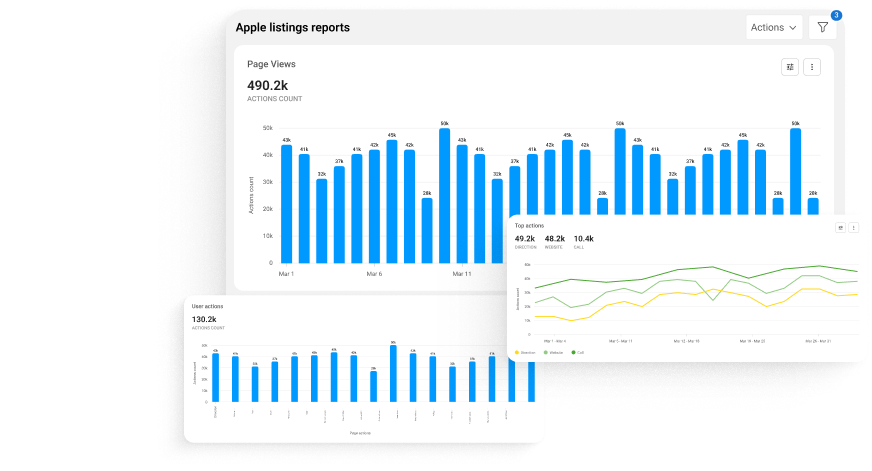
6. Monitor Business Insights
Review Place Card views, customer actions, Showcase engagement, and other Business Insights regularly to understand how customers interact with each location and identify opportunities for improvement.
Why does Apple optimization alone no longer cover the full discovery journey?
Apple Business plays a critical role in how locations appear across Apple Maps and Siri. However, customer discovery no longer stops inside map apps alone.

More customers now ask AI tools to recommend nearby businesses, compare options, or suggest where to go next, often without opening a map or clicking through search listings. These AI-generated answers rely on a combination of business listings, reviews, citations, and brand sentiment across the web.

For multi-location brands, this changes the scope of listings management. Even when Apple place cards are accurate and optimized, visibility can be limited if the broader data AI systems are inconsistent or outdated.
How Birdeye Search AI complements Apple Business Connect
Birdeye Search AI helps multi-location brands understand and influence how they appear in AI-generated answers across platforms such as ChatGPT, Gemini, and Perplexity. Working alongside Birdeye’s Listing Optimization Agent, Search AI ensures that business information remains accurate, consistent, and trustworthy wherever AI-generated answers source their recommendations.
With Search AI, brands can:
- Measure AI visibility by tracking how often locations appear in AI recommendations compared to competitors
- Understand AI sentiment and prompts that influence how the brand is described and discovered
- Identify and fix data gaps that affect AI answers by correcting inaccuracies at the source
- Optimize the citations AI relies on, helping teams focus on the directories and signals that matter most
How do you manage Apple Business alongside Google and AI search?
Managing Apple Business is only one part of local search management. Enterprise brands also need to maintain accurate listings across Google Business Profile, Facebook, Yelp, Bing, and other high-impact platforms while preparing for AI-powered search experiences.
Updating every profile manually is time-consuming and makes it difficult to maintain consistency across hundreds or thousands of locations. Even small inconsistencies in business information, categories, photos, or operating hours can impact local visibility and customer trust.
Optimize every listing with Birdeye’s Listings Optimization Agent
Birdeye’s Listings Optimization Agent continuously monitors your business profiles across Apple, Google, Facebook, Yelp, and other high-impact platforms, identifying missing information, outdated content, incomplete profiles, keyword opportunities, and competitive gaps as they appear.
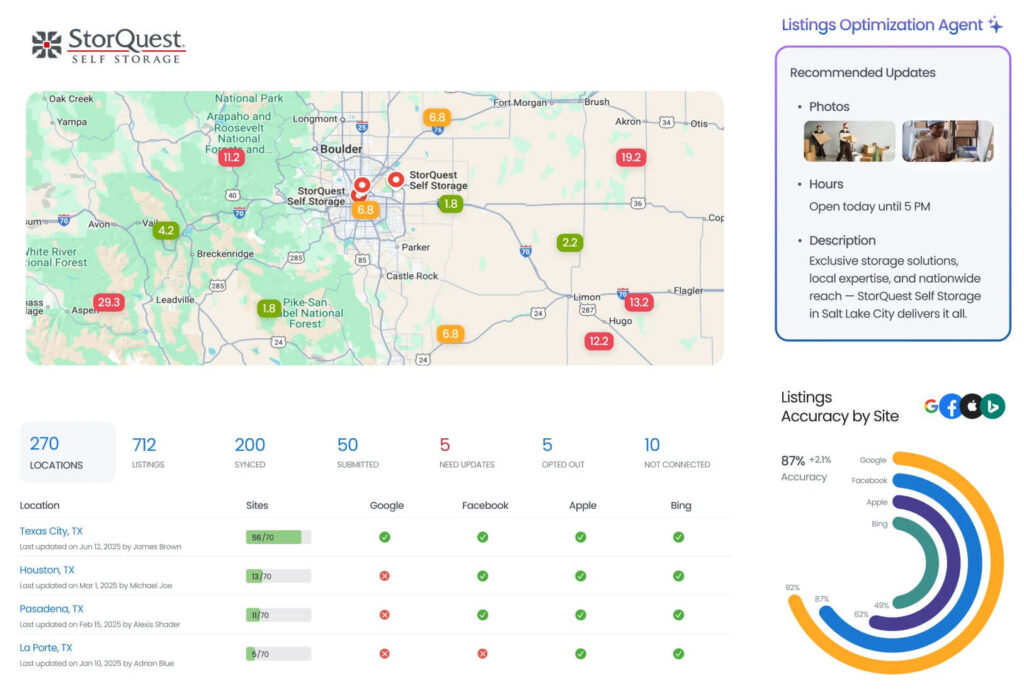
Instead of relying on periodic audits, the agent works continuously to:
- Monitor every business profile across locations
- Detect missing, outdated, or underperforming listing information
- Identify high-impact keyword opportunities using industry trends and competitor analysis
- Recommend optimizations for descriptions, photos, categories, and other profile elements
- Apply approved updates automatically while maintaining your brand guardrails
This continuous optimization helps brands maintain complete, competitive listings that improve local visibility across the platforms customers use most.
Extend your visibility beyond traditional search with Search AI
Local discovery is evolving beyond search engines. Customers now ask AI assistants for recommendations, compare businesses through AI-generated answers, and make decisions without visiting multiple websites.
Birdeye’s Search AI helps multi-location brands understand and improve how they appear across AI search platforms like ChatGPT, Gemini, and Perplexity.
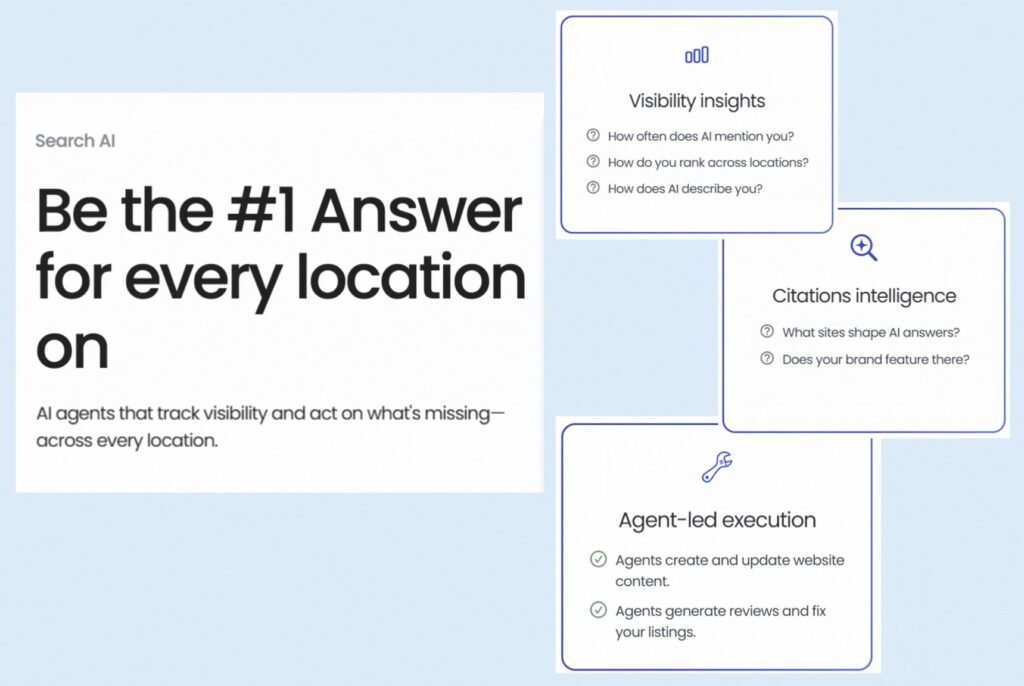
With Search AI, you can:
- Track how often your brand appears in AI-generated answers
- Monitor rankings across AI platforms at both the brand and location level
- Understand the prompts customers use to discover businesses like yours
- Identify the citations AI engines rely on most
- Detect inaccuracies in business information across AI platforms
- Receive prioritized recommendations to improve AI search visibility
AI agents then help execute those recommendations, making it easier to strengthen your visibility across both traditional local search and the next generation of AI-powered search experiences.
Together, Listings Optimization Agent and Search AI help multi-location brands stay visible wherever customers search, compare, and choose businesses.
Our customers, their stories:

Fantastic product for streamlining reviews & updating listings (Google, Apple, Bing)
We operate 4 restaurants, and responding to reviews promptly is essential. Birdeye helps me achieve this without constantly logging in and out of Google, TripAdvisor, FB, etc., which had become too tedious. The ease makes it possible to respond quickly to all review platforms, and the AI is great. I also love how it updates my Google, Bing, and Apple business details, as I have yet to find any company that does this correctly; it is so labor-intensive. Birdeye's service is what sets them apart. Highly recommend!

– Natalie Hallert Ladybird | Birdcage, Owner
FAQs on Apple Business Connect
Birdeye Listings AI maintains the accuracy and consistency of core business data across Apple Business Connect and other discovery platforms. It ensures locations stay compliant with Apple’s requirements for names, addresses, hours, categories, and attributes.
The Listings Optimization Agent builds on Listings AI by identifying which Apple place cards need improvement and which updates are likely to impact discovery or customer action. It prioritizes recommendations so teams focus on changes that matter, not every possible edit.
Apple Business Connect is now part of Apple Business. Existing business listings, Place Cards, photos, organization settings, and user permissions migrated automatically to the unified platform, so businesses can continue managing their listings without starting over.
Apple automatically migrated claimed locations, Place Cards, business information, media, organization settings, and team access to Apple Business. Businesses should still verify that location details, categories, and business hours remain accurate after migration.
Apple Business Manager is now part of Apple Business. The unified platform combines business listing management, device administration, and IT management into a single experience.
Verification methods vary depending on your business. Apple supports domain verification using a DNS TXT record, business document review, and App Store Connect verification for eligible organizations.
Yes. As an Apple-approved partner, Birdeye can help enterprise brands manage Apple Business listings across multiple locations. Businesses can delegate access while retaining ownership and control of their Apple Business account.
Turn Apple Business into a managed asset with Birdeye
Apple Business has become an essential part of local discovery for multi-location brands. But keeping listings accurate, optimizing every Place Card, publishing timely updates, and maintaining consistency across hundreds or thousands of locations requires continuous effort. As customers increasingly discover businesses through Apple Maps, Google, and AI-powered search, managing listings as a one-time task is no longer enough.
Birdeye is the #1 agentic marketing platform for multi-location brands. Built for enterprises that need trust, consistency, and control at scale, Birdeye's AI agents work alongside your teams to manage every stage of your digital presence.
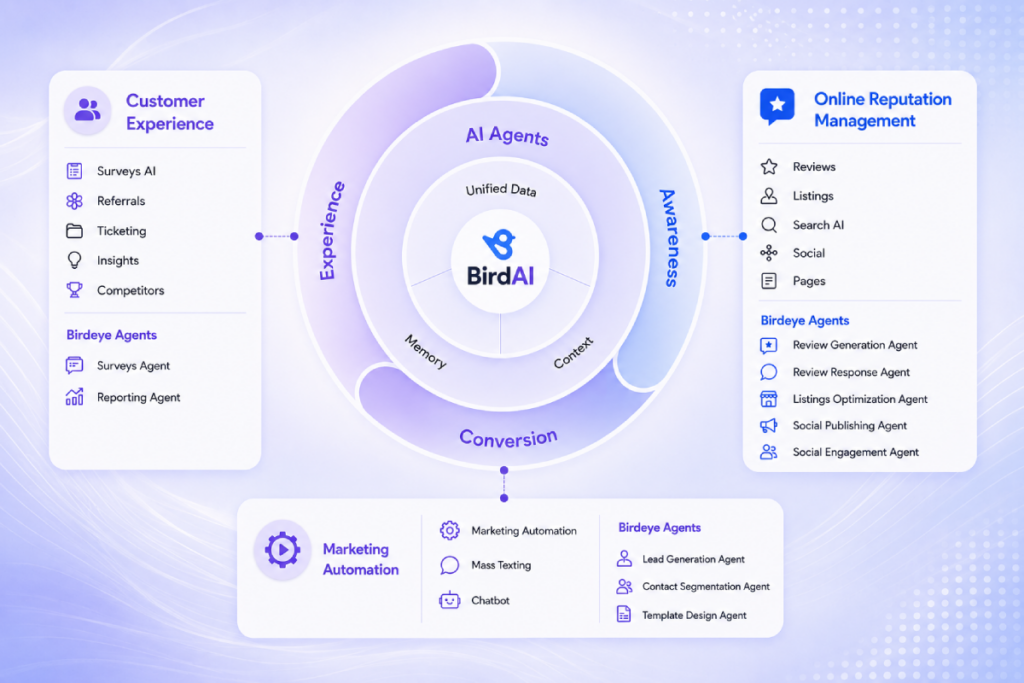
These BirdAI agents help:
- Enterprise brands generate and respond to reviews
- Publish localized social content
- Engage customers across messaging channels
- Automate marketing campaigns, collect customer feedback, and monitor brand performance
- Uncover actionable insights from every customer interaction.
Powered by AI coworkers at every location and supported by 3,000+ integrations, including Salesforce, HubSpot, and QuickBooks Online, Birdeye helps multi-location brands scale confidently from 100 to more than 10,000 locations.
As Apple Business continues to evolve alongside AI-powered search, brands that invest in accurate listings, continuous optimization, and centralized management will be better positioned to attract local customers.

About the Author

Shruti Dugar
Birdeye
Originally published