To get more Google reviews in 2026, multi-location brands need a repeatable system that works across thousands of locations: the right review link, the right moment to ask, clear compliance guardrails, and fast responses.
Summary
In 2026, getting more Google reviews isn’t the hard part. Running a consistent review request process across 100-10,000+ locations is.The fix is to manage reviews on Google like an operating system, not a one-time campaign: standardize direct review links and QR codes, define safe moments to ask, and use automated review request workflows to keep timing consistent.
This blog covers the five-step system for how to manage Google reviews for multi-location brands, the most important 2025 Google review compliance updates heading into 2026, Google Business Profile tips (including Google Business Profile Messaging), and how to use AI responsibly for Google review management so your Google review manager process supports trust and local SEO for reviews.
Table of contents
- Why review growth breaks across locations even when teams are asking
- Why Google is the first place most customers check reviews
- What review collection looks like in different industries
- How do you get more Google reviews by standardizing every location’s direct review link and QR code
- How do you get more Google reviews by controlling the exact moment and channel you ask?
- How do you keep review growth steady across thousands of locations
- What are some high-converting review requests templates
- How Birdeye helped McDuffie Dentistry earn 994% more Google reviews in one year
- What compliance rules must be in place to get more Google reviews without creating brand or platform risk?
- FAQ: Get more Google reviews
- Conclusion
For bonus tips on how to collect Google reviews, check out this audio guide.
Why review growth breaks across locations even when teams are asking
When your brand operates across thousands of locations, the problem usually isn’t effort. It’s an inconsistency. Each location ends up running its own version of the process, so review volume, ratings, and responsiveness start to vary by store, clinic, or branch. Over time, review growth depends more on who is working that day than on a reliable system.
Here’s what commonly breaks first:
- Wrong or indirect review links create friction. Customers hit extra steps, drop off, or land on the wrong location.
- Timing varies too much. Some customers get asked immediately, while others get asked days later or not at all.
- QR codes stop matching the right profile. Moves, renames, duplicates, or merges can make printed codes outdated and confusing.
- Google Business Profile issues split or hide reviews. Duplicate or outdated profiles can scatter reviews and muddy reporting.
- Follow-up becomes uneven. Some locations send reminders on schedule, while others delay or skip them.
- Response speed becomes inconsistent. Some locations respond quickly, while others leave reviews unanswered long enough to look unmanaged.
The fix is simple: remove the guesswork. Define the link, timing window, channel, and response expectations once, then apply them across every location.
Why Google is the first place most customers check reviews
Google sits at the decision point. It shows up when someone searches your brand name. It also shows up when someone opens Maps to find a nearby option. So, customers often see your Google reviews while they decide where to go.
Reviews shape first impressions. They also influence whether someone clicks, calls, or requests directions.
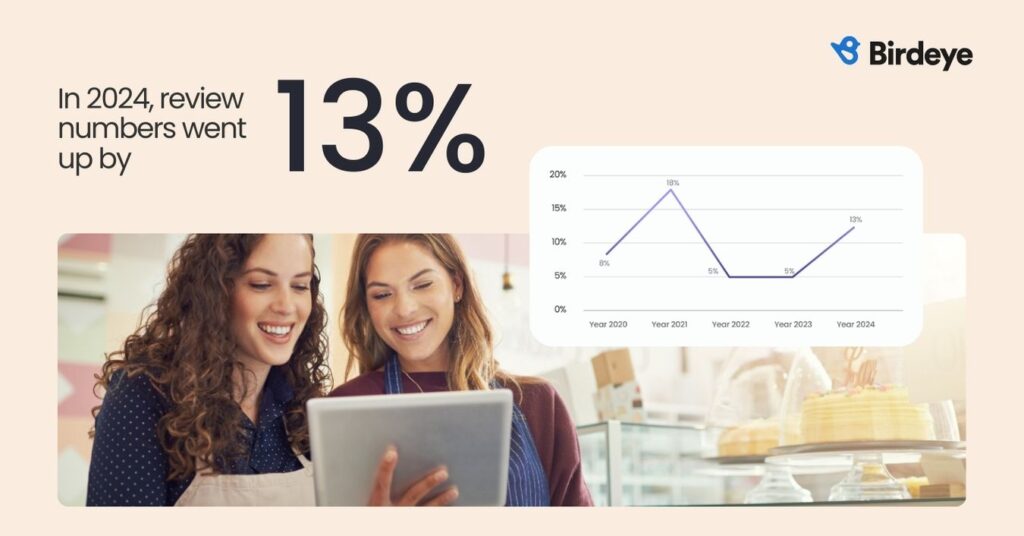
Birdeye State of Online Reviews 2025 shows that online reviews grew 13% in 2024, underscoring how much consumer decisions now hinge on what people say about businesses online.
So when you manage reviews on Google well, you improve how customers choose you in the moment. You also strengthen trust signals that support local SEO for reviews across every location.
What review collection looks like in different industries
Every industry has a different “best moment” to ask for a review. But the winning formula stays the same: ask while the experience is still fresh and make it one tap (direct link) or one scan (QR code).
Here are a few practical scenarios:
- Urgent care (walk-in, high volume): Ask at checkout and send a short SMS within 24 hours. Use a QR code at the front desk so patients can scan and post on their own device.
- Dental practices: Ask right after the appointment, especially after a successful cleaning, treatment, or friendly checkout experience. A same-day SMS works well, and a small QR code sign at the front desk helps capture reviews before patients forget.
- Residential HVAC (scheduled service): Send an SMS the same day the job closes, ideally right after the customer confirms the issue is fixed. Keep the message short and link directly to that location’s review screen.
- Property management (multi-family): Ask for a clear service “finish line,” such as a maintenance ticket marked resolved, a smooth move-in, or a positive leasing interaction. Use SMS for speed, or email for more formal interactions.
- Restaurants: Ask right after the meal for dine-in using table tents or receipt QR codes. For pickup and delivery, trigger an SMS after order completion while the experience is still top of mind.
- Automotive (service and repair): Ask at vehicle pickup or right after service completion, when the customer feels the value. SMS works best, with a single direct link to the correct location.
- Legal services: Ask for a clear milestone, such as a matter closing or a positive outcome. Use email for a more professional touch and keep the request simple with a direct link.
When you lock in the best moment for each industry and make the request effortless, review performance stops depending on the location manager and starts running like a reliable system
How do you get more Google reviews by standardizing every location’s direct review link and QR code
If you want steady growth across every location, start by standardizing two assets: your direct review link and your location-specific QR code.
A direct review link takes customers straight to the “Write a review” screen for the correct Google Business Profile. A location-specific QR code does the same in one scan. Together, they make every Google review request faster, simpler, and easier to control.
Birdeye State of Online Reviews 2025 reporting also states that Google captured 81% of all reviews in 2024, so getting the direct review link and QR code right for each location has an outsized impact on review volume and accuracy.
First, treat review links as a shared system, not a local shortcut. When each location uses a different link, customers must take extra steps or end up on the wrong profile. As a result, completion drops and reporting becomes messy.
Who should own review links: HQ or local teams?
HQ should own the direct review link and QR code for every location. Local teams can still ask. However, HQ should control the assets to ensure the process remains consistent and easy to audit.
Note: HQ means the central team that sets and controls the shared review assets for every location, such as:

-Each location’s direct Google review link
-Each location’s QR code file
-The “source of truth” sheet or system where those links are stored and verified

Local teams can still send the Google review request. HQ just owns the link and QR code so every location stays consistent.
What to maintain for each location
Keep one record per location that includes:
- Location name and internal location ID
- Google Business Profile URL
- Direct review URL
- Approved QR code file that opens the direct review URL
- “Last verified” date and owner
- Notes for changes like moves, rebrands, merges, or duplicates
What triggers for updating links and QR codes
Decide in advance what forces an update:
- Location move or suite change
- Rebrand or name change
- Profile merge, reinstatement, or suspected duplicate
- Any field report that reviews are not showing correctly
How do you keep the change process simple
Make updates predictable:
- Local teams flag issues when they spot them
- One central owner publishes the updated link and QR code
- Teams remove old QR codes and outdated printed materials during routine checks
What standards should you audit during location visits
Use these checks during store walks:
- Every customer-facing asset uses the approved link or QR code
- Teams do not tell customers to “search us on Google” as the main instruction
- QR codes open the correct location’s review screen every time
What to verify before you print and share QR codes
Before you roll anything out, verify the foundation. This step prevents wrong links, wrong profiles, and avoidable confusion. It also keeps your Google review management program clean across every location.
Use this checklist before launch:
- Confirm the correct Google Business Profile for each location: Check the name, address, phone number, category, and map pin. Also, identify duplicates and flag them for cleanup.
- Test the direct review URL for each location: Open the link on a phone. Make sure it goes straight to the review screen for the correct location.
- Create one approved QR code per location. Store the QR code file in a central location. Then name it clearly so teams don’t mix locations.
- Replace older customer-facing materials: Update front desk signage, receipts, invoices, email footers, and any printed handouts. Next, remove older QR codes to prevent customers from scanning the wrong one.
- Schedule a quarterly link check: Spot-check a sample of locations each quarter. This keeps links accurate after moves, renames, and profile changes.

How do you get more Google reviews by controlling the exact moment and channel you ask?
You get more Google reviews when the request feels natural and effortless. So, choose a few “safe moments” and repeat them the same way across locations. This is where Google review request automation helps most, because they protect timing and consistency.
Which customer moments are safe for review requests?
Pick a small set of moments that match how your business operates. Then train teams to use only these moments:
- Service or visit completion
- Delivery confirmation
- Invoice paid or ticket closed
- After a recovery interaction (the issue is resolved and the customer confirms they’re satisfied)
Keep the list short. Fewer moments are easier to train, monitor, and improve.
What follow-up window balances recall and irritation
A practical standard is 24 to 48 hours after the experience. That window keeps details fresh, while also giving customers breathing room. After you pick a window, apply it consistently across locations.
Which channels work best for review requests?
Your rule should be simple: one tap or one scan to the correct location’s review flow.
- SMS works best for speed and completion.
- Email works well for higher-consideration services.
- Receipts or invoices help in regulated or high-touch categories.
- In-store QR codes work when customers are on-site, provided HQ controls the QR code
How do you keep review growth steady across thousands of locations
Steady review growth beats short bursts. When you manage Google reviews across many locations, consistency protects performance and keeps reporting clean.
Here’s what to keep consistent:
- Send review requests as part of daily operations: Make the Google review request routine, tied to real customer interactions. This is the base of strong Google review management.
- Watch for gaps and fix them fast: If a location stops sending requests, investigate quickly. Either the volume dropped, or the process failed. This helps you manage reviews with control instead of surprises.
- Match requests to real customer volume: Align requests with completed visits, jobs, deliveries, or closed tickets. Avoid delayed batch sends. They reduce completion rates and make it harder to manage Google reviews accurately.
- Use the same channels and timing window: Stick to the approved mix (SMS, email, receipt, QR) and keep timing consistent. This is one of the most practical Google Business Profile tips for reliable execution.
How BirdAI agents help
BirdAI review: AI agents help you maintain consistent execution, especially when you use Google review request automation.
- Review Generation Agent increases review volume by choosing the best channel (SMS or email), sending at the right time, and keeping the message on-brand. It can also send controlled reminders, so follow-ups stay helpful.
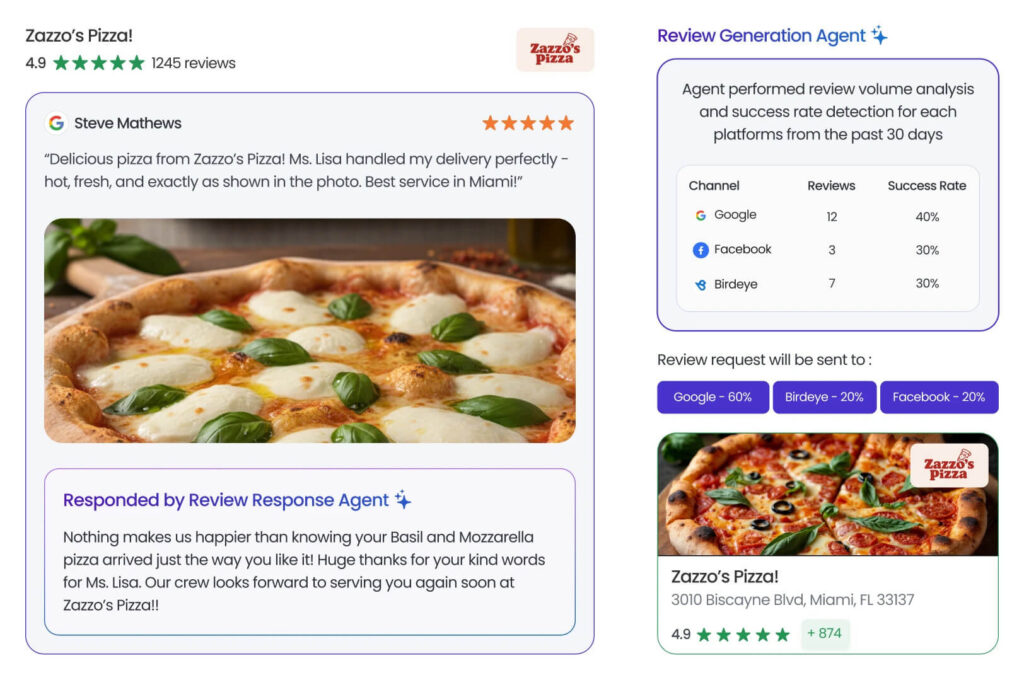
- Review Response Agent helps you respond faster and more consistently by drafting replies based on sentiment and context. It flags sensitive feedback for human review so your team can step in when needed.
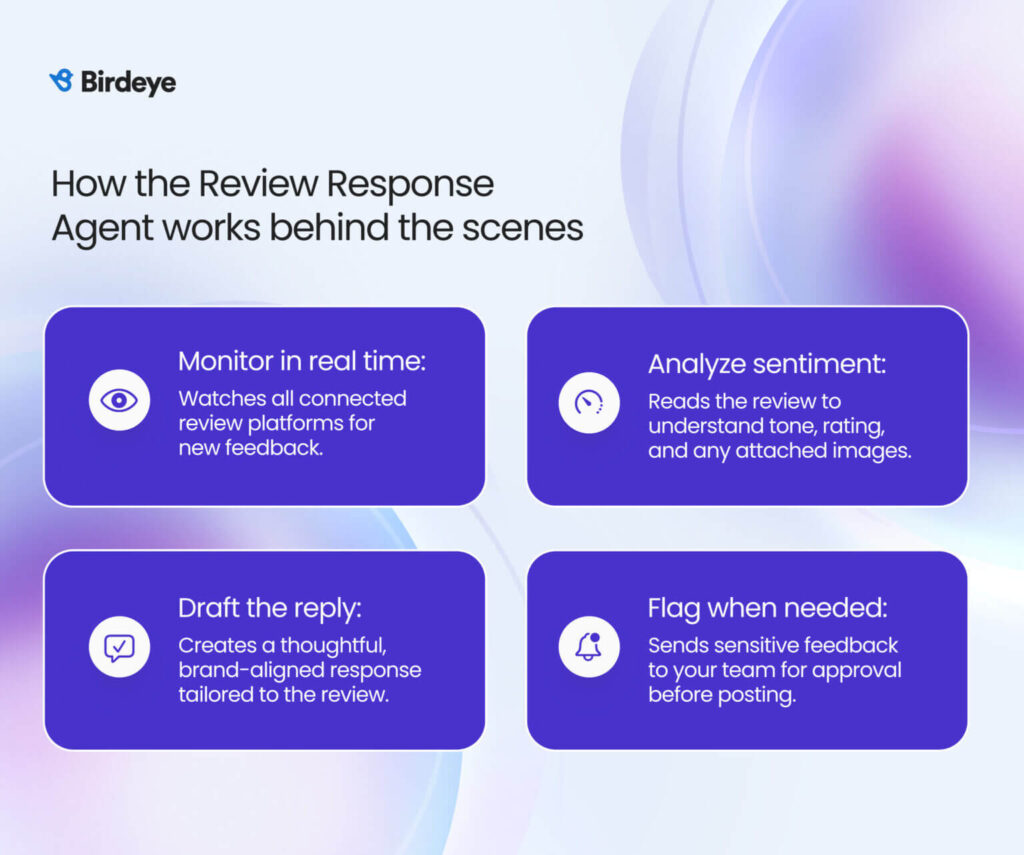
Birdeye, the #1 Agentic Marketing Platform for multi-location brands, uses these agents to support a scalable Google review manager process: consistent requests, controlled follow-ups, and timely responses that build trust and support local SEO for reviews.
What are some high-converting review requests templates
Your message should feel like a helpful follow-up, not a campaign. Keep it short, keep it specific, and make it easy to act with a single tap. This approach helps you manage Google reviews without adding friction.
Here are review templates you can use to manage reviews on Google while maintaining a natural tone.
SMS template (best for speed)
“Thanks for visiting [Business name] today. If you have a minute, could you leave a Google review for this location? [Direct review link]”
Email template (best for higher-consideration services)
Subject: Quick request about your visit to [Business name]
Body: “Thanks again for choosing [Business name]. If you can spare a minute, please leave a Google review for this location. Your feedback helps our team improve. [Direct review link].”
In-person prompt (front desk or checkout)
“If today went well, we’d appreciate a Google review. This QR code takes you to this location’s review page.”
Follow‑up review request (via email, SMS, or other messaging tools): ‘
Glad we could help today. If you’d like, you can leave a Google review for this location here: [Direct review link].
If you send review requests via email, design can also affect completion rates. Emails that look off-brand or messy reduce trust fast.
That’s where the Birdeye Template Design agent fits well. It helps you create branded review-request emails quickly, without HTML or external tools. You get full design control, and every message stays consistent with your brand. This makes it easier to scale Google review management across teams while keeping emails clean and professional.

Quick compliance reminder: keep language neutral. Do not suggest a star rating. Also, do not offer incentives. This keeps your Google review manager process aligned with Google’s expectations.
Now, let’s explore how Birdeye helps you turn review management into a consistent, scalable system.
How Birdeye helped McDuffie Dentistry earn 994% more Google reviews in one year
The brand
McDuffie Dentistry is a single-location dental practice in Durham, North Carolina, and a Birdeye customer since February 2017.
The challenge
- Too few reviews, with early feedback skewing negative.
- Ranking below nearby competitors in local search.
- Limited staff time to follow up with patients and request reviews consistently.
- Needed a way to get more Google reviews without adding manual work.
The solution
Birdeye automated review requests using SMS sent after appointments, routed patients to the right review flow in one click, and alerted the team when new reviews came in so they could respond quickly.
The result
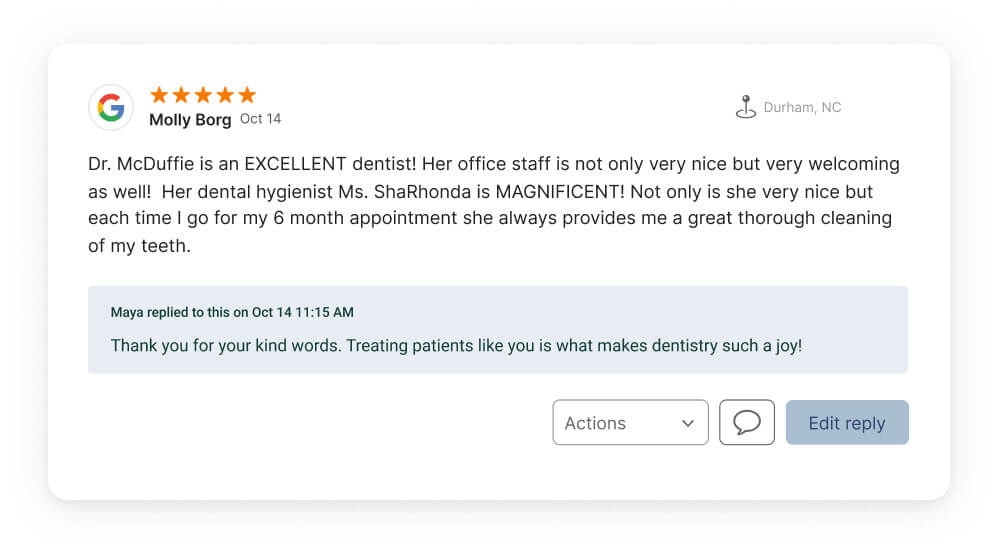
- 994% increase in Google reviews in one year.
- 346% increase in online reviews overall.
- Rating improved from 4.4 to 4.9.
- Reached the top 5 search results for “Dentists in Durham”.
“Patients always tell us how great we are. Now our patients can tell everyone else. Easy to use, set up and Birdeye maintains it.”
Jennifer Salinas, Manager at McDuffie Dentistry
Learn more about Birdeye and McDuffie Dentistry case study
What compliance rules must be in place to get more Google reviews without creating brand or platform risk?
When you scale review collection, you also scale risk. So, set clear rules that every location can follow. This protects your visibility and keeps your Google review management program stable.
Simple rules teams can follow every day
Do:
- Ask real customers after real interactions. Google expects reviews to reflect genuine experiences.
- Ask consistently. Use the same process for all customers so your team doesn’t slip into “selective asking.”
- Use the correct direct link or QR code. This reduces friction and supports local SEO for reviews by keeping reviews tied to the right profile.
- Encourage details, not ratings. Ask customers to share what happened, where, and what helped.
Do not:
- Do not offer incentives. Discounts, gifts, and rewards create policy risk.
- Do not gate requests. Avoid systems that only ask “happy” customers. Google treats this as manipulation under fake engagement policies.
- Do not ask employees, vendors, friends, or family to post reviews.
- Do not run bulk or unnatural patterns. Sudden spikes can trigger enforcement and slowdowns.
What changed recently that teams need to know
Google has increased enforcement around fake engagement. If Google determines a business violated fake engagement rules, it can place restrictions on the Business Profile, beyond removing reviews.
In late 2024, Google also announced stronger actions against fake review activity, including restrictions such as blocking new reviews and displaying warnings on affected profiles.
Google has also shared that it uses AI to detect policy violations at scale and reported blocking or removing a very large volume of policy-violating reviews in 2024.
Bookmark these official pages
These two links should inform your internal policy and training:
- Maps’ user-contributed content policy (what’s allowed in reviews and what gets removed).
- Business Profile policies overview (how Google applies content rules to profiles, including reviews).
Kiosk and in-store risks to call out clearly
Keep in-store collection clean and customer-led:
- Avoid “review kiosks” on company-controlled devices.
- Use a QR code posted for customers to scan on their phones.
- Don’t stand over customers while they write the review.
- Don’t troubleshoot the submission on the customer’s device.
These rules pair well with Google review request automation workflows, since automation should keep timing and links consistent, not pressure customers or bend rules.
FAQ: Get more Google reviews
To get more Google reviews, optimize your Google Business Profile, share a direct link or QR code at key touchpoints (in-store, email, SMS), and ask every real customer consistently without incentives. Birdeye Reviews AI automates this with the Review Generation Agent, sending the right request at the right time.
For brands with 500+ locations, the easiest way to manage Google reviews is to centralize every location’s reviews in one place, standardize response rules, and use workflows that route the right reviews to the right teams. Birdeye helps multi-location brands with 100–10,000+ locations track Google reviews from every profile in a single dashboard, set response guidelines with approvals, automate review requests to keep volume steady, and monitor sentiment trends by location so teams can fix repeat issues before they spread.
Ask every real customer consistently at defined moments. Make it one tap (direct link) or one scan (QR). Incentives create unnecessary platform and brand risk. Birdeye Reviews AI supports this by standardizing requests across locations so teams don’t slip into selective asking.
Yes, if automation standardizes timing, link accuracy, and routing. Do not automate in ways that encourage gating, incentives, or unreviewed public responses.
A posted, HQ-managed QR code that customers scan on their own device. Avoid staff-controlled devices or anything that pressures the customer in the moment.
Pick a standard your team can actually meet. For most brands, 24 to 48 hours is a practical target that signals you are paying attention.
Conclusion
If you want to get more Google reviews across many locations, build control into the system. Start with a location-specific direct review link and QR code owned by HQ. Then send every Google review request at the right moment through the right channel, using automated review workflows to keep timing consistent. Next, follow Google’s compliance rules so your Google review management stays safe and sustainable. Finally, respond fast and stay on-brand so customers see you listen.
When you manage reviews on Google this way, results stop feeling random. You protect trust. You improve local SEO for reviews. You also run a cleaner Google review manager process that teams can follow every day.
Ready to turn review collection into a repeatable system? Use Birdeye to automate review requests, keep links accurate, and respond faster with AI agents, so every location grows trust on Google.

About the Author

Sudeepta Bora
Originally published