To get more Google reviews in Singapore, claim or verify and complete your Google Business Profile (formerly Google My Business), create its official review link or QR code, and ask real customers for honest feedback after a visit, purchase, appointment, or completed service. Keep each request timely, neutral, and consistent with Google’s review policies. When using customer contact details, ensure the process complies with Singapore’s Personal Data Protection Act (PDPA).
Summary
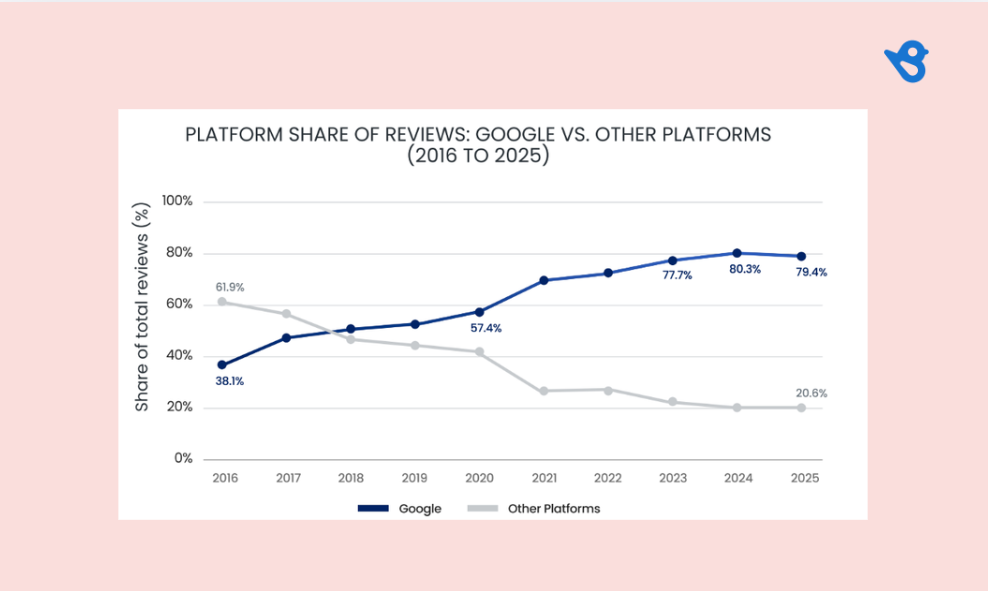
The Birdeye State of Online Reviews 2026 report found that Google accounted for 79.4% of reviews per location across the Birdeye customer base in 2025. For Singapore businesses, these reviews can influence whether customers choose a nearby clinic, restaurant, tuition centre, retailer, or service provider.

Businesses can share their Google review link through WhatsApp, SMS, email, receipts, and in-store QR codes. Businesses must also use customer contact details in line with the PDPA and consider DNC requirements when a request may constitute marketing. The Competition and Consumer Commission of Singapore (CCS) also identifies fake or manipulated reviews as practices that can mislead consumers.
This blog explains how to get more Google reviews for your Singapore business and manage reviews consistently across locations. For multi-location brands, Birdeye Reviews helps automate review requests, monitor feedback, and manage responses from one platform.
Table of contents
- Summary
- Why Google reviews matter for Singapore businesses
- What Google allows and what it does not
- How to generate your Google review link
- 10 proven ways to get more Google reviews in Singapore
- How to respond to Google reviews: templates for Singapore businesses
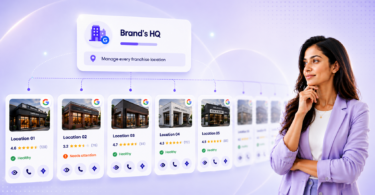
- How to manage Google reviews for multi-location Singapore brands
- FAQ about Google reviews for Singapore brands
- Turn customer feedback into a local advantage
Why Google reviews matter for Singapore businesses
Google reviews are one of the most visible trust signals customers see when they find a business on Google Search or Google Maps. For Singapore businesses, this matters because many local decisions happen quickly. A customer may compare ratings, read recent reviews, check photos, confirm opening hours, and decide whether to call, book, or visit within minutes.
This is especially important in competitive local categories such as F&B, healthcare, dental, beauty and wellness, tuition, retail, renovation, and home services. When two businesses offer similar services in the same area, reviews can help customers decide which one feels more reliable, current, and worth contacting.
That does not mean brands should ignore platforms such as HungryGoWhere, Yelp Singapore, or industry-specific review sites. But it does show why Google reviews should be a core part of any local reputation strategy.
How reviews affect your Google Maps ranking
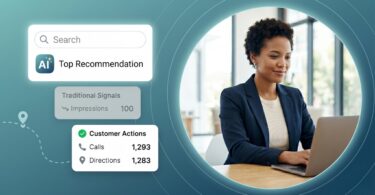
Google says local results are based mainly on relevance, distance, and prominence. Relevance refers to how well a Google Business Profile matches what someone is searching for. Distance considers how far the business is from the searcher or the location specified in the query. Prominence refers to how well known the business is, based partly on signals such as links, review volume, and ratings.
Google also states that more reviews and positive ratings can help a business’s local ranking. Reviews work alongside complete profile information, accurate categories, updated hours, and other location-specific details. Although Google does not identify review recency as a direct ranking factor, recent feedback can give customers greater confidence that the experience described is still current.
Why Singaporeans trust reviews
Reviews provide a customer perspective that complements information published by the business. They show what customers noticed, valued, or found disappointing during a real interaction.
Clinic reviews may discuss waiting times and staff communication. Restaurant reviews may cover food quality, service, queues, or ambience. Tuition centre reviews may mention teacher support, while renovation reviews often focus on workmanship, timelines, and coordination.
Detailed and recent reviews help customers understand what to expect before they call, book, or visit. This is why review quality matters alongside volume. A steady flow of authentic feedback provides more useful context than a large number of vague or outdated reviews.
Reviews vs. ads: which converts better for Singapore brands?
There is no universal answer because performance depends on the industry, audience, offer, and customer journey. Ads help a business reach potential customers, while reviews influence whether those customers trust the business enough to take the next step.
When someone clicks an ad or searches for the brand afterward, its rating, review volume, recent feedback, and owner responses may affect whether they call, book, request directions, or continue comparing alternatives.
For most Singapore brands, reviews and ads work best together. Ads generate visibility and traffic, while reviews provide social proof that can help turn that attention into action.
What Google allows and what it does not
Businesses can ask customers for Google reviews, provided the feedback reflects a genuine experience and the request does not influence the rating or content. The goal should be to collect honest feedback, not only positive reviews.
Google prohibits fake engagement, paid or incentivised reviews, conflicts of interest, selective requests for positive reviews, and attempts to pressure customers or tell them what to write. For Singapore businesses, these rules also support fair and transparent marketing. The Competition and Consumer Commission of Singapore (CCS) identifies fake reviews as a dark pattern that can mislead consumers. It cites practices such as posing as customers or suppressing genuine negative feedback as examples of review manipulation.
The five things you cannot do
1. Do not buy Google reviews
Google does not allow reviews or ratings that are paid for directly or in kind. Reviews must come from customers who had a genuine experience with the business.
This also applies to third-party sellers offering bulk Google reviews in Singapore. Even if the reviews appear realistic, purchasing them violates Google’s policy and may result in their removal or other restrictions on the Business Profile.
2. Do not offer incentives for reviews
Do not offer vouchers, discounts, loyalty points, free products, upgrades, or service credits in exchange for a review. This applies to new reviews as well as requests to revise or remove an existing review.
Use a simple and neutral request instead:
“Thank you for visiting us today. If you have a moment, we’d appreciate your feedback on Google.”
3. Do not ask only satisfied customers
Google prohibits businesses from discouraging negative reviews or selectively requesting reviews only from customers likely to leave positive feedback. This practice is commonly known as review gating.
For example, do not ask customers to rate their experience privately and send the Google review link only to those who provide a high score. Review requests should be available to all eligible customers following a genuine interaction.
4. Do not ask employees, agencies, friends, or family to review your business
Reviews should come from genuine customers, not people with a personal or professional connection that could create a conflict of interest. Google identifies current or former employment, contractual relationships, competitors, and family or personal affiliations as potential conflicts.
Staff should not review their own outlet, clinic, restaurant, tuition centre, or branch. Agencies must not create reviews for the business, post reviews on behalf of customers, or use customer information to submit feedback.
5. Do not tell customers what rating or wording to use
Businesses can invite customers to describe their experience, but they should not ask for a five-star rating or request specific words and phrases. Instead of asking customers to write “best café in Tanjong Pagar” or “dentist in Orchard,” use a neutral prompt:
“We’d love to hear what stood out about your experience. Your honest feedback helps other customers make informed decisions.”
This encourages customers to provide useful detail without scripting their feedback.
PDPA considerations for Singapore: consent, opt-out, and data use
The Personal Data Protection Act (PDPA) governs how Singapore businesses collect, use, and disclose personal data. Its Do Not Call provisions apply to certain marketing messages sent to Singapore telephone numbers. Whether a review request falls within these provisions depends on its purpose, content, and the surrounding customer relationship.
Follow these three principles:
- Consent and permitted purpose: Use customer contact details only for a purpose the customer was informed about or that is otherwise permitted under the PDPA. If an SMS, WhatsApp message, or other phone-based request contains promotional content and qualifies as a specified marketing message, assess the applicable DNC requirements. These may include checking the relevant DNC Register unless the customer has given clear and unambiguous consent in an accessible form or an applicable exception applies.
- Opt-out: Clearly identify the business and give customers a simple way to stop receiving future messages. Honour withdrawal requests promptly. An opt-out mechanism does not replace valid consent or other DNC obligations where they apply.
- Data use: Keep the message focused on the completed customer experience. Do not include unnecessary personal data, medical or treatment information, student details, financial information, payment details, or purchase history. When replying publicly, do not confirm private information or whether the reviewer is a customer, patient, student, or client.
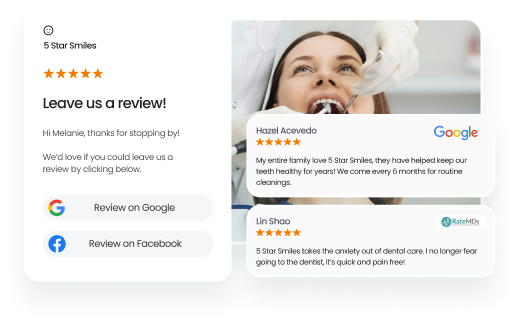
A review request should identify the business, ask for honest feedback, and include the official Google review link or QR code. It should not include rewards, pressure, or suggested review language.
For regulated industries and high-volume campaigns, legal or compliance teams should review the request, consent process, and communication workflow before launch.
How to generate your Google review link
A direct Google review link takes customers to the review form for your Google Business Profile. It eliminates the need to manually search for the business and makes the review process easier to complete.
A location’s review link can be shared through WhatsApp, SMS, email, receipts, invoices, and post-service follow-ups. It can also be converted into a QR code for printed and in-store materials. For multi-location brands, each link or QR code must lead to the correct location’s Google Business Profile.
Step-by-step: finding your review link in Google Business Profile
Google allows businesses to create and share a review link or QR code directly from their Google Business Profile.
To find the link:
STEP 1: Go to your Google Business Profile.
STEP 2: Select Read Reviews.
STEP 3: Select Get more reviews.
STEP 4: Select Copy to copy the review link.
To download the QR code, right-click it and select Save image as. Google review QR codes can currently be generated only through a computer browser, not on a mobile device.
Share the link only after a genuine customer interaction, such as a completed visit, purchase, appointment, or service. Do not attach language that asks for a five-star rating, offers a reward, or tells customers what to include in their review.
Creating a QR code for your Singapore storefront
QR codes are useful for Singapore businesses with physical locations, including restaurants, cafés, clinics, salons, retail stores, tuition centres, gyms, and service counters.
Display the location-specific QR code where customers naturally pause, such as:
- Reception or cashier counters
- Dining tables
- Receipts or invoices
- Appointment cards
- Product packaging
- Waiting areas
- Post-service thank-you cards
Use a short, neutral message beside the code:
“Share your experience with us. Scan to leave a Google review.”
Or:
“Your feedback helps us improve. Scan here to leave a Google review.”
The QR code should give customers a voluntary and convenient way to provide feedback. Do not require customers to scan it, pressure them to post while they are on the premises, or offer a discount or reward in return.
Where to place your review link: WhatsApp, email, receipts, SMS
Place the review link in channels customers already use to communicate with the business. The right channel and timing will depend on the industry and customer journey.
For example:
- F&B: Add the link to a post-visit WhatsApp message, digital receipt, or loyalty-app follow-up.
- Clinics and dental practices: Include it in a post-appointment SMS or email without mentioning treatment or other private details.
- Tuition centres: Add it to parent communications after a completed term or scheduled progress review.
- Renovation and home services: Send it after project handover or service completion.
- Retail: Include it in a post-purchase email, digital receipt, or SMS follow-up.
A simple request can say:
“Thank you for choosing [Business Name]. We’d appreciate your honest feedback about your experience. You can leave a Google review here: [link].”
For multi-location Singapore brands, every location should follow the same centrally approved process while using its own Google review link or QR code. This prevents customers from accidentally reviewing the wrong outlet and helps teams maintain consistent review-request practices across locations.
Ask for Customer Reviews and Scale Your Business
Want to see the impact of Birdeye on your business? Watch the Free Demo Now.
10 proven ways to get more Google reviews in Singapore
A strong review programme depends on consistent timing, suitable channels, and a simple process. The following tactics can help Singapore businesses comply with Google’s policies.
1. Ask soon after a completed customer experience
Send the request soon after a completed customer interaction, while the experience is still fresh. The appropriate moment will depend on the industry:
- F&B: After the meal or once payment is complete
- Clinics: After a completed appointment, without mentioning medical details
- Renovation: After project handover or an agreed milestone
- Tuition centres: After a completed term or scheduled progress review
Use a short, neutral request:
“Thank you for choosing us. We’d appreciate your honest feedback about your experience on Google.”
2. Train frontline staff with a review script
Frontline teams are well placed to make the request because they interact with customers at the end of a visit, appointment, purchase, or service.
Give staff a simple script:
“Thank you for visiting us today. If you have a minute, we’d appreciate your honest feedback on Google.”
Staff should make the request politely and allow customers to complete it voluntarily. They should never ask for a five-star review, suggest what the customer should write, set review quotas, or offer anything in return. For multi-location brands, approve the script centrally so every location follows the same standard.
3. Use QR codes at your counter, table, or receipt
Place the location-specific Google review QR code at natural customer touchpoints, such as reception desks, dining tables, checkout counters, receipts, invoices, or service-completion documents.
Pair it with neutral wording:
“Scan to share your experience on Google.”
Display the code passively and test it regularly. For multi-location brands, make sure every QR code directs customers to the correct location’s Google Business Profile.
4. Send a WhatsApp follow-up
WhatsApp can be useful for Singapore businesses that already use it for bookings, confirmations, delivery updates, or service communication.
Keep the request short and connected to the completed interaction:
“Hi [Name], thank you for visiting [Business Name]. We’d appreciate your honest feedback on Google: [review link].”
Avoid treatment details, student information, financial data, purchase history, or other sensitive information. Clearly identify the business, respect opt-out requests, and assess PDPA and DNC requirements based on the message’s purpose and content.
5. Add a review CTA to your post-purchase email
Email works well when customers already expect a receipt, booking follow-up, or post-service message. Place a short CTA near the end of the email:
“How was your experience with us? Share your honest feedback on Google.”
This can be useful for renovation firms, clinics, tuition centres, professional services, and higher-value retail purchases where customers may need more time to provide feedback.
Across the Birdeye customer base, SMS accounted for 54.6% of review requests in 2025, according to the Birdeye State of Online Reviews 2026 report. Email nevertheless remained the dominant channel in hospitality and continued to support industries with booking-system workflows and longer customer journeys.
6. Connect requests to your loyalty programme or POS system
A POS system, CRM, booking platform, loyalty programme, or service-management system can trigger a request after a completed transaction, appointment, visit, or job.
For example, a restaurant group can send a request after a recorded visit, while a clinic can trigger one when an appointment is marked complete. Retailers and home-service brands can include the request in their post-purchase or job-completion workflows.
Use the loyalty or POS system only to trigger the request. Do not give customers points, discounts, or other benefits for leaving a review.
7. Showcase existing reviews in-store and on social media
Displaying genuine reviews shows customers that the business values feedback and can create a natural opportunity to invite more customers to share their experiences.
Reviews can be featured through:
- In-store or reception displays
- Social media posts
- Website review widgets
- Email newsletters
- Printed service materials
Preserve the original meaning and do not present reviews selectively in a misleading way. Follow the review platform’s sharing rules and avoid republishing personal or sensitive information. Where appropriate, use approved review widgets or obtain permission before sharing identifiable customer content.
8. Encourage useful detail without scripting keywords
Detailed reviews give future customers more context than a star rating or a generic comment. However, Google does not allow businesses to request specific words or phrases.
Do not ask customers to write “best café in Tanjong Pagar” or “dentist in Orchard.” Use a neutral prompt instead:
“What stood out about your experience with us?”
This encourages useful detail while leaving the rating and content entirely up to the customer.
Businesses should also avoid copying the same review and reposting it as if it were new feedback on another platform. See why copying and pasting reviews can create problems and how to share customer feedback more appropriately.
9. Respond to every review with a helpful reply
Responses show customers that the business reads and values feedback. Thank customers for positive reviews. For negative feedback, acknowledge the concern, apologise where appropriate, and offer a private channel for further discussion.
Keep every reply concise, professional, aligned with the brand’s tone, and free of private customer information. The next section provides response templates for positive, negative, and potentially fake reviews.
10. Automate review requests with a reputation management platform
Manual review requests often become inconsistent across multiple locations because teams are busy and follow-ups are easily missed. Automation can trigger requests after real customer actions, such as completed purchases, appointments, visits, or service jobs.
Birdeye’s Leveraging Google for Business Growth: The Marketing Leader’s Playbook explains that automated workflows can request feedback at the appropriate moment across locations without depending on staff availability or transaction volume.
For Singapore brands with multiple outlets, clinics, restaurants, or service teams, a reputation management platform can centralise requests, monitor incoming reviews, route feedback for follow-up, and maintain consistent response workflows. Birdeye Reviews helps multi-location brands automate review requests, monitor Google reviews, and manage responses from one platform.
How to respond to Google reviews: templates for Singapore businesses
Responding to Google reviews shows customers that the business values feedback. Replies also give prospective customers additional context when they compare businesses on Google Search and Google Maps.
Google recommends keeping replies professional, polite, relevant, and concise. Since responses are public, do not disclose personal information or confirm details about a customer’s appointment, treatment, purchase, class, account, or service history. This is especially important for Singapore businesses in healthcare, education, finance, beauty, property, and home services.
Responding to 5-star reviews
Thank the customer and acknowledge something from the review when it can be mentioned safely. Avoid repeating private details or turning the response into a promotional message.
Personalise responses where possible instead of posting the same reply to every customer.
Template 1: Positive review
Thank you for taking the time to share your feedback. We’re glad you had a positive experience with our team at [Location]. We appreciate your support and look forward to welcoming you again.
If the customer mentions a specific team member, service, or product, refer to it only if doing so does not reveal private information.
Responding to negative reviews
Respond calmly and avoid debating the complaint publicly. Acknowledge the concern, apologize where appropriate, and offer a private channel where the business can understand the situation and discuss a resolution.
Do not confirm whether the reviewer is a customer, patient, student, tenant, or client. Even if the reviewer has shared personal details, keep the business’s response general.
Template 2: Negative review
Thank you for sharing your feedback. We’re sorry that your experience did not meet expectations and would like to understand what happened. Please contact us at [email/phone] so our team can look into this and follow up directly.
Avoid defensive language, personal attacks, or promises that the business may not be able to keep.
Handling fake or malicious reviews: how to report and request removal
Google removes reviews only when they violate its content policies. A review is not eligible for removal simply because it is negative, critical, or disputed by the business.
A review may qualify for removal if it contains fake engagement, spam, offensive content, harassment, personal information, or a conflict of interest. If you believe a review violates Google’s policies:
- Take a screenshot and record any relevant internal information.
- Check the review against Google’s prohibited and restricted content policies.
- Go to your Google Business Profile and select Read reviews.
- Select Report beside the relevant review and choose the applicable policy violation.
- Check the report’s status through Google’s Reviews Management Tool.
- If Google finds no violation and the review is eligible, submit a one-time appeal through the Reviews Management Tool.
Do not accuse or confront the reviewer publicly while Google assesses the report. If the review remains visible, post a short and neutral response.
Template 3: Suspicious or unverifiable review
Thank you for your feedback. We’re unable to identify the experience from the information provided, but we would like to understand it better. Please contact us at [email/phone] so our team can look into this further.
This response avoids confirming whether the person is a customer while showing prospective customers that the business handles concerns professionally.
How to manage Google reviews for multi-location Singapore brands
Managing Google reviews becomes more complex as the number of locations grows. Retail chains, clinic groups, F&B brands, and tuition networks need to coordinate review requests, monitoring, and responses across different teams and customer journeys.
Each eligible location typically has its own Google Business Profile, review volume, rating, and response activity. Without a centralised process, performance can vary significantly. One outlet may generate recent reviews and respond consistently, while another receives fewer reviews or leaves customer concerns unaddressed.
Birdeye builds AI agents for multi-location brands with 100 to 10,000+ locations. Its AI coworkers operate at every location, including Jay for marketing. Jay employs specialised agents that consolidate customer and location signals, reason with brand and industry context, and act within established guardrails.
How Birdeye’s review agents support every location
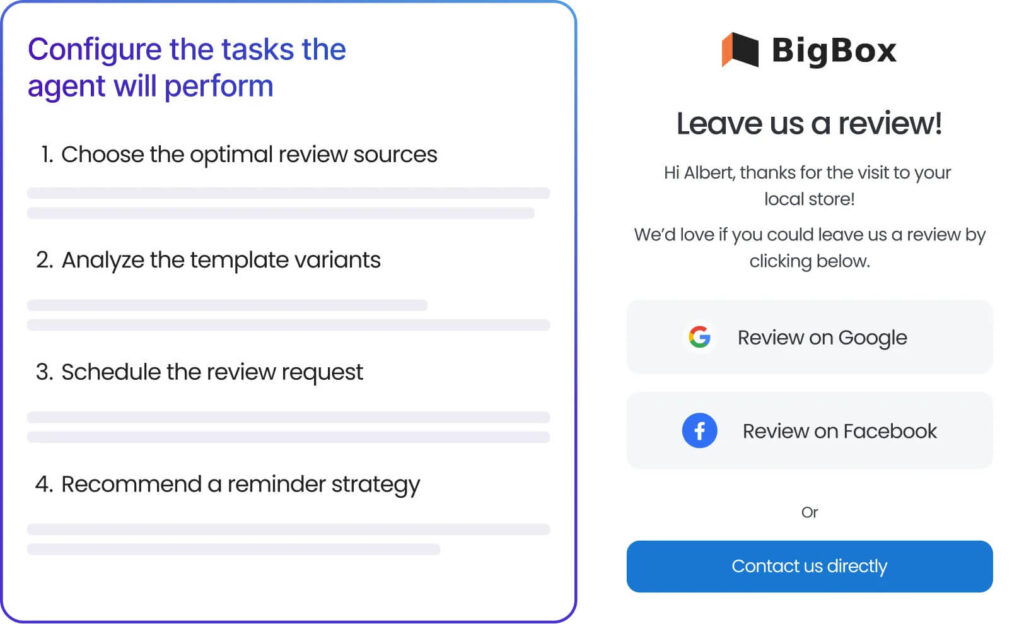
Review Generation Agent: Selects the relevant review platform, message, and timing based on genuine customer interactions and engagement patterns. It automates requests and follow-ups so review generation does not depend entirely on frontline staff.
Review Response Agent: Interprets the review’s content, sentiment, and context to create personalised, on-brand replies. Responses can be reviewed before publication or published autonomously within the brand’s approved guardrails.
Review Reporting Agent: Explain performance changes, flag anomalies, and surface trends across reviews, sentiment, reputation, and location performance. It also benchmarks reputation performance using Birdeye Score, Birdeye’s proprietary metric that combines sentiment, reputation, and listing accuracy. This helps enterprise teams quickly identify underperforming locations and prioritise action without manually analysing every review.
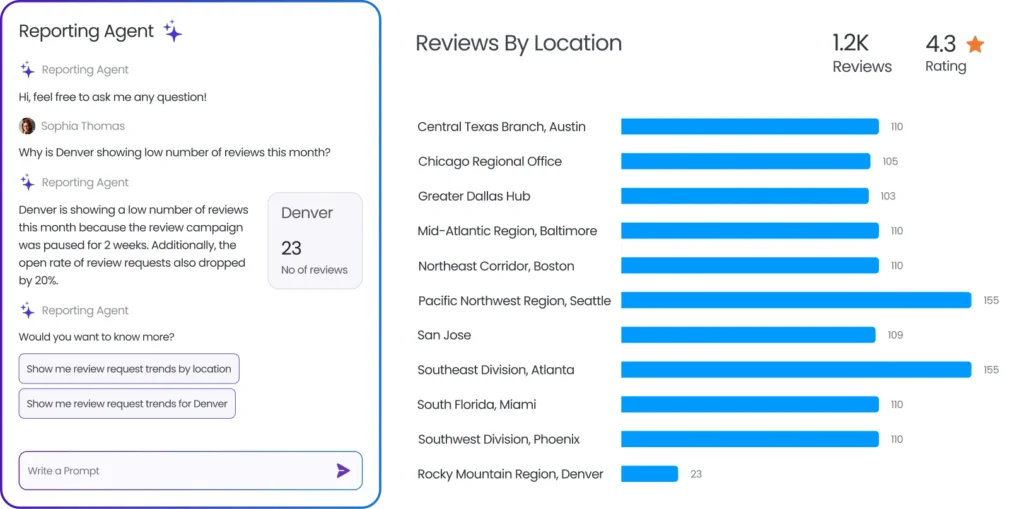
Birdeye Reviews helps enterprise-grade multi-location brands generate, monitor, manage, and share reviews across 200+ review sites, while the Birdeye platform connects with 3,000+ integrations. Multi-location brands can coordinate requests, monitor feedback, manage responses, and track location-level performance from one platform.
This creates a more consistent review programme with central oversight and local visibility. Enterprise teams can identify where review volume is falling, where responses are delayed, and which customer experience issues require follow-up.
FAQ about Google reviews for Singapore brands
Claim or verify and complete your Google Business Profile, create the correct review link or QR code, and ask customers for honest feedback after a genuine visit, purchase, appointment, or completed service. Share the request through suitable channels such as WhatsApp, SMS, email, receipts, or in-store QR codes. Use a neutral process for all eligible customers and do not offer rewards or request only positive reviews.
Yes, businesses can ask customers for Google reviews in Singapore. However, the collection and use of customer contact details must comply with the PDPA. If an SMS, WhatsApp message, or other phone-based request qualifies as a specified marketing message, applicable DNC requirements may also apply. Businesses must not buy reviews, offer incentives, create fake reviews, or selectively request positive feedback.
Ask shortly after a completed customer interaction, while the experience is still fresh. Thank the customer, request honest feedback, and provide the correct review link or QR code. For example: “Thank you for choosing [Business Name]. We’d appreciate your honest feedback on Google: [link].” Do not ask for a five-star rating or tell the customer what to write.
Use a centralised review management platform to coordinate review requests, monitor feedback, and respond consistently across every Google Business Profile. Birdeye Reviews helps multi-location brands generate, monitor, manage, and share reviews across 200+ review sites, while providing location-level reporting and centralised workflows from a single dashboard.
Businesses cannot remove a Google review simply because it is negative. You can report a review if it violates Google’s policies, such as fake engagement, spam, offensive content, a conflict of interest, or the disclosure of personal information. Google will assess the report and remove the review only if it finds a policy violation.
Google says local results are based mainly on relevance, distance, and prominence. More reviews and positive ratings can help a business’s local ranking, but reviews are only one part of the calculation. A complete Google Business Profile, accurate location information, suitable categories, and consistent business details also help Google understand and surface a location for relevant searches.
Turn customer feedback into a local advantage
Google reviews give Singapore businesses a direct view of what customers value and where experiences fall short. Using that feedback to improve service standards across locations can build greater confidence among future customers. When reviews inform regular decision-making, they contribute to a more consistent customer experience, a stronger local reputation, and better performance over time.
Ready to improve review management across your locations? Watch a free demo to see how Birdeye’s AI agents support review generation, monitoring, responses, and insights for multi-location brands.
About the Author

Somya Yesodharan
Originally published