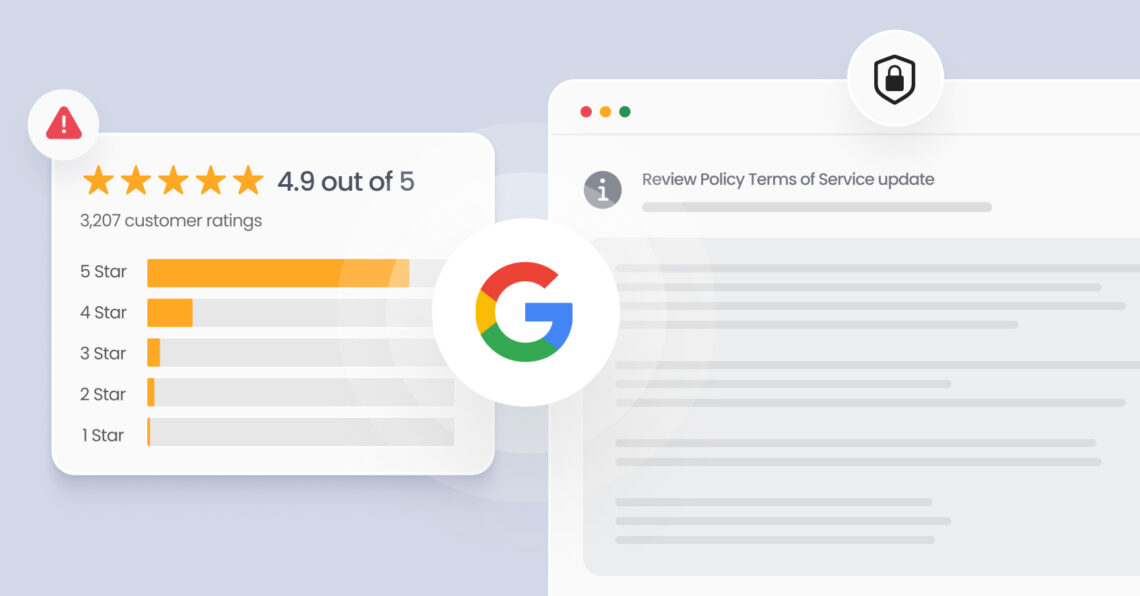
Google review policy is the set of rules governing what content users can post on Google Business Profiles, what businesses can solicit, and how Google enforces removal of reviews that violate its guidelines. These policies apply across Google Maps, Google Search, and all Google Business Profile listings.
Summary
Google has increased enforcement against fake and incentivized reviews to protect review quality. According to Google Business Profile policies, violations can lead to review removals and profile restrictions. This is especially important as review activity continues to grow. The Birdeye State of Online Reviews 2026 found that Google generated 79.4% of all reviews per location in 2025. For multi-location businesses, policy violations can result in lost reviews, reduced local visibility, profile restrictions, and lower customer trust.
This blog covers the 2026 Google review policy updates, prohibited review practices, reporting violations, and best practices for maintaining compliance.
What is Google’s review policy?
Google’s review policy is a set of rules that ensures user feedback on Google Maps, Google Search, and Google Business Profiles is authentic, unbiased, and safe. This standard Google business review policy sets the requirements that all customer feedback and merchant actions must follow.
The core Google reviews guidelines are detailed in two official, governing documents:
- The Maps User-Generated Content Policy and
- The Prohibited & Restricted Content policy
These documents establish the boundaries for local search behavior, dictating how a company should manage its profile and how users should submit ratings.
To maintain a fair marketplace, these Google review policies apply to text, ratings, photos, and videos. Businesses are strictly prohibited from manipulating their scores, meaning any attempts to self-review, bias collection methods, or artificially inflate ratings violate the core Google review rules. Compliance ensures that local rankings reflect real-world consumer experiences.
What changed in the Google review policy 2026 update?
Google introduced major updates to its Google review content policy to improve the authenticity of user feedback. According to official announcements published in Google’s The Keyword Blog, Google deployed advanced screening technologies, driven by its Gemini models, designed to catch unhelpful, manipulative, or policy-violating edits and fake reviews before they ever go live.
These moderation efforts are part of why Google reviews remain largely reliable despite the presence of some fake reviews.
Google review policy 2026: Rollout timeline
According to the official Google Maps User-Generated Content policy changes, the update rolled out in stages during the first half of the year:
- March 2026: Google began testing new location-proximity filters and account-history verification.
- April 16–17, 2026: Google officially implemented the new pre-publication screening tools and updated its Maps Rating Manipulation clauses regarding staff name requests.
- May–June 2026: Enforcement expanded globally, including retroactive sweeps of older reviews and the application of public warning banners on non-compliant business profiles.
The key changes affecting how businesses manage reviews include:
Incentivized review restrictions
Google has updated its automated filters to detect any reviews tied to compensation. The system scans review text for phrases that indicate a customer received a reward, such as discounts, coupons, or gift cards. Under these updated Google review rules, profiles found in violation of this policy face strict restrictions, including the public display of a warning banner on their listing, which lets consumers know that fake reviews have been removed.
Staff name limitations
An important update to Google’s Business Profile review guidelines restricts businesses from asking customers to mention specific employees. While organic mentions of staff members by customers are completely acceptable, Google review policies now prohibit businesses from instructing staff to systematically solicit reviews that include their individual names.
Reviewer account verification
Google now evaluates the account’s history and context before leaving the review. The system looks at signals like past review history, device data, and location records. New accounts with no prior history that immediately post a five-star rating are flagged for closer review under Google’s review guidelines to ensure they reflect real customer experiences.
Location and proximity signals
The updated detection engine checks physical proximity signals before a review becomes public. If a user leaves a detailed review for a local service business, but Google Maps location data indicates they have never visited or interacted with that location. The review may be filtered or hidden from public view to uphold the Google Business Review policy.
Business response guidelines
The new Google review rules also apply to business owners when they reply to feedback. Using promotional language, stuffing local keywords into responses, or offering post-review incentives within responses is against policy. Replies must remain professional and directly address the customer’s comments.
Stay on top of Google reviews with Birdeye
Want to see the impact of Birdeye on your business? Watch the Free Demo Now.
How Google’s review policy evolved (2021-2025)
Before the recent updates, Google spent several years improving its review systems to protect the quality of Google reviews. Over time, the platform evolved from relying heavily on user reports and manual moderation to using AI-powered systems that proactively identify suspicious review activity.
The timeline below highlights the key policy and enforcement developments that shaped Google’s review ecosystem before 2026:
- 2021–2022: Expansion of automated review detection systems.
- 2023–2024: Stronger enforcement against review manipulation and biased review collection practices.
- 2025: Enhanced verification capabilities and improvements to review management processes.
2021–2022: Automated detection systems
During this period, Google increased its use of machine learning to identify suspicious review activity at scale. The platform introduced automated systems to detect abnormal activity immediately. These systems flagged issues such as sudden spikes in reviews with identical wording or multiple ratings from the same IP address, establishing the basis for modern Google review rules.
2023–2024: Restrictions on biased feedback
Google placed a major focus on how businesses ask for customer input. The platform updated its Maps User-Generated Content Policy to stop review gating, fake reviews, and incentivized reviews. Businesses were reminded that review requests must be sent fairly to all customers rather than selectively targeting those most likely to leave positive feedback. These updates to the Google business review policy made it clear that all review collection must be fair and open to every customer.
2025: Advanced verification and tracking tools
By 2025, Google connected its automated verification tools directly to the Google Business Profile dashboard. The company also refined its review management and appeal processes, giving businesses greater visibility into review moderation decisions and policy enforcement actions. These improvements made it easier for businesses to monitor review status and address potential policy violations.
Together, these developments laid the groundwork for the stricter review enforcement measures and AI-powered verification systems that define Google’s review policies in 2026.
What Google’s review policy prohibits
Google maintains strict standards regarding the type of content allowed on its platforms. To protect both consumers and businesses, the Google review content policy specifies categories of text, images, and behavior that are strictly prohibited on Google Maps, Google Search, and Google Business Profiles.
If a review falls into any of the following prohibited categories, Google’s automated systems or manual moderation teams will remove it to uphold the platform’s integrity.
Prohibited content categories
- Hate speech and harassment: Content that attacks, threatens, or dehumanizes individuals or groups based on race, ethnicity, religion, disability, age, nationality, veteran status, sexual orientation, gender, or gender identity is strictly banned under Google review policies.
- Sexually explicit content: Reviews must not contain profane language, sexually explicit text, or links to adult-oriented media and services.
- Illegal content: Any text or images that promote illegal acts, depict unlawful goods, or link to websites selling restricted or illegal products will be taken down immediately.
- Fake engagement: Reviews must reflect genuine experiences at the business location. Content that is purchased, generated by automated tools, or posted from multiple accounts to manipulate ratings violates Google’s core review policies.
- Off-topic content: Feedback must focus on the actual customer experience with the business. Reviews that contain political rants, social commentary, or personal attacks unrelated to the merchant are not allowed under the Google business review policy.
- Promotion and solicitation: Reviews cannot be used as an advertising platform. Including promotional links, phone numbers, or social media handles to direct customers to another business is prohibited.
- Violence and terrorism: Content that depicts graphic violence, promotes terrorist organizations, or encourages acts of violence against individuals or public spaces is strictly banned.
- Conflict of interest: Reviews must be unbiased. Business owners, current employees, former employees, and direct competitors are prohibited from posting ratings or reviews, as detailed in the Google Business Profile reviews policy guidelines.
- Impersonation: Users cannot create fake profiles or use someone else’s identity to leave a review. Falsely claiming to represent a company, an official entity, or another consumer will result in immediate removal.
The violations list
This numbered list outlines the most common actions that trigger penalties or review removals under the new Google review rules:
- Review gating: Using software or internal processes to screen customers, routing unhappy clients to private forms while sending happy clients to Google.
- Incentivizing feedback: Offering discounts, free items, gift cards, or entry into raffles in exchange for a review, which directly violates the Google review solicitation policy.
- Employee self-reviewing: Allowing staff members, managers, or stakeholders to leave positive ratings for their own workplace.
- Competitor review manipulation: Posting negative feedback on a competitor’s listing or hiring services to lower their overall rating.
- Bulk review generation: Generating an unnatural spike in reviews over a short period using automated tools, which trips Google’s velocity filters.
- Systematic staff name collection: Instructing employees to tell customers to write their specific names in the review text to meet internal company metrics.
- Cross-location copying: Copying and pasting the exact same review text across multiple business locations or branches of the same brand.
To help ensure your business remains compliant with these strict restrictions, it’s important to understand how your everyday review collection practices align with the rules. The table below provides a side-by-side comparison of actions that are permitted and those that violate Google’s current review guidelines.
What is allowed and prohibited under Google’s review policy?
Staying compliant with Google’s Business Profile review policy guidelines requires understanding the fine line between helpful review collection and artificial manipulation. Google’s advanced detection systems actively compare review patterns to separate natural feedback from prohibited activities.
The following two-column comparison table serves as a quick reference guide to ensure your local marketing strategies align completely with the core Google review rules:
| Allowed practices (Compliant) | Prohibited practices (Violations) |
| Asking all customers for honest feedback, whether positive or negative. | Pre-screening customers (review gating) to block negative feedback. |
| Sharing a direct, neutral link to your Google profile on receipts or emails. | Offering discounts, free items, or raffle entries for a review. |
| Allowing customers to naturally mention a staff member’s name. | Instructing staff to ask customers to use specific names to meet quotas. |
| Replying to reviews professionally without using promotional offers. | Stuffing marketing links or local SEO keywords into owner responses. |
| Receiving reviews at a steady, natural pace from real customer visits. | Buying fake reviews or using automated tools to spike your ratings. |
| Accepting ratings from real consumers with first-hand experiences. | Allowing owners, employees, or competitors to post biased reviews. |
Following these side-by-side rules ensures that your day-to-day review collection remains completely fair, transparent, and safe from automated penalties. One of the most strictly monitored areas within these boundaries involves keeping personal and business relationships entirely separate from your customer ratings.
What constitutes a conflict of interest in Google reviews?
Under Google’s official review policies, any relationship that threatens neutrality is considered a conflict of interest, and the associated reviews will be removed.
According to the official Google Maps Prohibited and Restricted Content guidelines, you should not “post content about a current or former employment experience” or “post content about a competitor to manipulate their ratings.”
To maintain a compliant Google business review policy, businesses must avoid the following conflict-of-interest violations:
- Business owners: You cannot review your own business or any branch locations that you own or manage.
- Current and former employees: Staff members cannot leave positive ratings for their workplace, nor can former employees use the review section to air personal grievances about their employment history.
- Competitors: Writing negative reviews on a competitor’s profile to lower their score, or organizing groups to do so, is a major violation of the Google review rules.
- Financial interest: You cannot review a business if you have a financial stake in its success or if you have been offered money, equity, or commercial favors to influence its public rating.
When these Google review guidelines are violated, Google uses account tracking, shared network signals, and user reports to identify the relationship. Profiles that systematically ignore these conflict-of-interest rules run a high risk of losing their reviews or facing a complete Google Business Profile suspension.
What does Google’s policy say about review gating and incentivized reviews?
Review gating and offering incentives are severe violations of the Google business review policy. These practices artificially distort a business’s true reputation and break the consumer trust that Google platforms aim to protect.
Why review gating violates Google’s policy
Google’s google reviews guidelines explicitly prohibit this practice because it creates an artificial, one-sided view of your business performance. To remain completely compliant, you must offer an equal, unfiltered opportunity for every single customer to share their experience. Understanding why review gating violates Google’s policy helps businesses build transparent collection processes that protect their online presence from automated filtering.
Incentivized reviews and the legal risks
Google’s automated systems actively look for text patterns that suggest a transaction occurred behind the scenes.
Furthermore, this practice carries heavy legal risks beyond platform penalties:
- FTC guidelines: The Federal Trade Commission (FTC) maintains strict endorsement and testimonial guidelines. The FTC treats paid or incentivized reviews that are not clearly labeled as “sponsored” as deceptive advertising.
- Algorithmic tracking: Google’s updated detection tools track rapid spikes in rating activity, known as an unnatural review velocity. If a business runs a giveaway that causes dozens of reviews to appear in a single afternoon, the account triggers an automatic fraud filter.
- Severe penalties: Violating these Google review rules by buying Google reviews results in swift enforcement. Google will strip the fraudulent ratings, drop your rankings in the local pack, and place a prominent warning banner on your business profile to alert local shoppers.
While local business reviews focus on the physical location and service quality, a separate set of rules governs online shopping environments. If your business sells items online, you must also follow specific guidelines for feedback on individual items.
What are Google’s product rating policies?
The Google product reviews feature can vastly benefit store-based retail businesses such as car dealerships or online e-commerce stores. It helps establish trust and improve conversion rates. Here is what Google’s review policy states for product ratings:
- Avoid low-quality content (e.g., “Luv it!” without details).
- Ensure reviews are authentic and specific.
- Avoid boilerplate text that repeats in all reviews.
- Review feeds must be owned by the retailer (no syndicated reviews).
- Follow the rules for user-generated images—no blurry, irrelevant, or heavily filtered photos.
What happens if you violate Google’s review policy
When Google’s automated systems detect artificial manipulation, fake engagement, or biased collection methods, the platform applies immediate algorithmic and manual penalties.
Policy Enforcement Escalation
- Algorithmic Filtering: Specific non-compliant reviews are hidden.
- Profile Restrictions: Warning banners are applied; new ratings are blocked.
- Profile Suspension: The entire listing is removed from Search and Maps. (preformatted box content)
If your business profile violates the current Google Business Review policy, it faces several distinct levels of enforcement:
Immediate review removal
The first action Google takes is stripping away the non-compliant feedback. The automated screening filters constantly evaluate incoming data and will instantly remove any rating that triggers a policy violation.
Retroactive enforcement sweeps
Compliance is monitored continuously. Google frequently runs retroactive sweeps through its historical databases. If your business profile used non-compliant tactics in the past, such as historical review gating or restricted employee-name solicitation scripts, the system can permanently delete those older reviews years after they were initially posted.
Public warning banners and profile restrictions
Under the new google review rules, businesses caught using manipulative feedback loops face high-profile account restrictions. Google will actively place a prominent warning banner on the business profile to let local consumers know that fake reviews were discovered and removed. During this penalty phase, Google can also temporarily unpublish all existing reviews and block the profile from receiving any new customer ratings for a set period.
Google Business Profile suspension
For severe or repeated violations, Google will escalate penalties to a full Google Business Profile suspension. A suspension completely cuts off your online visibility:
- Soft suspension: Your business listing remains visible on Google Maps and Search, but you lose your administrative access, meaning you cannot update information or reply to customers professionally.
- Hard suspension: Your entire business profile is completely removed from the local pack, Google Search results, and Maps, instantly halting your inbound local leads.
Trust and SEO damage
Beyond the immediate loss of your business listing, policy violations create long-term search engine optimization (SEO) damage. When your local review velocity spikes artificially or your account faces a restriction, your local pack visibility drops sharply. Rebuilding your organic local search authority and regaining consumer trust takes months of careful, completely manual work after the underlying penalties are cleared.
How to report and remove reviews violating Google’s guidelines
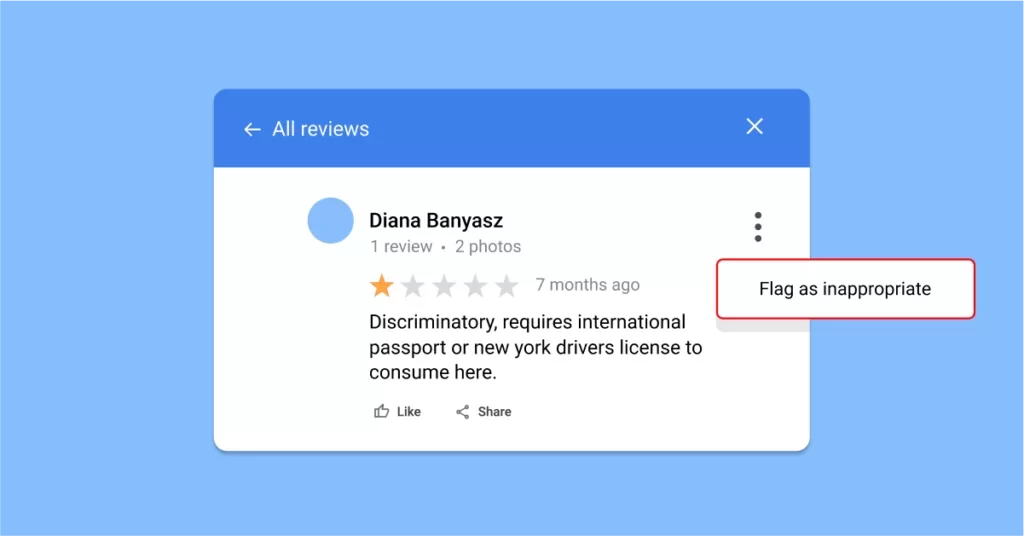
Steps to report inappropriate reviews:
- Go to Google Search or Maps.
- Click the three-dot menu on the review.
- Select Report review.
- Choose the violation reason.
- Submit and monitor via the Reviews Management Tool.
Review statuses you may encounter in the management tool
When you report a review via Google’s Reviews Management Tool, here are the possible statuses and what to do next:
- Decision pending:
- Google’s moderation team (AI or human) is still reviewing your flagged review.
- Next step: Be patient. Reviews under this status are still under assessment.
- No policy violation found:
- Google determined that the flagged review did not violate any of Google’s policies.
- Next step: If you believe this is a mistake, use Google’s one-time appeal option.
- You can also respond to the negative/spam reviews so potential customers know not to be deterred.
- Escalated – check email for updates:
- Your appeal has been escalated to Google’s internal teams for further investigation.
- Next step: Watch your inbox for resolution updates. If the appeal is successful, the review will be removed.
How to move forward
- Always keep an internal record of problematic reviews and your actions.
- If reviews persist after appeals, focus on generating more positive reviews to outweigh non-removable ones.
- Use Birdeye’s review tracking features to monitor flagged content across review sites and ensure you’re ready to respond.
Pro tip: Regularly reviewing your profile helps spot issues early and gives you time to act before your business’s online reputation is impacted.
How to handle negative reviews while staying compliant
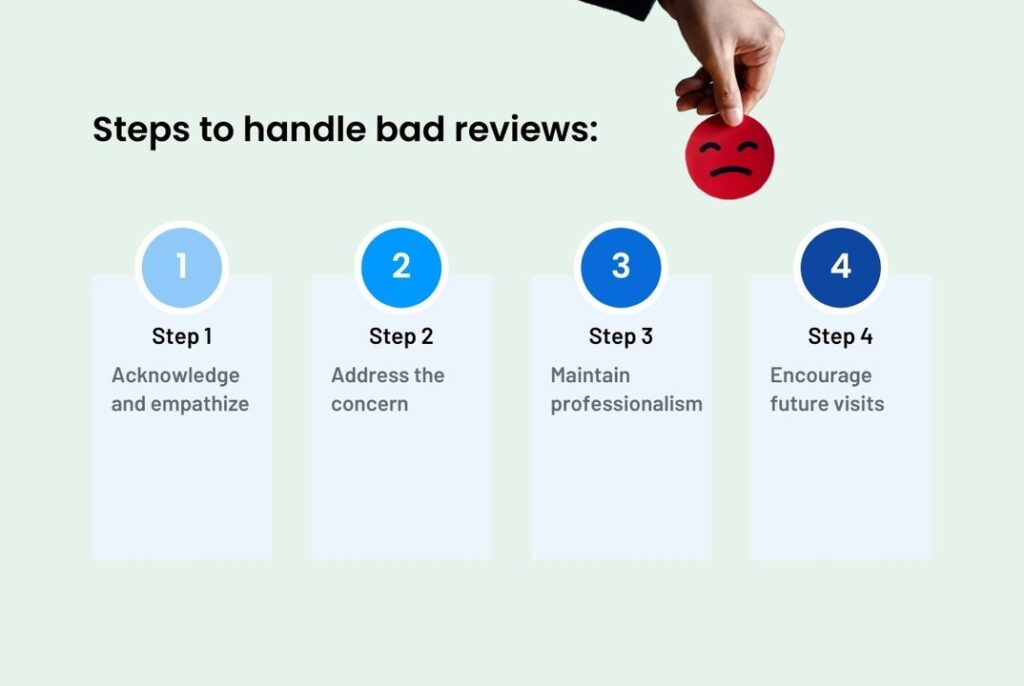
Negative reviews are common, but how you handle them sets you apart from your competitors. And yes, you can manage negative reviews while staying within Google’s review policy guidelines.
Here’s what you can do:
- Respond to negative reviews professionally and promptly. Create and distribute standardized review response templates so that on-ground staff can quickly respond to all reviews.
- Avoid defensive or aggressive responses.
- Use customer feedback to fix service gaps and invite private resolution.
- Monitor reviews across locations to spot patterns and develop strategies to prevent such issues in the future.
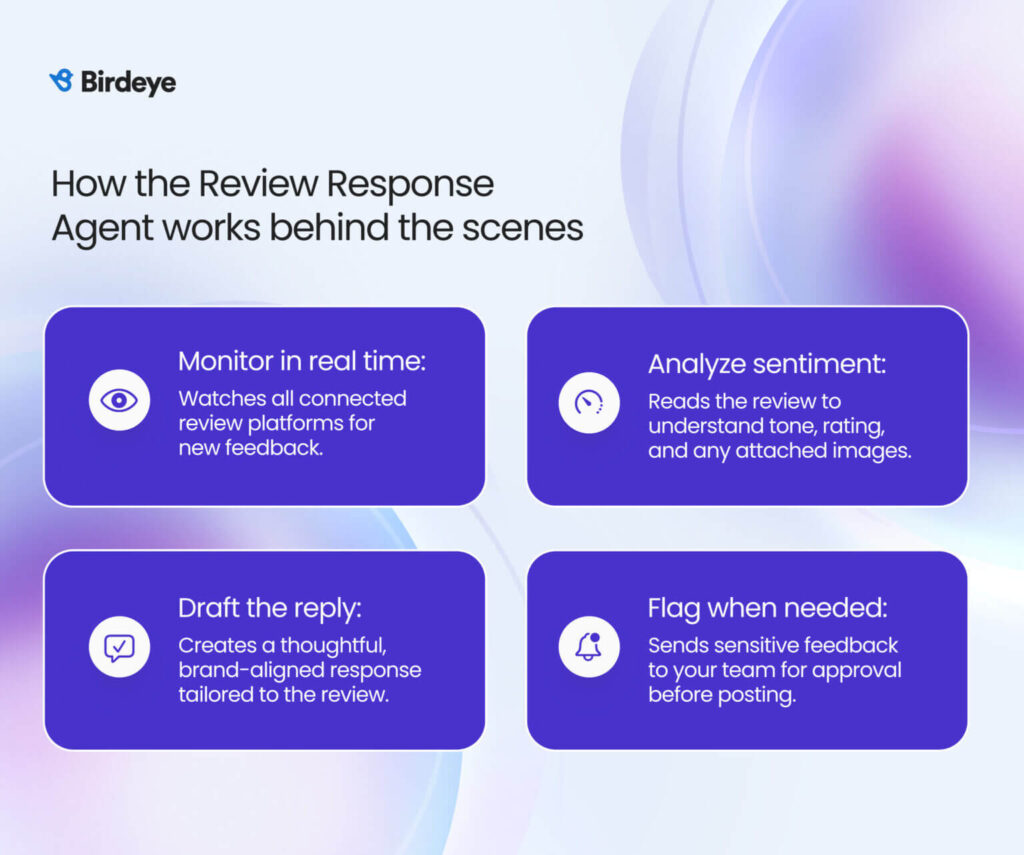
Consistent, policy-safe replies are hard when dozens of locations respond in different tones. Birdeye Reviews helps by using the Birdeye Review Response Agent to draft replies that align with your brand guidelines and reflect sentiment and context.
Teams can review and approve responses before publishing, helping regulated brands avoid sharing personal details or making claims that could pose compliance risk. Then, the Review Reporting Agent highlights repeat issues by location, so teams can fix the underlying experience rather than responding to the same complaint over and over.
How to recover after a policy penalty
If your listing receives a public warning banner, has reviews filtered, or faces a profile suspension due to a Google customer review policy violation, you can recover your online presence.
The recovery process involves four structured steps to restore your profile to good standing:
1. Identify the flag
The first step is determining exactly why your profile was flagged. Check your administrative dashboard and review your recent collection methods against the core Google review policies. Look for recent triggers such as a sudden surge in rating velocity, an internal contest that encouraged staff-name mentions, or automated software that used review gating. Google will typically send an email notification detailing the broad policy category that caused the restriction.
Note: Birdeye helps businesses proactively identify potential compliance risks before they become larger issues. Reviews and Insights AI can surface unusual review trends, sudden spikes in review activity, and reputation patterns across locations.

2. Document your corrections
Before asking Google to reconsider your status, you must completely stop the non-compliant activity and document your corrections. Clean up your internal feedback processes by taking the following actions:
- Deactivate any software features that pre-screen or gate customers.
- Remove any active customer incentives, giveaways, or discount offers tied to review generation.
- Update your customer communication scripts to ensure they follow standard Google reviews guidelines.
- Gather formal documentation proving your business is legitimate, such as an official business license, tax certificates, or utility bills matching the name and address on your profile.
3. Use the one-time appeal steps
Once your business operations comply fully with the Google Business Review policy, you can submit a formal request for reinstatement.
To file your request, use the official Google Business Profile appeals tool and follow these steps:
- Log in to the Google account associated with your verified business profile.
- Select the specific restricted or suspended profile from your list.
- Review the stated moderation action and click Submit appeal.
- Access the evidence form immediately after submitting.
Important Evidence Note: Once you open the evidence upload form, you have exactly 60 minutes to upload your supporting documents before the session times out. Upload your business license, tax documents, and a brief explanation showing that you have removed all non-compliant review collection methods.
4. Realistic recovery timeline
Resolving a policy penalty requires patience, as multi-location brands and single listings go through the same manual review queue. The general resolution timeline follows this path:
- Initial submission: Google acknowledges your appeal forms and routes them to a policy specialist.
- Review assessment: The assessment of your evidence takes roughly 3 to 5 business days. Do not submit multiple appeals during this window, as duplicates can delay your case.
Profile restoration: If your appeal is approved, Google will lift the profile suspension or remove the warning banner. While your administrative access returns immediately, it can take an additional 7 to 14 business days for your historical ratings and local pack keyword rankings to stabilize across Google Search and Maps.
How Birdeye keeps multi-location brands compliant
Managing reviews across 100-10,000+ branches requires strict oversight to avoid automated filter penalties. Birdeye is an AI-powered agentic marketing platform built for multi-location brands that need to scale growth and customer experience through one governed system.
By replacing manual collection methods with compliant automation, Birdeye ensures your digital footprint aligns completely with the latest Google review content policy. Jade Lyon, Marketing Manager, The Hydration Room, shares:
“Before Birdeye, we didn’t have many reviews at all. Only 44 reviews with a 4.7 rating. Since having Birdeye, we have tripled that, which has been great, and our rating has increased to 4.9.”
The three core pillars of Birdeye include:
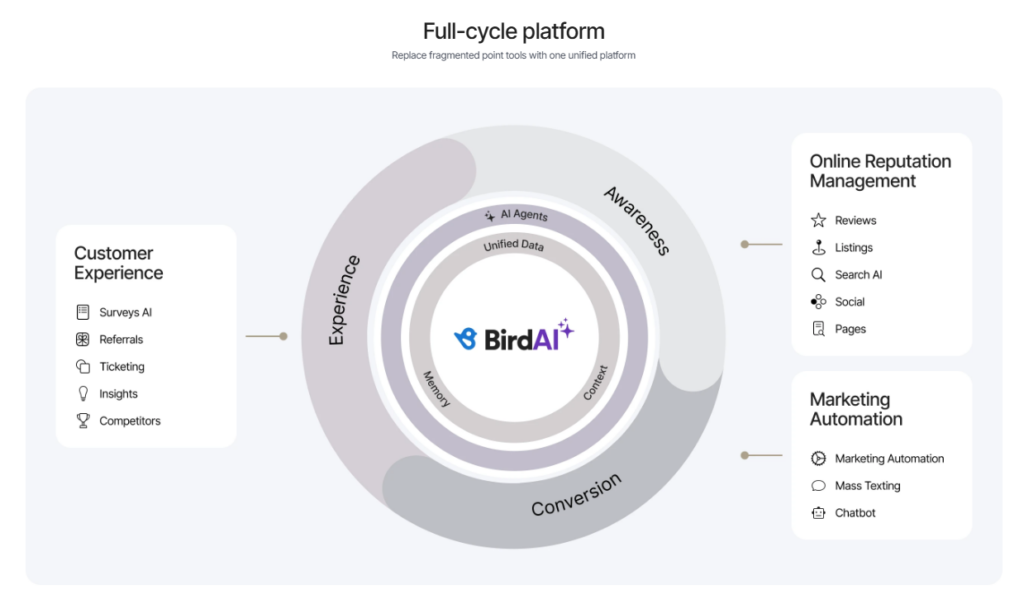
Full-cycle platform
Birdeye unifies customer experience, reputation, and marketing workflows into a single system, helping enterprise teams reduce fragmentation and improve execution across locations.
- Full-cycle approach: Connects reviews, listings, messaging, social, surveys, search visibility, and insights in one system to eliminate disparate, non-compliant tools.
- Enterprise governance: Gives enterprise teams control through approvals, role-based access, audit trails, and compliance controls to prevent unauthorized staff scripts.
- Deep ecosystem integration: Integrates with 3,000+ CRM, POS, EMR, analytics, and operational tools to connect marketing with real-world business workflows.
Local intelligence
Birdeye helps brands strengthen discoverability and maintain an accurate digital presence across search, directories, and AI-driven discovery channels.
- Brand AI and Industry AI: Helps AI agents generate responses and content that stay on-brand, compliant, and aligned with industry-specific context.
- Search AI: Helps brands track visibility, sentiment, and trusted sources across AI engines like ChatGPT, Gemini, and Perplexity.
- Competitors AI: Monitors share of voice, ratings, and market trends to identify performance shifts across locations.

Marketing agents
Birdeye’s AI agents automate daily execution while helping multi-location teams maintain speed, personalization, and compliance at scale.
- Birdeye Review Generation Agent: Sends review requests using channel-timed SMS or email tied directly to real-world POS interactions. This design avoids the artificial, high-velocity review spikes that Google’s automated systems flag, and uses neutral templates that are anti-review-gating by design.
- Review Response Agent: Drafts personalized, on-brand replies using sentiment and customer context. This automation keeps replies compliant with the new Google review rules by avoiding promotional language, coupon offers, or local SEO keyword-stuffing.
- Listings Optimization Agent: Audits profiles, fixes duplicates, and pushes approved updates across Google, Apple, Yelp, and industry directories to remove trust-signal inconsistencies that compound enforcement risk.
- Messaging AI: Centralizes SMS, web chat, Google, and Facebook conversations with smart routing and suggested replies.
- Surveys AI: Turns customer feedback into themes, insights, and next steps through automated analysis.
- Social Publishing Agent: Helps teams create, manage, and respond to social interactions more efficiently.
Birdeye designs its solutions directly around current search requirements, providing multi-location brands with a reliable way to scale feedback safely and maintain accurate local rankings.
FAQs on Google review policy
Google updated its Google review content policy to use Gemini-powered tools that scan for artificial patterns before a review goes public. Key changes include strict filters on incentivized feedback, a ban on systematic employee name-dropping, and deeper checks on location proximity signals.
Yes. A business owner can use the official Reviews Management Tool to report any content that directly violates the Google reviews guidelines. Google will remove reported text if it contains spam, harassment, or clear promotional solicitation.
No. Offering payment, coupons, or gift cards in exchange for five-star ratings violates Google review rules and breaches the FTC endorsement and testimonial guidelines. This deceptive practice carries heavy financial and legal penalties.
No. Current or former employees leaving ratings for their employer is a major conflict of interest under the Google business review policy. Google’s automated verification systems flag and delete these internal reviews to keep ratings unbiased.
Violations include review gating, offering customer rewards for feedback, impersonation, hate speech, and fake engagement. Using scripts to force staff names into reviews or utilizing automated software to buy ratings also breaks the new Google review rules.
A conflict of interest happens when a review is posted by someone with a personal or financial connection to the company. This includes ratings left by business owners, direct staff members, or active business competitors looking to alter ranking averages.
No. Google’s review solicitation policy explicitly bars contests, sweepstakes entries, discounts, or physical gifts in exchange for customer ratings. All requests for feedback must be completely transparent and open-ended.
Yes. Businesses are completely free to ask customers for honest reviews. To stay fully compliant, requests must be sent evenly to all clients, avoid any language offering rewards, and direct users to a neutral profile link.
Google Play reviews manage mobile application downloads rather than local storefronts. They follow specific developer rules that ban artificial downloads, duplicate text submissions across apps, and paid rating manipulation schemes.
Build trust, stay compliant, grow confidently
Maintaining a transparent strategy for collecting feedback is essential for long-term visibility on local search platforms. The latest Google review content policy shifts enforcement away from manual checks toward automated, real-time context verification.
Businesses that try to manipulate their online reputation through review gating, employee name solicitation, or incentivized rewards face immediate removal of reviews, warning banners, and potential profile suspension.
To succeed under these updated rules, brands must focus on consistent compliance and honest consumer interactions. Automated tools like Birdeye help multi-location brands streamline review requests, respond to customer feedback at scale, and maintain compliant reputation management practices across 100-10,000+ locations.
Watch a Birdeye free demo to see how you can build trust and grow your reputation the right way.
About the Author

Avtar Madan
Avtar Madan
Originally published