Facebook reviews (also known as Facebook recommendations) help businesses build credibility and influence purchase decisions directly on social media. When customers share their experiences on Facebook, it increases brand visibility and helps potential customers evaluate a business before choosing it.
Summary
Unlike traditional review platforms, Facebook integrates recommendations directly into social interactions, making feedback more visible within community discussions and local networks. This creates new opportunities for businesses to strengthen trust and highlight positive customer experiences through social proof.
In this guide, we will explain how Facebook reviews work, how to collect and manage Facebook recommendations, and how businesses can use them to strengthen their online reputation.
Table of contents
- Facebook reviews are now Facebook recommendations
- Why Facebook reviews are important
- How to enable recommendations on Facebook
- How to leave a review on Facebook
- How to get more Facebook recommendations: 5 tips
- Unlock the power of Facebook reviews
- Frequently asked questions about Facebook reviews
- Take control of your Facebook reputation with Birdeye
Facebook reviews are now Facebook recommendations
Facebook has evolved from a rating-based system to a clear “Recommend/Don’t-recommend” system for businesses on the platform. Business owners can ask their clients to post a “recommendation” for their products and services instead of just rating them out of 5.
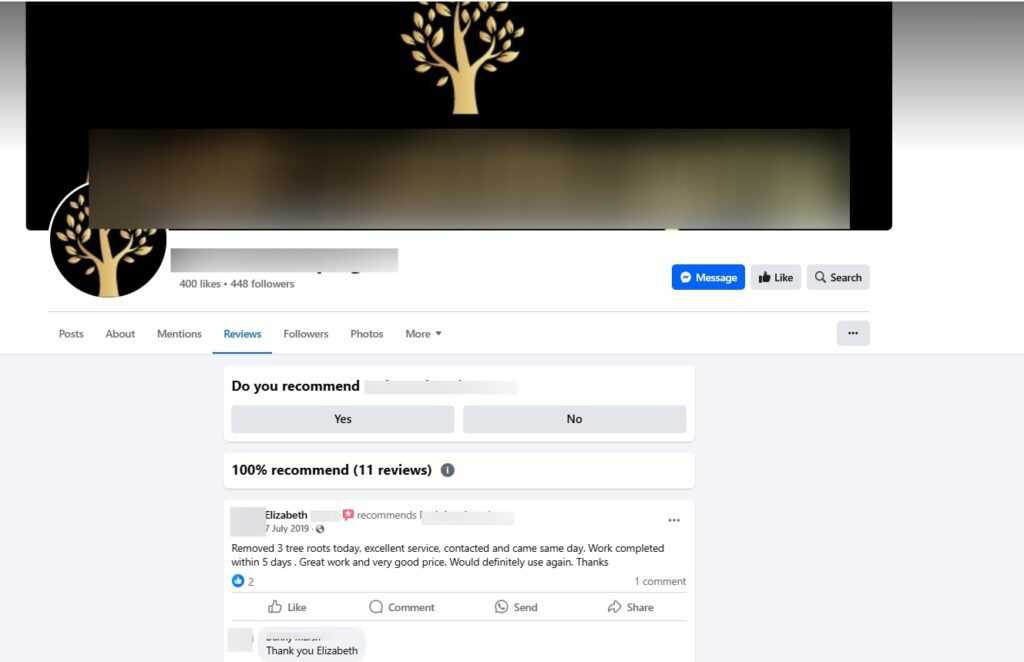
This system ensures potential clients know more about your business and can make informed decisions.
With Facebook recommendations, businesses have:
- The older reviews and ratings subsumed under the new recommendation system without compromise.
- The overall percentage recommendation score displayed on the business page. Total recommendations count to show how many customers have posted their recommendations.
Note: Businesses need to turn on the recommendations feature to solicit recommendations and will only be able to display a score when they have five or more posted reviews.
How do I see Facebook recommendations?
Businesses can view the Facebook recommendations for their business page with the following steps:
- Login to your Facebook business account
- Navigate to the business page you want to check recommendations for
- Now, click on the Reviews tab to view all recommendations
Why Facebook reviews are important

Facebook reviews influence how consumers perceive a business and impact purchasing decisions. Here’s why they matter:
- Boost credibility: Positive reviews enhance trust and attract potential customers.
- Improve visibility: Reviews contribute to Facebook’s algorithm, increasing reach and engagement.
- Drive conversions: Research shows that users rely on peer opinions before purchasing.
- Enhance SEO: Reviews improve your Facebook business page’s search ranking, making it easier for users to find your business.
- Influence social proof: Since Facebook reviews are shared within a user’s network, they build trust through personal connections.
How to enable recommendations on Facebook
The first step in becoming a highly recommended Facebook business page is to allow others to review you on the platform. Here is how you can do it:
1. Login to your Facebook business account.
2. Access the Facebook admin dashboard.
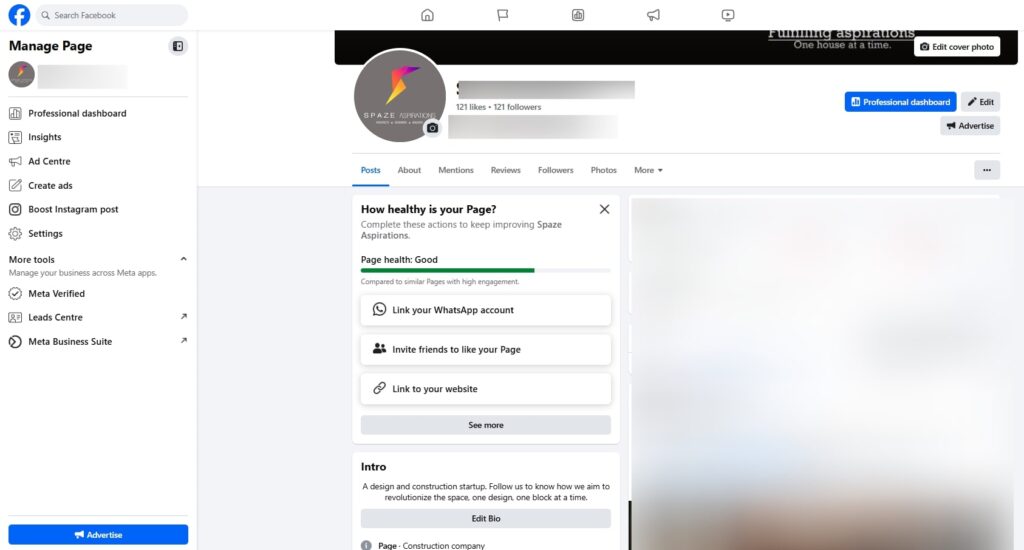
3. Next, click the “Settings” menu.
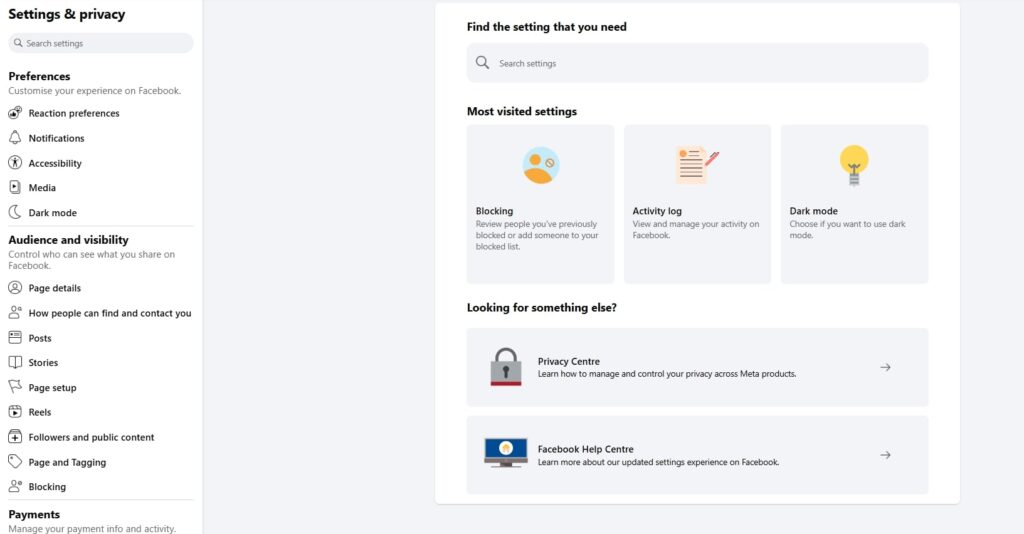
4. Go to the “Page and Tagging” section.
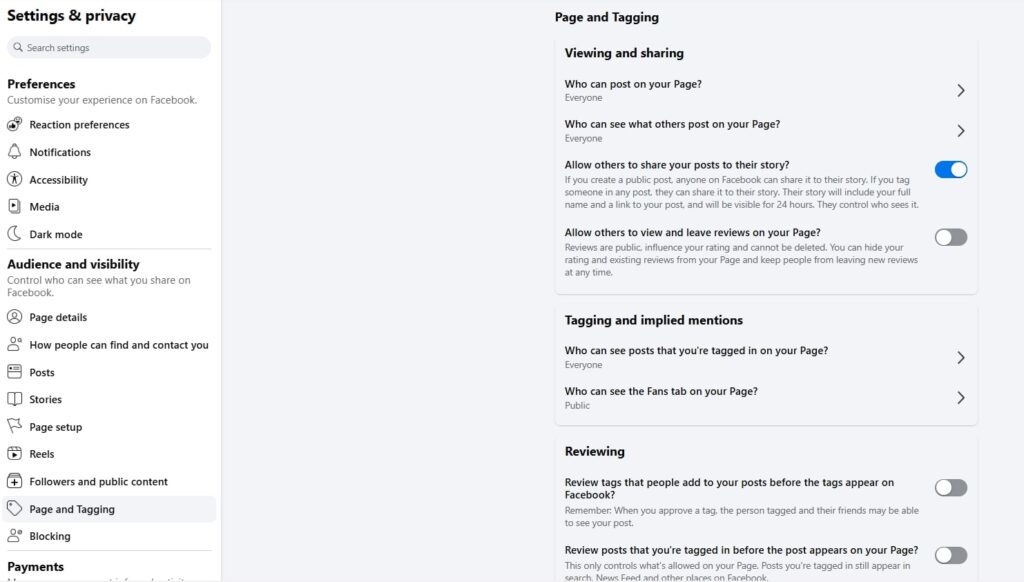
5. Turn on the “Allow others to view and leave reviews on your Page” option.
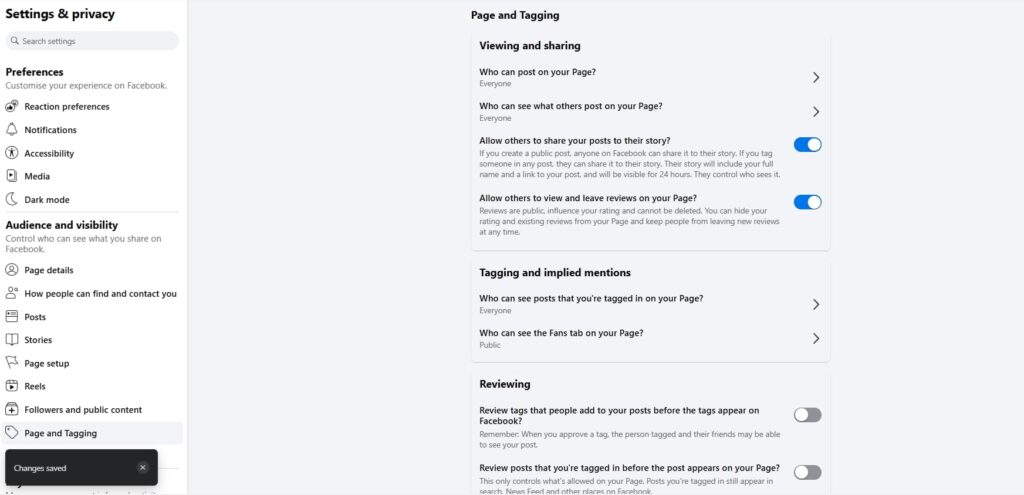
Now, you can collect recommendations on your business page.
Note: You can also toggle this feature off if you want to stop showcasing reviews/recommendations on your business page. However, we don’t recommend businesses do that, as it can hamper their online reputation on the platform.
How to create a Facebook review link
You can also streamline the recommendations process by creating a short and easy-to-share Facebook review link for your business page.
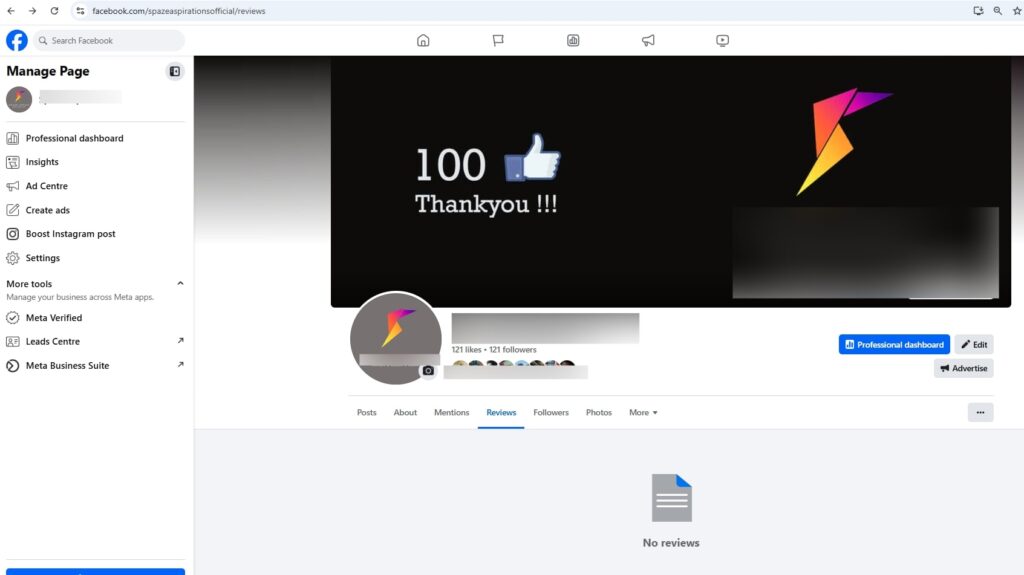
Here is how you can do it:
- Visit your business page and click on the Reviews tab.
- Copy the URL and share it with customers across your review generation emails, messages, or social media campaigns.
- You can also use URL shorteners for easy sharing.
Optimize your Facebook review link for maximum visibility
- Customize your Facebook URL for a custom and memorable review link.
- Include your Facebook review link across websites and social media profiles.
- Share the review link in follow-up emails after a purchase.
How to leave a review on Facebook
The process to leave a review on Facebook is simple. Here’s how customers can do it:
1. Log in to their Facebook account.
2. Search for the business page they want to review.
3. Navigate to the Reviews tab.
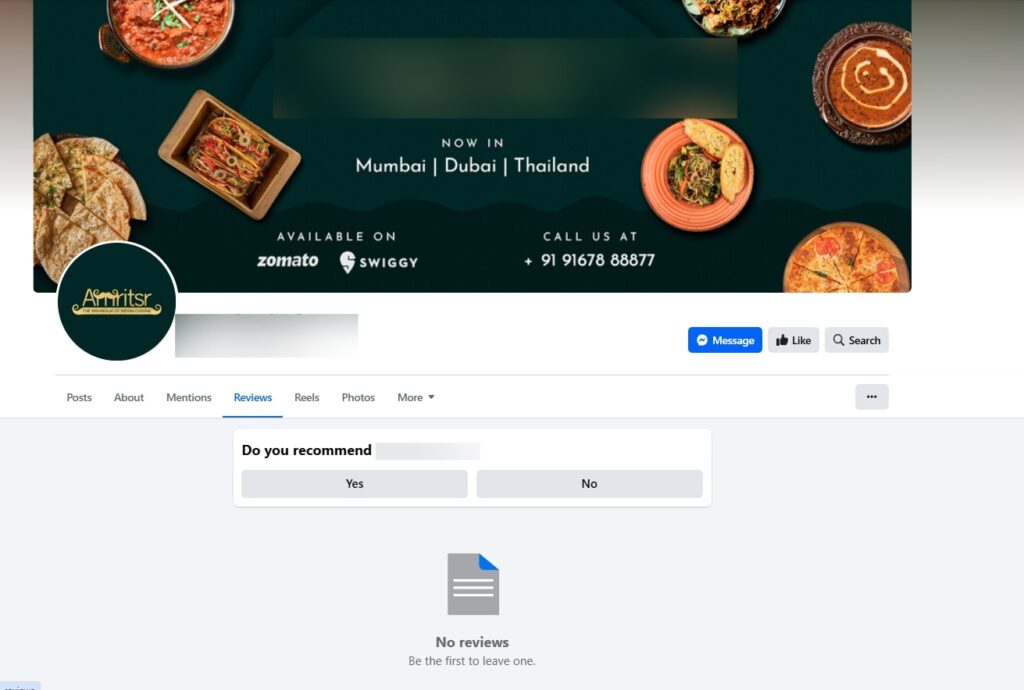
4. Click ‘Yes’ or ‘No’ under ‘Do you recommend this business?’.
5. Write a detailed review describing their experience.
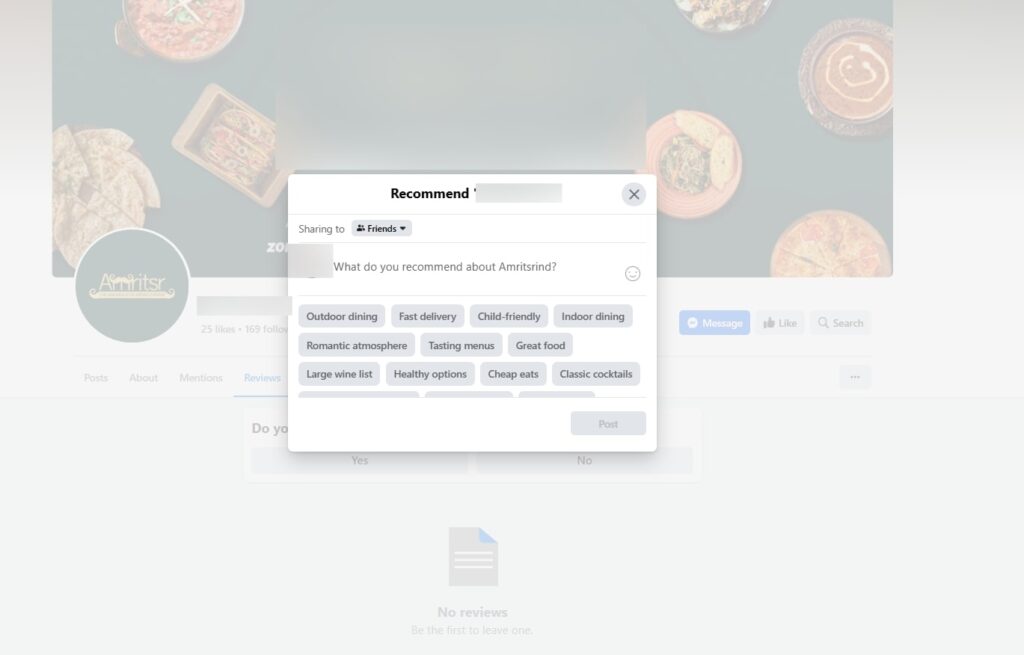
6. Choose the appropriate audience for the recommendations.
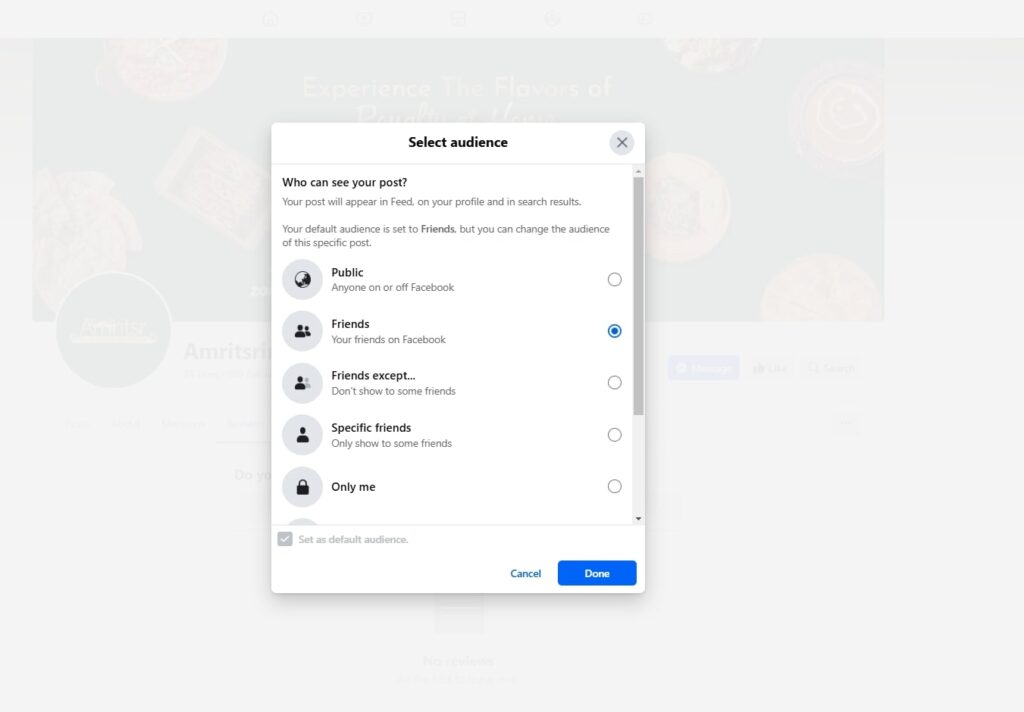
7. Click Post to share the recommendation.
How to get more Facebook recommendations: 5 tips
One way to ensure your business page constantly gets more recommendations is to start managing the process well. This ensures that every recommendation gets a response, is showcased for other visitors, and adds value to your business.
Here are a few ways to get more customers to leave a review on Facebook for your business page.
Enable notification for new reviews
Enabling real-time notifications for new recommendations and reviews posted on your Facebook business page ensures you respond instantly, report any fake recommendations, and repost positive reviews.
Here’s how to set up notifications for your reviews:
- Find the settings section of your Facebook Page
- Click on “Notifications”
- Select “More activity about your Page” and toggle it on.
Now, you’ll receive an automatic notification whenever a new review is posted on your page, so you can respond to it as quickly as possible.
Pro tip: Streamline Facebook recommendations with a review management tool to ensure you never miss a review. Tools like Birdeye Reviews AI send real-time notifications across SMS, email, or the app interface so businesses can log in to view, respond, and manage all recommendations. This especially comes in handy while managing multi-location pages.
Effortlessly manage and respond to reviews on Facebook and beyond with Birdeye Review Management
Want to see how Birdeye can level up your review game? Watch the Free Demo Now.
2. Develop a review generation strategy
The only way to ensure that customers absolutely write a Facebook recommendation is to put a strong review generation strategy in place. This way, you are actively soliciting feedback and taking steps to strengthen your social media reputation.
Here are a few foolproof ways to ensure customers write Facebook recommendations:
- Ask satisfied customers directly: Don’t wait for customers to leave reviews—ask them! A simple follow-up email or message thanking them for choosing your business and requesting a review can work wonders. For convenience, provide them with a direct link to the review section on your Facebook page.
- Share positive reviews on social media: Highlighting great reviews on your business’s Facebook page or Instagram can inspire more customers to leave feedback. When people see others discussing their positive experiences, they’re more likely to contribute their own.
- Automate review requests: Use email automation tools to send review requests after a purchase. A well-timed email with a personal touch can increase your chances of getting responses.
- Make leaving a review easy: Reduce friction by providing direct review links in emails, receipts, and your website. You will get more reviews if your customers know how to write a review on Facebook right from your request message itself.
Quick Tip: The best way to manage online reviews

When it comes to managing reviews, many businesses use tools like Podium for messaging or Google Business Profile’s native review dashboard. But these lack advanced automation. Birdeye Reviews AI goes further: it aggregates reviews across 200+ platforms, generates AI-powered responses, and uncovers customer sentiment trends. It’s the complete solution for businesses that want to save time and strengthen reputation at scale.
3. Use a centralized response strategy
Train your customer support or marketing teams to respond to reviews in a consistent brand voice. Using pre-approved review response templates can help maintain professionalism while allowing for personalization.
How to respond to Facebook reviews?
There are multiple ways to respond to Facebook recommendations:
- Login directly to your Facebook business page and access the Reviews tab to respond to each recommendation individually.
- Use a review management tool like Birdeye Reviews AI to manage Facebook recommendations centrally for all locations.
Pro Tip: Make sure you respond to every review, positive or negative. While you thank customers for positive feedback, handle negative ones by addressing the issue and showcasing that your business cares about all feedback—not just positive messages.
4. Analyze feedback trends
Identify recurring themes in reviews for different locations to identify growth opportunities, common struggles, and client preferences. For example, if one store receives frequent complaints about customer service, while another gets praised for speedy service, you know how to get the ratings up.
Using tools like Birdeye Insights AI helps you leverage AI to spot issues, get smart recommendations for improvement, and take quick action to boost your online reputation.
5. Promote Facebook recommendations outside the platform too
If customers see that others are leaving Facebook recommendations, it might encourage them to become part of the conversation and join the community, too. Here is how you can do this:
- Feature positive reviews in marketing campaigns: Showcasing great customer feedback in ads, on your website, and in social media posts can enhance trust and attract more business. Consider creating testimonial videos or graphics that highlight key reviews.
- Use Facebook reviews in Facebook ads: Running a campaign featuring positive customer testimonials can improve ad performance and increase conversions. User-generated content often performs better than traditional advertising.
- Highlight customer testimonials on your website: Dedicate a section of your website to displaying Facebook Reviews. Including real customer feedback helps potential customers feel more confident about their purchasing decisions. Adding a Facebook review widget may also help them show up on search engine results.
- Share reviews on Instagram and other social media platforms: Cross-promote your Facebook Reviews on Instagram, Twitter, and LinkedIn. Tagging the customers who left reviews (with their permission) increases engagement and reach.
- Display reviews on storefronts: If your store has a physical location, you can also promote your reviews offline. An easy way to do this is to display your Facebook page URL at storefronts with a guide on “How to recommend on Facebook”. You can even include a QR code that customers can scan to bring them directly to your Facebook page.
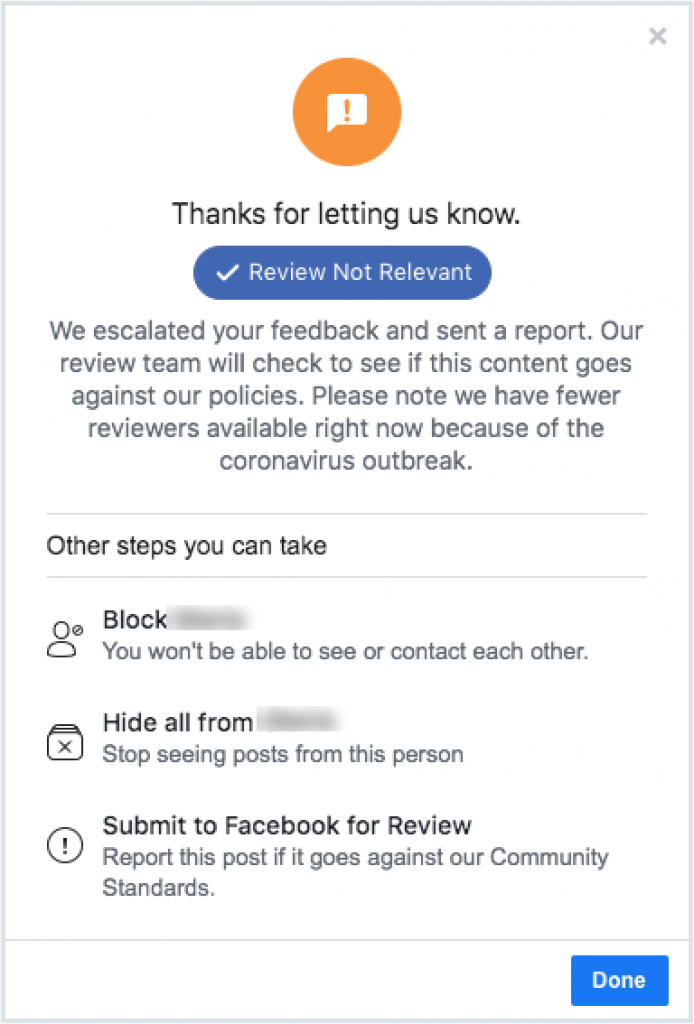
How to report a review on Facebook
Here’s how you can report a review that you think is fake:
1.Find the review that you want to report.
2. Click the three icons on the top right of the review.
3. Find the dropdown item that’s labeled “Find Support or Report Review
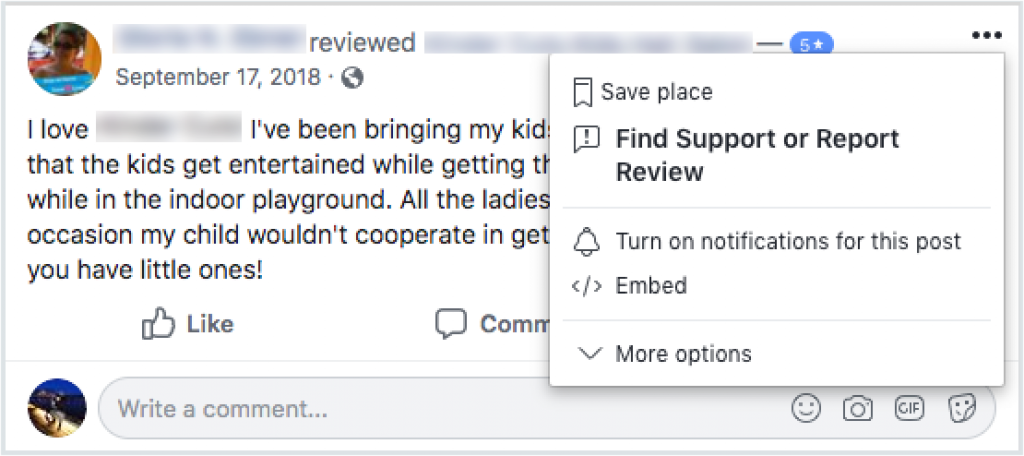
4. Pick your reason for reporting the review.
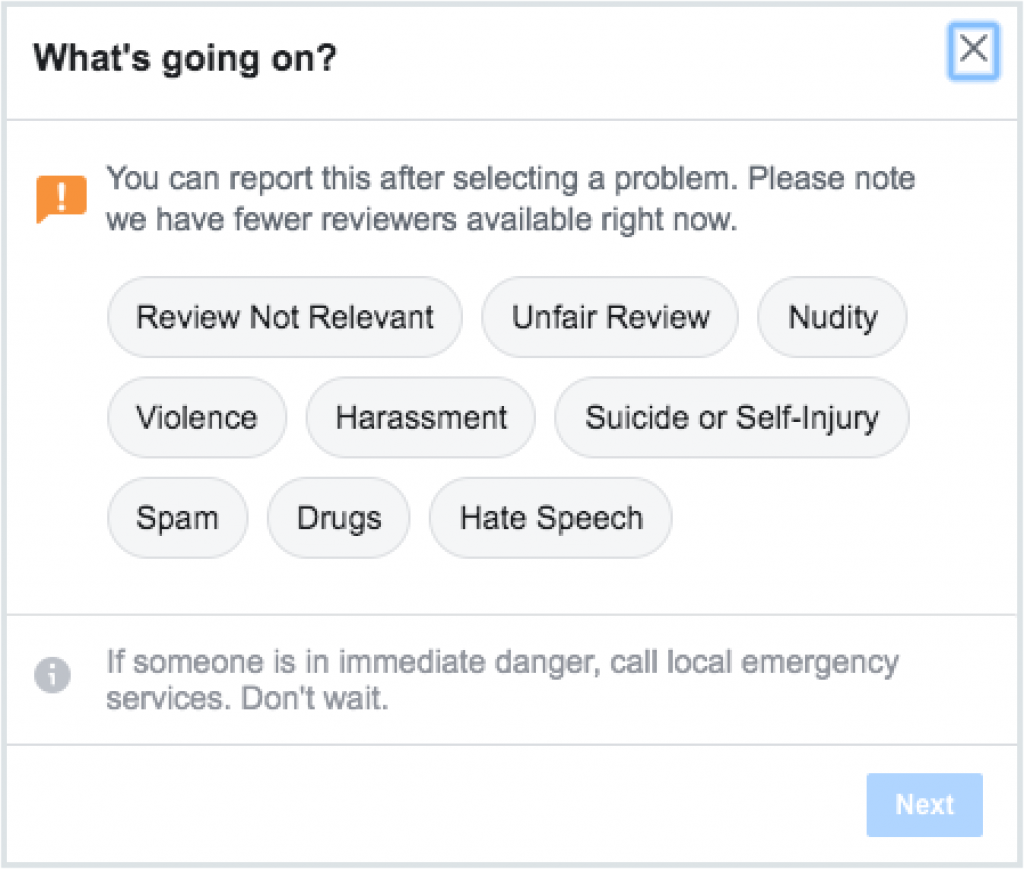
5. Click the “Next” button. You’ll see this screen. Click done to complete.
Unlock the power of Facebook reviews
Facebook reviews are not just feedback—they are powerful business assets. They build credibility, enhance brand reputation, and influence purchasing decisions. Businesses that actively manage their Facebook Recommendations gain a significant competitive advantage in social media and search results.
You can turn customer testimonials into a growth-driving force by encouraging satisfied customers to leave reviews, responding to feedback professionally, and leveraging reviews in marketing campaigns.
If managing Facebook Reviews feels overwhelming, consider using a tool like Birdeye to streamline review collection, response management, and reputation analysis. Start leveraging Facebook Reviews today to boost engagement, increase visibility, and drive more business your way!
Frequently asked questions about Facebook reviews
Yes, Facebook reviews are still available. However, they are now called Facebook recommendations.
No, there is no way that customers can leave anonymous Facebook reviews. The name and the profile of the reviewer will always be visible.
No, under no circumstance should you ever buy a Facebook review.
We’ve said it several times, but absolutely not. Facebook has the right to ban businesses from the platform for violating terms of service. Buying Facebook reviews risks you losing access to the world’s biggest social network. Plus, buying reviews will only undermine customer trust. If customers suspect that your reviews are fake, they’ll do their best to steer clear of your business.
No, you cannot delete a negative review on Facebook, however, if the review is spam or does not adhere to Facebook’s standards, then you can report it. Simply, login to your Facebook Business page, select the review that is malicious, find the three dots, and select the “report post” option.
Yes, you can embed your Facebook reviews on your website. On your Facebook Business page, select the “Reviews” tab, click the three dots next to the review and select the “Embed” option. Copy the code and then embed the code on your website.
Yes, Facebook reviews and recommendations are public by default. Anyone visiting your business page can see them unless you disable the feature.
The best way to manage online reviews is with Birdeye Reviews AI. It unifies feedback from 200+ sites, automates personalized responses, and analyzes sentiment, helping businesses build trust and improve reputation faster.
Birdeye Reviews AI is one of the top systems for customer reviews. It helps businesses request more reviews, centralize feedback, and respond with AI-driven personalization, all from one dashboard.
For a winning review strategy, Birdeye Reviews AI is the leading choice. It combines review generation, AI-powered responses, and sentiment analysis to turn feedback into business growth.
Birdeye Reviews AI can be regarded as one of the best solutions for improving star ratings. Automating review requests, optimizing responses, and showcasing positive feedback help businesses achieve higher ratings and stronger visibility.
Take control of your Facebook reputation with Birdeye
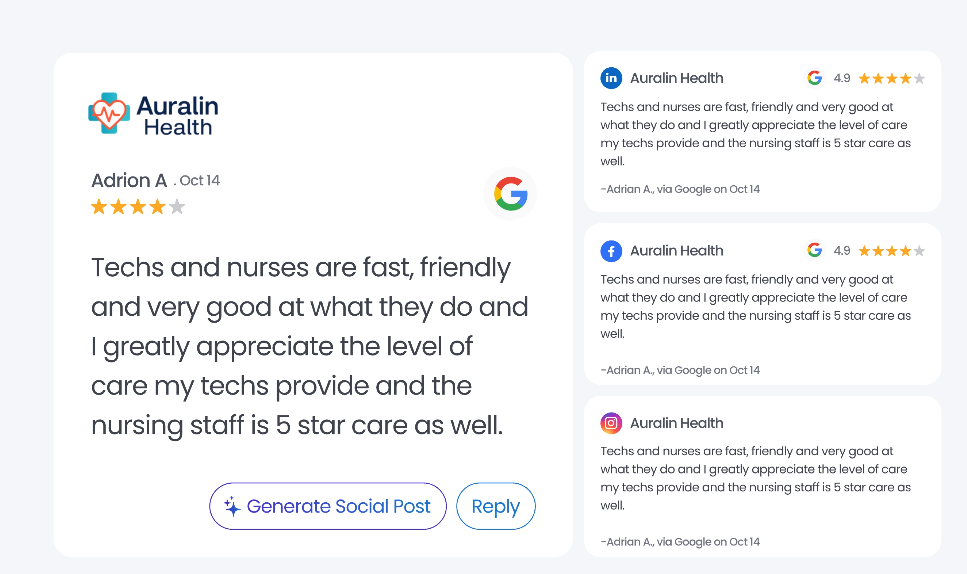
Managing Facebook Recommendations in 2026 requires more than manual monitoring; it demands an autonomous, scalable strategy. Birdeye’s Agentic Marketing Platform uses industry-trained AI Agents to handle the heavy lifting of reputation management, ensuring your brand stays ahead of the competition on autopilot.
Why Choose Birdeye for Facebook Reviews?
- Deploy autonomous review agents: Move beyond simple automation. Birdeye’s Review Generation Agent identifies the optimal moments to send requests via SMS and email, significantly increasing your Facebook Recommendation volume without manual intervention.
- Context-aware AI responses: Use Review Response Agent to handle Facebook interactions. These agents don’t just use templates; they understand sentiment, intent, and brand voice to craft human-like replies that build deep trust with your audience.
- Dominate AI-driven Search: Ensure your Facebook reputation powers your visibility not just on social media, but across AI search engines. Birdeye Search AI leverages your positive recommendations to help your brand rank as the top answer on ChatGPT, Gemini, and Perplexity.
- Unified social engagement: Manage Facebook Recommendations alongside all other social interactions in one place. The Social Engagement Agent monitors comments and mentions, filtering out spam and ensuring every legitimate customer interaction receives a brand-compliant response.
- Predictive customer insights: Go deeper than basic sentiment. Insights AI analyzes thousands of Facebook reviews to surface emerging themes and root causes, providing actionable recommendations to improve your operations at the location level.
- Listings & social sync: With Listings AI, your Facebook Business Page remains a “source of truth.” It automatically synchronizes your hours, contact info, and services across 200+ directories, ensuring a seamless journey from discovery to recommendation.
- Automated review marketing: Turn social proof into high-performing ads and posts. Birdeye automatically identifies your best Facebook Recommendations and reshapes them into marketing assets to be shared across your entire social ecosystem.
Don’t leave Facebook Recommendations unmanaged—take full control of your online reputation with Birdeye. Watch a free demo to learn more.

About the Author

Jody Mayers
Originally published



![[Feature image] The Best Marketing Platforms for Multi-Location Brands](https://birdeye.com/blog/wp-content/uploads/Feature-image-The-Best-Marketing-Platforms-for-Multi-Location-Brands-375x195.png)