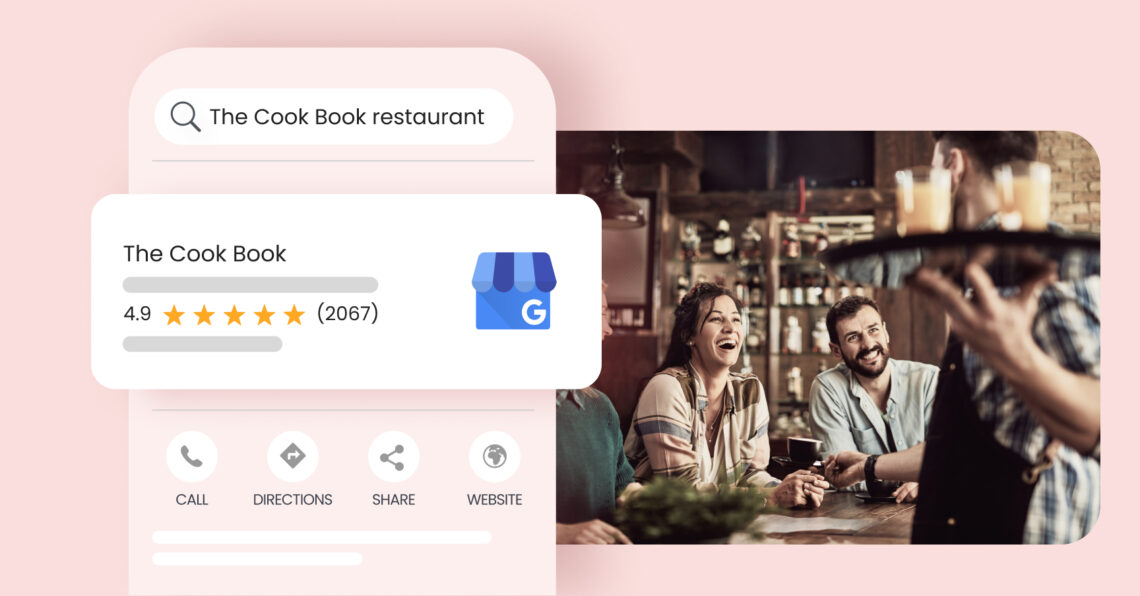
Google My Business for restaurants is the most effective way to get your venue noticed by diners searching for their next meal. Setting up and optimizing your Google Business Profile puts your restaurant in front of local customers right when they’re deciding where to eat.
Summary
This guide walks you through practical steps to optimize your restaurant’s Google Business Profile, boost bookings, and manage your online presence more efficiently with support from Birdeye’s enterprise-scale solutions and AI agents.
Table of contents
- What is Google My Business for restaurants?
- Benefits of having a Google Business Profile for your restaurant
- How to create and set up the Google My Business profile for your restaurant
- 8 tips to optimize your restaurant’s Google Business Profile
- Where should restaurant businesses focus their online efforts?
- What mistakes can hurt your restaurant’s online presence?
- Leverage Google My Business for restaurants to scale new heights
- FAQs on Google My Business for Restaurants
- Birdeye: The smartest choice for your restaurant’s GBP optimization
What is Google My Business for restaurants?
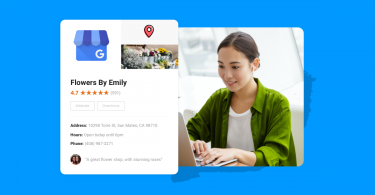
Google My Business (GMB), now called Google Business Profile, is a powerful, free tool that lets you control how your restaurant appears in Google Search and on Google Maps when potential diners are searching for “restaurants near me,” “best vegan food,” or specific cuisines and locations.
By claiming and optimizing your Google Business Profile, you can showcase your real-time menu, photos, reviews, reservation options, and accurate business details right when people are making dining decisions.
A well-managed Google Business Profile improves visibility, invites customer feedback, and helps your restaurant stand out in local search results. With features such as direct booking buttons and instant messaging, you make it easier for diners to book a table, order food, and interact with your business—all from a single Google search.
How does Birdeye make managing your restaurant’s GBP easier?
Managing and optimizing these listings can be overwhelming, especially for brands with multiple locations. That’s where platforms like Birdeye come in.
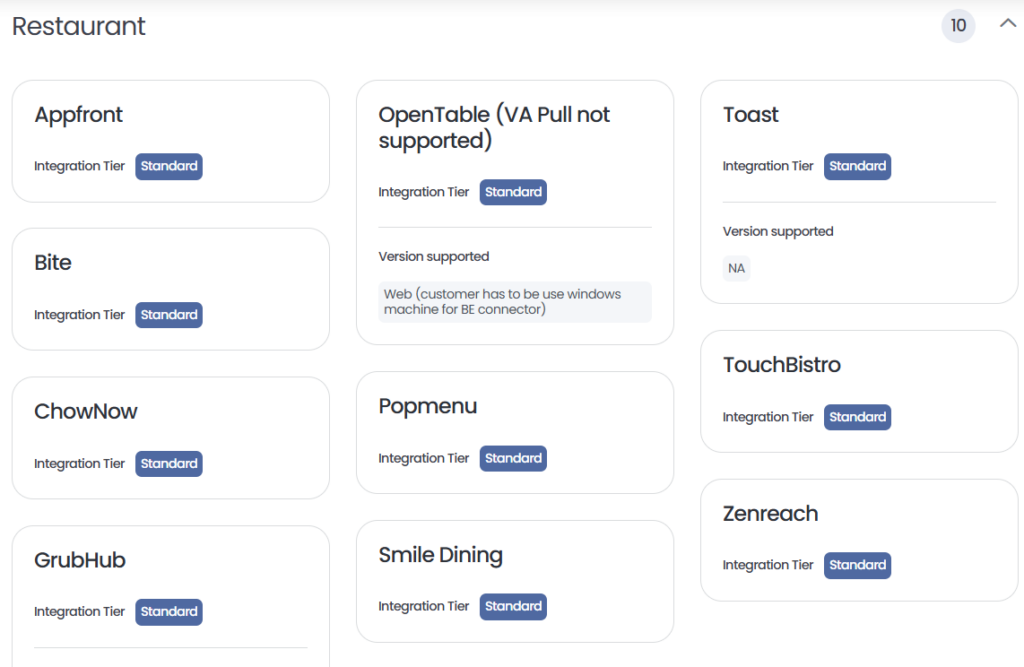
Birdeye is an enterprise-grade solution trusted by global brands—including leading restaurant groups and hospitality brands for managing online listings, reputation, and customer experience at scale. It offers seamless integration with more than 3,000+ software tools that restaurants already use, as shown in the image below:
Birdeye’s platform makes this process simple and effective:
- Sync critical location data (name, address, menu, hours) instantly across Google, Yelp, Facebook, Apple Maps, and dozens of directories—no manual updates needed.
- Monitor and respond to customer feedback across 200+ review sites to build a strong reputation and attract more diners where it matters most.
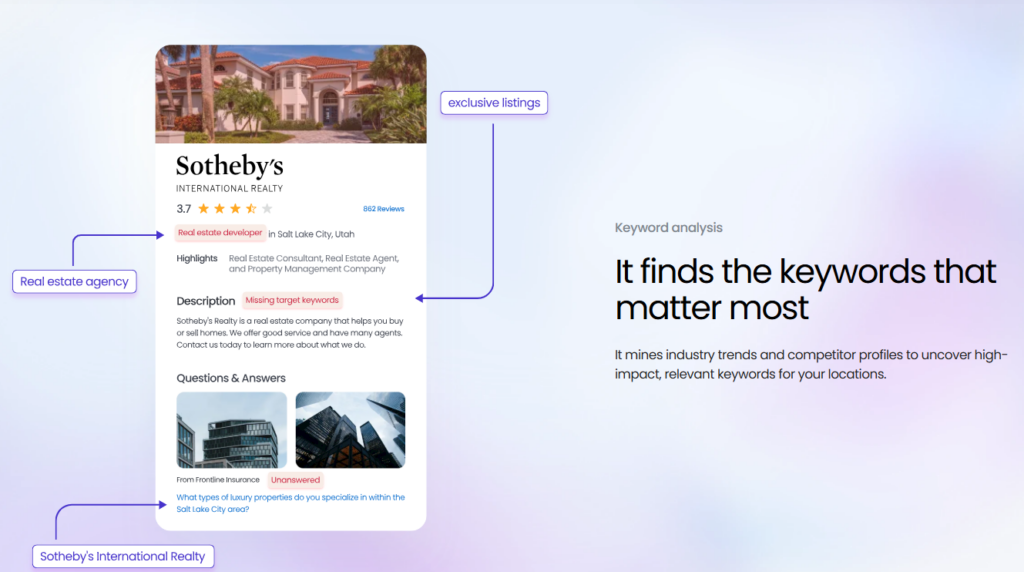
- Birdeye Listing Agent is an always-on AI assistant that autonomously analyzes each of your restaurant’s profiles for accuracy, visibility, and opportunities. It recommends and can even implement improvements: keeping business info up to date, optimizing keywords, adding new attributes, and ensuring your restaurant stands out in local “restaurants near me” searches. It’s like having a 24/7 local SEO strategist for every location.
- Birdeye’s Search AI leverages industry-specific large language models to analyze trending customer search terms, FAQs, and diner intent. It suggests the most relevant keywords and surfaces hidden customer questions. It helps you craft content that wins high-intent searches, giving your restaurant an edge in Google results and voice assistant queries.
Benefits of having a Google Business Profile for your restaurant
For restaurants, Google My Business is a key factor in attracting customers and preventing them from being lost to competitors. Creating and managing a local Google business improves your restaurant’s discoverability, ensures accurate business information, builds trust, and ultimately drives higher revenue.
Let’s explore each of these benefits in detail.
Improve discoverability for diners on Google search
Restaurant businesses thrive on being discoverable to potential customers searching for places to dine or order food. They often turn to Google Search or Maps to guide their choice. What they see here vastly impacts their decision. With your restaurant’s Google Business Profile, you can ensure:
- Higher visibility in local search results: When customers search for “Italian restaurant near me,” having an optimized Google Business Profile ensures your restaurant appears in the local pack, boosting visibility.
- Google Maps integration: Optimized business profiles ensure accurate location information on Google Maps, making it easier for potential customers to find your location and get directions.
- Updated restaurant menu with photos: Displaying menu items and adding high-quality images of your dishes can entice diners to visit your business.
Ensure diners find accurate business information
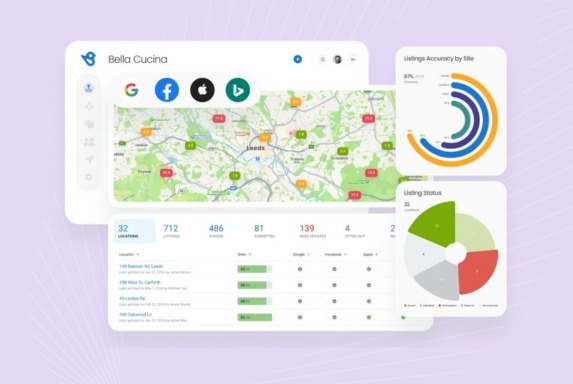
Incorrect information can deter customers and damage your restaurant’s reputation. Inconsistencies in online information can also adversely affect local search results.
With your restaurant’s Google Business Profile, you can:
- Update opening hours and business address regularly to reflect changes.
- List your contact details so potential customers can reach you.
- Highlight your dine-in, takeaway, or online ordering options.
PREFORMAT: The Birdeye’s Listings Optimization Agent ensures your profiles are complete, accurate, and competitive across Google, Apple, Yelp, and more, helping customers find and choose you first.
Boost trust among potential clients
Google’s business profile is not just a portal for displaying restaurant details. It also allows you to collect and showcase diners’ feedback to garner industry trust. Positive reviews build trust and encourage customers to choose your restaurant over others.
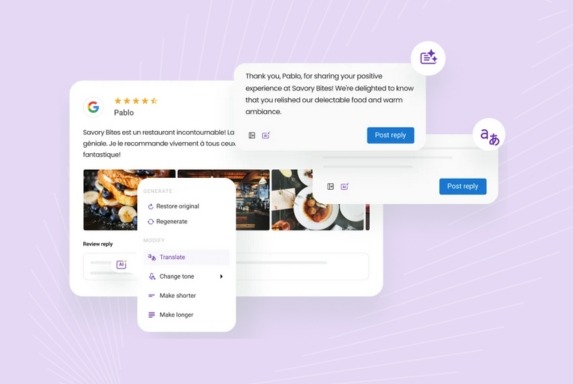
- Google reviews: Responding to customer feedback—both positive and negative reviews demonstrates your commitment to customer satisfaction.
- High-quality images and videos: Showcasing your restaurant’s ambiance, food, and staff helps enhance your restaurant’s reputation and make a lasting impression.
Improve revenue across locations
A well-optimized business profile ensures your restaurant outperforms competitors across search rankings and online reputation parameters. This means more eyes are on your establishment, and more diners choose your restaurant.
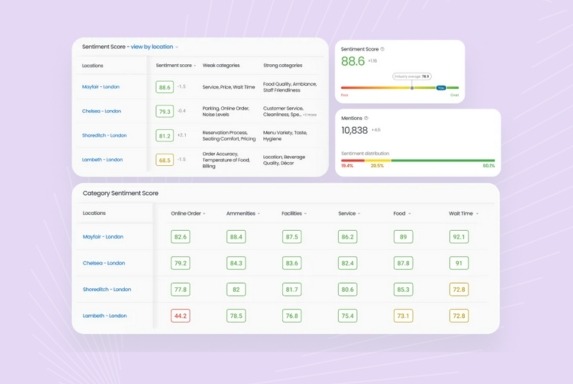
Additionally, Google Business Profile also provides a way to track business listing performance. This helps optimize wherever locations slip up and ensure every storefront puts its best foot forward.
Now that we know the benefits of a Google business listing, let us look at how you can claim an existing listing or set up one from scratch for your restaurant.
How to create and set up the Google My Business profile for your restaurant
Here is a step-by-step guide on how restaurants can claim/setup, and verify their Google Business Profiles:
Step 1: Find or set up your restaurant’s Google My Business profile
Most restaurants already have a presence on Google Maps because diners or third parties may have added them. So, it is possible that you could have a Google Business Profile, but you may not have access to it yet.

To check if your restaurant is listed:
- Search for your restaurant on Google My Business. If your business is listed, claim it by following the steps on the screen. Claiming ensures you have complete control of your profile and prevents unauthorized changes by third parties.
- If there is no profile, the platform will prompt you to create a new one from scratch. Enter the NAP (Name, Address, and phone number) just as it is on your website and other online directories.
Step 2: Enter relevant restaurant details
Once you have claimed the profile or set it up, you can spruce it to ensure it is complete and relevant in all aspects. Some of the areas to focus on include:
- Business description: Describe your restaurant’s concept, ambiance, and what sets you apart. For example: “An authentic Italian restaurant offering wood-fired pizzas in a cozy dining setting.”
- Relevant keywords: To improve discoverability, add terms like “family-friendly restaurant,” “vegan options,” or “late-night dining.”
- Operating hours & other details: Include your business website, operating hours, and location to help customers easily reach you
Pro Tip: Highlight your best-selling dishes in your description to attract foodies searching for specific cuisines. If you’re using Birdeye, our Listings AI product helps you generate SEO-friendly attractive descriptions for your business listings.
Step 3: Verify to generate reviews and manage the profile
Verification is crucial for unlocking full access to your Google Business Profile. It helps you generate reviews, analyze performance, and always make the most of your profile.
- Choose verification by phone, email, or postcard.
- Once verified, you can manage your profile, respond to reviews, and access valuable insights.
Pro Tip: Before applying for verification, ensure you fill in all the relevant information . Having your storefront image, street details, and business registration handy can speed up approval.
8 tips to optimize your restaurant’s Google Business Profile
Creating your restaurant’s Google Business Profile is just the beginning. What matters is how you optimize and manage it to boost local search rankings and outshine your competitors.
1. Regularly update address, hours, and contact details
Keeping your business information up to date is essential for a seamless customer experience and building trust in your establishment. Since dietary options, operating hours, and availability frequently change, it’s crucial to update your profile regularly so diners always find accurate and relevant details.
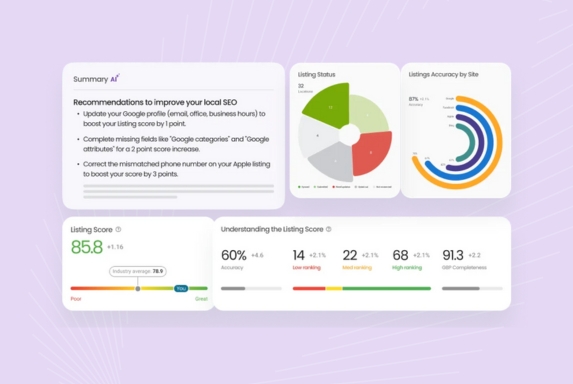
When optimizing your profile, focus on:
- Operating hours: Adjust for holidays, special events, or unexpected changes to prevent confusion.
- Contact information: Ensure your phone number and email are correct at all times.
- Location: The location pin matters greatly in ensuring your restaurant gets picked as the nearest establishment for the search query. Google Maps pins get moved quite often, so keep an eye on this. Ensuring accuracy here makes a massive difference in your local performance.
Example: If your restaurant closes early on certain weekdays, update this information to avoid negative reviews from disappointed customers.
2. Enable chat options for enhanced connectivity
Diners and potential customers often have questions regarding reservations, dietary options, and amenities like parking. Allowing them to connect with you ensures:
- Real-time communication: Address queries like menu availability or seating capacity instantly.
- Build relationships: Personalized responses can encourage repeat visits.
- Faster lead conversion: Receiving instant responses to their queries encourages diners to walk into your restaurant.
Pro Tip: Messaging tools like Birdeye Messaging AI can help streamline diner communication. These tools make it easy to set up automated responses, manage all communications centrally, and use AI solutions for nuanced responses 24x7.
3. Highlight your best dishes with high-quality photos
Visual content plays a huge role in attracting diners – they often say people eat with their eyes first.
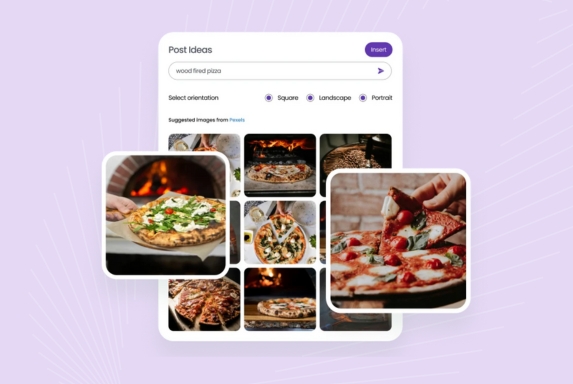
Start this visual journey even before they step into your restaurant by:
- Adding high-quality images of signature dishes, your dining area, and special events.
- Use professional photography or well-lit smartphone shots to showcase your food at its best.
- Encouraging diners to post images with their reviews.
Grow your restaurant on Google with Birdeye
Want to see the impact of Birdeye on your business? Watch the Free Demo Now.
4. Accept online food orders and reservations right from your profile
Convenience is the name of the game, especially in food delivery. Most Google users filter search results by online ordering, delivery time, and reservation facilities. Integrating these into your Google Business Profile ensures customers don’t have to use any other app or website to book a table or order food delivery.
Why this matters:
Reduces friction: Customers can book a table or order food without leaving Google.
Boosts revenue: More convenience means more orders and visits.
Pro Tip: You can use third-party platforms like Birdeye to set up reservation systems. This way, diners can book a convenient slot, reducing wait times and boosting walk-ins for your outlet.
5. Generate reviews to showcase happy experiences
Diners rely on Google reviews to guide their final decision, and what your previous diners have said plays a massive role in your online reputation. That is why it is essential to consistently encourage all customers to leave reviews on your Google Business Profile so that you can strengthen your online reputation.
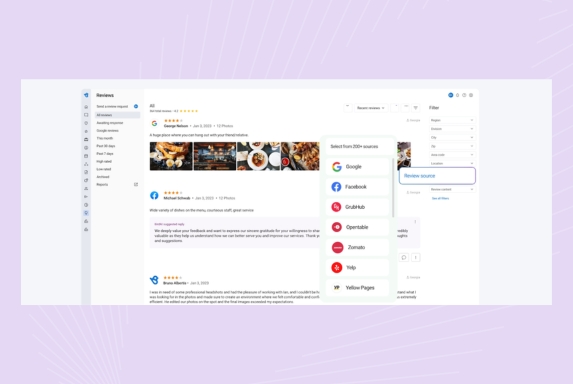
Encourage diners to leave reviews by:
- Sending prompt review requests that are easy to fill – ideally, a one-click solution.
- Sharing a QR code linking to your review page on receipts.
- Responding to all reviews promptly. Thank customers for positive reviews and offer to make things right for negative experiences.
- Sharing positive reviews on newsletters, social media channels, and your restaurant to show that you care, and encouraging other diners to leave reviews as well.
6. Post regularly to keep diners updated on offers and events
Exciting offers, special performances, and themed nights bring in diners. And you don’t have to rely on traditional marketing channels alone to spread the word. The updates section on Google Business Profile can do that for you, too.
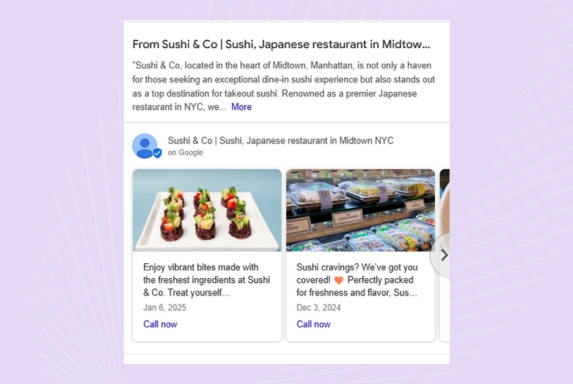
With Google posts, businesses can:
- Announce limited-time offers or upcoming events.
- Share photos and short updates to keep your audience engaged.
- Inform the audience about any new additions to the restaurant, the opening of a new branch, and more.
Pro Tip: Schedule weekly posts to maintain a consistent presence. Working with a social media management tool like Birdeye Social AI allows you to create engaging content and sync your Google posts calendar with the overall social calendar to never miss an update.
7. Add attributes to bring diners in
Adding attributes not only helps customers decide if your restaurant meets their preferences but also makes it easier for them to find key information at a glance. These are displayed right below the business information, saving time for your potential customers to ask you via chat or go through your website for the details. You can use this field to highlight popular services like contactless payment or curbside pickup.
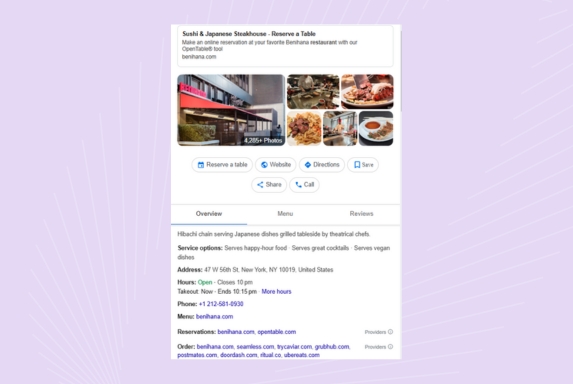
Some common restaurant attributes include
- “Outdoor seating,”
- “Live music,”
- “Family-friendly”
- Wheelchair-accessible
8. Track performance across multiple locations
Google Business Profile provides insights into your restaurant’s performance by letting you track profile views, search queries, call clicks, and directions requests. This helps you identify trends in web traffic sources, replicate successful strategies across locations, benchmark performance against competing restaurants, and take steps to outperform them.
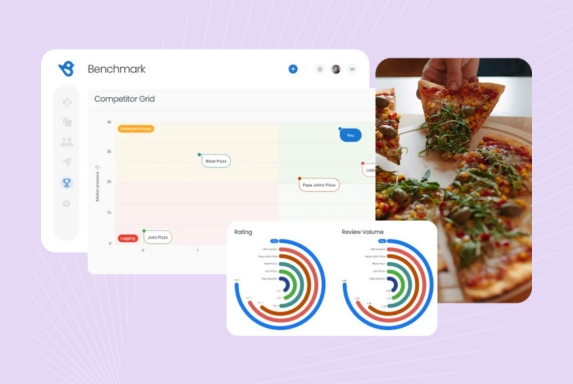
Additionally, you can identify patterns in customer engagement to better understand their preferences and behaviors:
- When do most customers search for your restaurant?
- What type of posts or updates get the most attention?
- What days are the busiest, and what are the most commonly sought-out amenities?
Pro Tip: You can use Google Analytics with GMB insights for deeper data analysis. However, multi-location Google business listing management becomes easy with an integrated solution like Birdeye Listings AI and Birdeye Insights AI. Know more about your business performance and allow it to guide your future strategies.
Where should restaurant businesses focus their online efforts?
Restaurant businesses juggle dozens of details every day, but a few high-impact actions can make all the difference online. Here’s a practical checklist to help you boost discoverability, win more diners, and turn every digital interaction into a great guest experience—featuring the latest AI-powered tools to save you time and grow your reputation.
Optimize guest touchpoints
Make sure your profiles, menu, and hours are up to date on Google and review sites. Birdeye’s Listing Agent can scan for old info and refresh all locations with a single action.
Respond to search trends instantly
Birdeye Search AI identifies what diners in your area are searching for. With its recommendations, adjust descriptions and highlights to match local demand and popular searches as they change.
Run a quarterly experience audit
Go through your ordering journey from a diner’s perspective—test booking, menu links, and digital contact. Spot friction before guests do and fix issues to maximize satisfaction.
Schedule monthly “show & tell” updates
Share a new menu item, behind-the-scenes photo, or special event each month. Fresh, authentic content keeps diners engaged and signals to Google that your listing is active.
What mistakes can hurt your restaurant’s online presence?
Even established restaurants can stumble online, often with small mistakes that quietly drain bookings and visibility. Here are some overlooked pitfalls that can trip up even the best brands, plus quick fixes to ensure your restaurant stays discoverable, trustworthy, and guest-friendly in every search and review.
Now, you can dive into your unique, non-repetitive pointers with solutions.
Ignoring mobile optimization
Many restaurant websites and Google listings aren’t mobile-friendly, causing visitors to bounce.
Quick fix: Test your site on different devices and update to a responsive design. Prioritize fast loading and easy-to-tap phone/menu buttons.
Lack of clear dietary or allergy info
Missing labels for common allergens or dietary options drives cautious diners elsewhere.
Quick fix: Clearly mark vegan, gluten-free, and allergy info in all online menus and update Google attributes to reflect dietary offerings.
No instant reservation or ordering link
Hidden, broken, or missing “Reserve” and “Order Online” buttons lead to lost direct bookings.
Quick fix: Add prominent, always-visible reservation and ordering links—on Google, your site, and all profiles. Test regularly to ensure they work.
Weak local SEO signals
Generic or city-agnostic content leaves you invisible in “near me” searches.
Quick fix: Use local keywords in your About section, get listed on local directories, and keep address/city info accurate on EVERY site.
Forgetting “get directions” buttons
Google Maps integration is skipped, especially on mobile, making it hard for guests to find you.
Quick fix: Embed a clickable map and “Get Directions” on your Google profile and website contact page.
Leverage Google My Business for restaurants to scale new heights
Optimizing your Google My Business Profile is necessary for restaurant owners aiming to increase their restaurant’s online visibility and attract new customers. By keeping your profile up to date, encouraging customer reviews, and adding high-quality photos, you’ll create a compelling online presence that draws diners in. Start managing your profile today to grow your restaurant business and reach more diners.
FAQs on Google My Business for Restaurants
Menu, photos, reviews, address, hours, and ordering links are critical—diners want to see food, read peer feedback, and know how/when they can visit or order.
Google My Business helps improve your restaurant’s local visibility, provides accurate business information to customers, and enhances discoverability on search engines and Google Maps.
Use relevant keywords, update your business information regularly, post high-quality photos, and encourage customer reviews to improve your local SEO.
Pick categories that best match your cuisine and service, e.g., “Italian restaurant,” “cafe,” or “delivery.” More precise categories improve search visibility and help attract relevant diners.
Yes. Regular Google Posts boost visibility, showcase offers/events, and signal activity to both Google and guests. They help keep profiles fresh and improve local rankings.
Absolutely. Enable reservation and ordering links so diners can book or order without leaving your Google profile. This converts searches into instant actions.
Respond promptly and professionally, explaining your side and inviting direct contact. Flag fake reviews for removal, but focus on maintaining a constructive tone to build public trust.
Use tools like Birdeye Listing Agent to sync and manage info across all locations. Update hours, menu, and categories for every branch to avoid confusion and boost search results.
Birdeye: The smartest choice for your restaurant’s GBP optimization
Managing multiple locations and keeping your Google Business Profile optimized can be overwhelming for restaurant owners. Birdeye offers a comprehensive suite of tools to help streamline this process and ensure your restaurant stands out in search results.
- Listings management: Ensure your business information stays accurate and consistent across significant directories like Google, Yelp, and Facebook. Say goodbye to manual updates and let Birdeye handle it.
- Customer reviews management: Monitor, respond, and showcase customer reviews from multiple platforms in one dashboard. Encourage positive reviews and address negative ones promptly to boost your restaurant’s reputation and attract more customers.
- Insights AI: Get advanced analytics and actionable insights from your reviews and business data. Understand diner behavior, identify trends, and receive recommendations to improve customer experience.
- Competitors AI: Stay ahead of the competition by analyzing competitor reviews and social media activity. Identify strengths, weaknesses, and opportunities to refine your strategy.
- Social media publishing: Manage your restaurant’s social media presence effortlessly. Schedule and publish posts across multiple platforms from one central hub, keeping your audience engaged with updates, offers, and events.
Whether you run a single-location restaurant or manage a multi-location brand, Birdeye’s AI solutions ensure you take control of your online presence while also helping you deliver a superior dining experience.
Ready to transform how diners discover your business? Watch a free demo to learn more.

About the Author

Shruti Dugar
Birdeye
Originally published

![[Feature image] The Best Marketing Platforms for Multi-Location Brands](https://birdeye.com/blog/wp-content/uploads/Feature-image-The-Best-Marketing-Platforms-for-Multi-Location-Brands-375x195.png)