Google Business Profile guidelines are the foundation of local visibility on Google Search and Google Maps. They determine how businesses represent themselves online, what information they can publish, and whether their profiles remain eligible to appear in local results.
SUMMARY – As Google continues to tighten verification standards and enforce stricter quality controls, compliance has become just as important as optimization. Businesses that overlook key guidelines risk inaccurate listings, reduced visibility, ranking declines, and, in some cases, profile suspensions. For multi-location brands, maintaining consistency across hundreds of profiles adds another layer of complexity.
This guide breaks down the latest Google Business Profile guidelines for 2026, including eligibility requirements, verification standards, naming rules, review policies, content restrictions, and the most common violations businesses should avoid. Table of contents
Table of contents
- What are Google Business Profile guidelines?
- Who qualifies for a Google Business Profile?
- Which businesses do not qualify for a Google Business Profile?
- How have Google Business Profile verification requirements changed in 2026?
- What are Google Business Profile name guidelines?
- What are Google’s rules for business addresses and service areas?
- What phone number and website should you use on your Google Business Profile?
- How should you choose business categories and attributes?
- What are Google Business Profile business description guidelines?
- How should businesses manage business hours on Google?
- What are Google Posts guidelines in 2026?
- What review practices violate Google Business Profile guidelines?
- How does Ask Maps answer questions about your business?
- What are the most common Google Business Profile mistakes?
- What happens if you violate Google Business Profile guidelines?
- How are Google Business Profile guidelines changing in 2026?
- FAQs about Google Business Profile guidelines
- Birdeye helps you stay compliant with Google Business Profile guidelines
Before diving into optimization tactics, let’s ensure your business is eligible for a Google Business Profile. Google has strict rules on which businesses qualify. Let’s understand those.
What are Google Business Profile guidelines?
Google Business Profile guidelines establish the standards businesses must follow when creating, managing, and updating their profiles on Google Search and Google Maps.
Why did Google create Business Profile guidelines?
Google's goal is simple: To provide users with reliable local business information. When customers search for a nearby restaurant, healthcare provider, retailer, or service business, Google wants them to find legitimate businesses that accurately represent who they are, where they operate, and what they offer. The guidelines help prevent spam, fake listings, misleading information, and manipulation of local search results.
Without these standards, search results would quickly become cluttered with duplicate listings, fake locations, keyword-stuffed business names, and inaccurate information, creating poor user experiences.
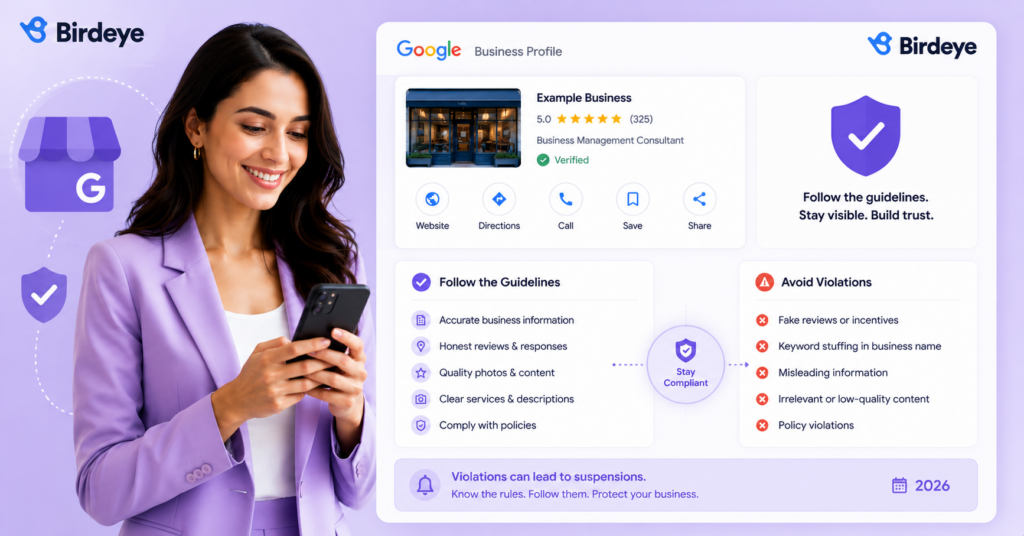
How do Google Business Profile guidelines affect visibility, rankings, and trust?
Businesses that maintain accurate information, complete profiles, and compliant listings are more likely to build trust with customers and maintain a strong local presence. In contrast, businesses that repeatedly violate guidelines may experience ranking declines, profile restrictions, or suspension.
According to Birdeye's State of Google Business Profile 2026, customer engagement on Google Business Profiles is concentrated around three high-intent actions: website visits, direction requests, and phone calls. Inaccurate or non-compliant profiles can disrupt each of these conversion points.
Google also uses profile quality signals to evaluate whether a business deserves visibility in local search results. Inaccurate business information, duplicate listings, misleading content, or review policy violations can weaken those signals over time.
What’s the difference between compliance and optimization?
Many businesses focus heavily on optimization while overlooking compliance. A Google Business Profile needs both. Optimization can improve visibility, but compliance protects it. Even a highly optimized profile can lose rankings or face suspension if it violates Google’s guidelines.
Let’s understand core differences:
| Compliance | Optimization |
| Ensures your profile follows Google’s rules | Helps improve visibility and engagement |
| Focuses on eligibility, verification, and policy adherence | Focuses on categories, reviews, content, and profile completeness |
| Prevents suspensions, penalties, and profile restrictions | Helps improve local search performance |
| Forms the foundation of a healthy Google Business Profile | Builds on that foundation to maximize results |
Before reviewing specific rules, it’s important to understand whether your business is eligible for a Google Business Profile in the first place.
When scaling a multi-location brand, corporate oversight and local flexibility must go hand in hand. Implementing a structured approach to Google Business Profile for franchises allows corporate teams to protect brand voice while empowering local managers to update store hours, post regional updates, and respond to local reviews.
Who qualifies for a Google Business Profile?
To qualify for a Google Business Profile, a business must interact with customers in person during stated business hours, either at a physical location or within a defined service area.
This requirement helps Google maintain accurate local search results and prevent listings for businesses without a genuine local presence.
Google recognizes three eligible business types:
| Business type | Description | Examples |
| Brick-and-mortar business | Serves customers at a physical location and can publicly display its address. | Restaurants, retail stores, hotels, medical practices, law firms |
| Service-area business (SAB) | Travels to customers and typically hides its street address while defining service areas. | Plumbers, electricians, HVAC marketing companies, landscapers, and cleaning services |
| Hybrid business | Serves customers at a physical location and at customer locations. | Restaurants with catering, healthcare providers offering home visits, retailers with installation services |
Can multi-location brands create multiple profiles?
Yes. Businesses can create a separate Google Business Profile for each eligible location. However, each profile must represent a real customer-facing location with its own operational presence. Google does not allow multiple listings for the same location simply to increase visibility.
Next, let’s look at which businesses do not qualify for a Google Business Profile and the violations that commonly lead to verification issues or suspensions.
Which businesses do not qualify for a Google Business Profile?
While many businesses are eligible for a Google Business Profile, Google’s guidelines exclude certain business models and location types. Most profile eligibility issues occur when businesses attempt to establish a local presence without a legitimate customer-facing operation.
If a business cannot demonstrate real-world customer interactions, it may struggle to verify its profile or maintain compliance over time.
| Business type | Why doesn’t it qualify |
| Online-only businesses | Customers cannot visit the business or interact with it in person. |
| Lead-generation companies | The profile must represent the business delivering the service, not an intermediary. |
| Virtual offices | Mailing addresses and rented office spaces without a genuine customer-facing presence are not eligible. |
| P.O. boxes | Google requires a real business location, not a mailing address. |
| Properties for sale or rent | Individual listings cannot have profiles, though real estate agencies and leasing offices may qualify. |
Important: If your business never interacts with customers face-to-face—either at your location or theirs, it likely doesn’t qualify for a Google Business Profile.
Many GBP profile suspensions occur because businesses use ineligible addresses, virtual offices, or unverifiable locations. As Google continues strengthening its fraud-prevention efforts, businesses should expect greater scrutiny during verification and re-verification.
Next, let’s look at how Google Business Profile verification requirements have changed in 2026 and what businesses need to prepare for before creating or updating a profile.
How have Google Business Profile verification requirements changed in 2026?
As Google continues to combat spam, fake locations, and fraudulent listings, verification has become a critical part of maintaining profile eligibility and visibility.
Birdeye’s State of Google Business Profile 2026 identifies verification as one of the top optimization priorities for 2026, recommending that multi-location brands maximize verification and maintain consistent profile information across every location.
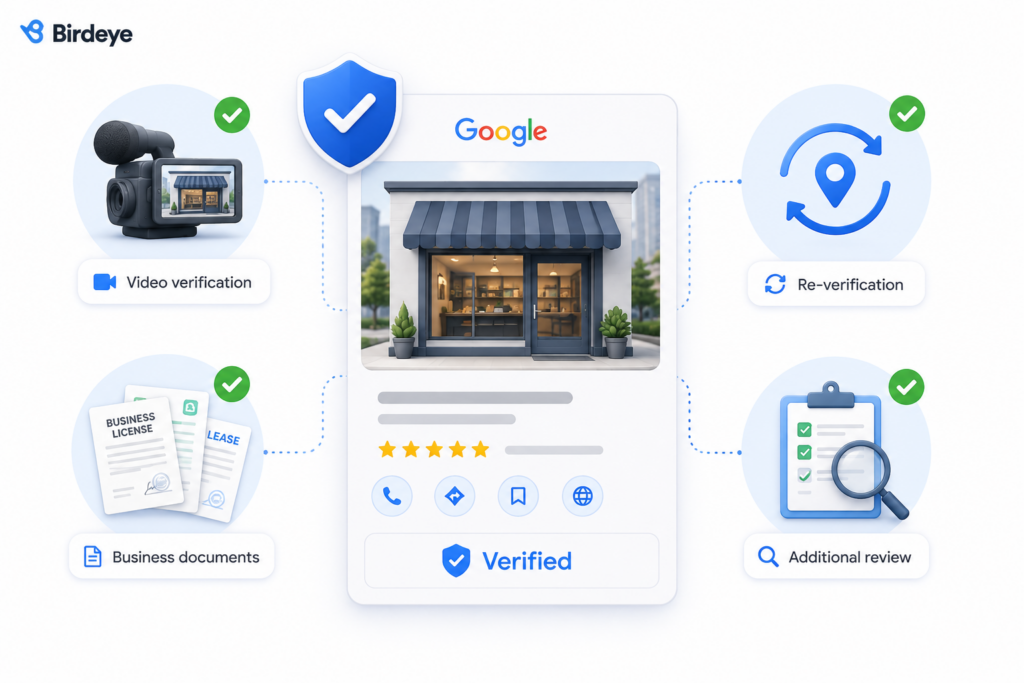
Businesses may now encounter multiple verification methods depending on their industry, location, business model, and risk profile. In some cases, Google may also require businesses to complete additional verification steps long after a profile has already been approved.
Understanding these requirements can help businesses avoid delays, prevent suspensions, and maintain uninterrupted visibility in local search results.
| Verification requirement | What Google may request |
| Video verification | A continuous, unedited video (typically 30+ seconds) showing permanent signage, the storefront, interior, business equipment or inventory, and employee-only areas or proof of business operations. |
| Business documents | Business licenses, utility bills, lease agreements, tax documents, professional certifications, or incorporation records. |
| Re-verification | May be triggered by changes to the business name, address, categories, ownership, or other core profile details. |
| Additional review | Google may request further evidence if profile information conflicts with other online sources. |
What happens if verification fails?
Failed verification doesn’t always result in profile removal, but it can delay profile approval, limit functionality, trigger re-verification requests, or temporarily reduce visibility in Google Search and Google Maps.
To avoid verification issues, ensure your business name, address, phone number, website, and supporting documents are accurate and consistent across all online properties.
Once verified, businesses must continue following Google’s profile guidelines. One of the most closely monitored areas is the business name, where violations such as keyword stuffing can lead to ranking losses, profile edits, or suspension.
How do we avoid GBP suspensions when bulk editing locations?
To reduce the risk of GBP suspensions when bulk editing locations, make sure every change accurately reflects the real-world business before uploading it. Review business names, addresses, categories, phone numbers, and other core details for consistency, and avoid making unsupported changes simply to improve search visibility.
For multi-location brands, it is especially important to validate bulk-upload data before publishing changes across the network. Significant edits to fields such as the business name, address, or category may also trigger additional verification.
What are Google Business Profile name guidelines?
Your business name should reflect your real-world business name. Adding keywords, locations, or promotional language that aren’t part of your actual business name may violate Google’s guidelines and result in profile edits, re-verification requests, or suspension.
What can and can’t be included in your business name?
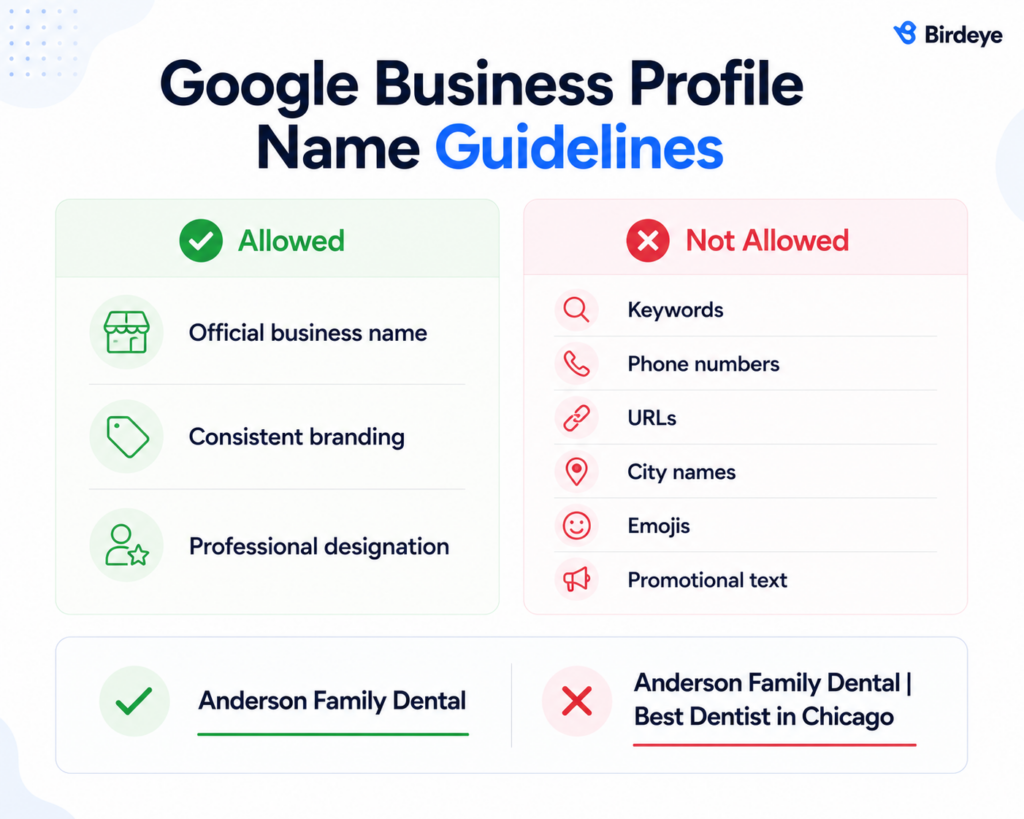
Google expects your profile name to match what customers see on your storefront, website, business licenses, and other customer-facing materials.
What are examples of compliant and non-compliant business names?
The easiest way to evaluate a business name is to ask a simple question:
| Compliant | Non-compliant |
| Green Valley Veterinary Clinic | Green Valley Veterinary Clinic Best Vet in Austin |
| Elite Fitness | Elite Fitness 24/7 Gym Houston |
| Riverstone Law Group | Riverstone Law Group Personal Injury Attorneys |
| Coastal Roofing | Coastal Roofing Free Estimates Available |
What happens if you violate Google’s business name guidelines?
Google actively reviews profile names using both automated systems and user-generated reports. When violations are detected, businesses may experience:
- Profile edits made by Google
- Re-verification requests
- Reduced visibility in local search results
- Temporary suspensions
- Complete profile suspensions for repeated violations
Keyword stuffing is particularly risky because it creates a poor user experience and undermines trust in local search results.
For multi-location brands, naming consistency is especially important. If different locations use different naming conventions, customers may become confused, and Google’s systems may struggle to associate those profiles with the same brand.
Once your business name complies with Google’s requirements, the next priority is ensuring your address and service area are represented correctly. Address-related violations remain one of the leading causes of profile suspensions, particularly for service-area and multi-location brands.
What are Google’s rules for business addresses and service areas?
Accurate location information is essential for Google Business Profile compliance. Inaccurate, misleading, or unverifiable addresses are among the most common causes of profile suspensions and verification issues.
The correct setup depends on how your business serves customers.
| Business type | Address rules | Service area rules |
| Storefront business | Display your full business address publicly. The location must be staffed during the listed business hours. | Not required. |
| Service-area business (SAB) | Hide your street address unless customers are regularly served at that location. | Define the areas where you actively provide services. |
| Hybrid business | Display your business address publicly. | You can also define service areas where you provide services. |
How many service areas can you add?
Google allows businesses to add up to 20 service areas. These areas should reflect where you actually operate, not locations chosen solely to expand visibility.
While Google doesn’t specify a mileage limit, as a best practice, many local SEO professionals recommend limiting service areas to locations that can realistically be served within a two-hour drive.
Can you use a P.O. box as your business address?
No. Google does not allow P.O. boxes because they do not represent a physical location where customers can interact with a business. Service-area businesses should hide their address rather than use a mailing address as a substitute.
Can you use a virtual office or co-working space?
Usually not. A virtual office, mailbox, or rented workspace does not automatically qualify as a business location. To be eligible, the business must maintain a genuine operational presence and be able to serve customers during stated business hours.
What happens if your address violates Google’s guidelines?
Address-related violations may trigger:
- Re-verification requests
- Profile edits
- Reduced visibility
- Temporary suspensions
- Profile removal in severe cases
Because location data is one of Google’s primary trust signals, businesses should ensure their address and service-area information accurately reflects where they operate.
Next, let’s look at Google’s guidelines for phone numbers, website URLs, and NAP consistency.
What phone number and website should you use on your Google Business Profile?
Google recommends using contact information that accurately represents the location associated with the profile.
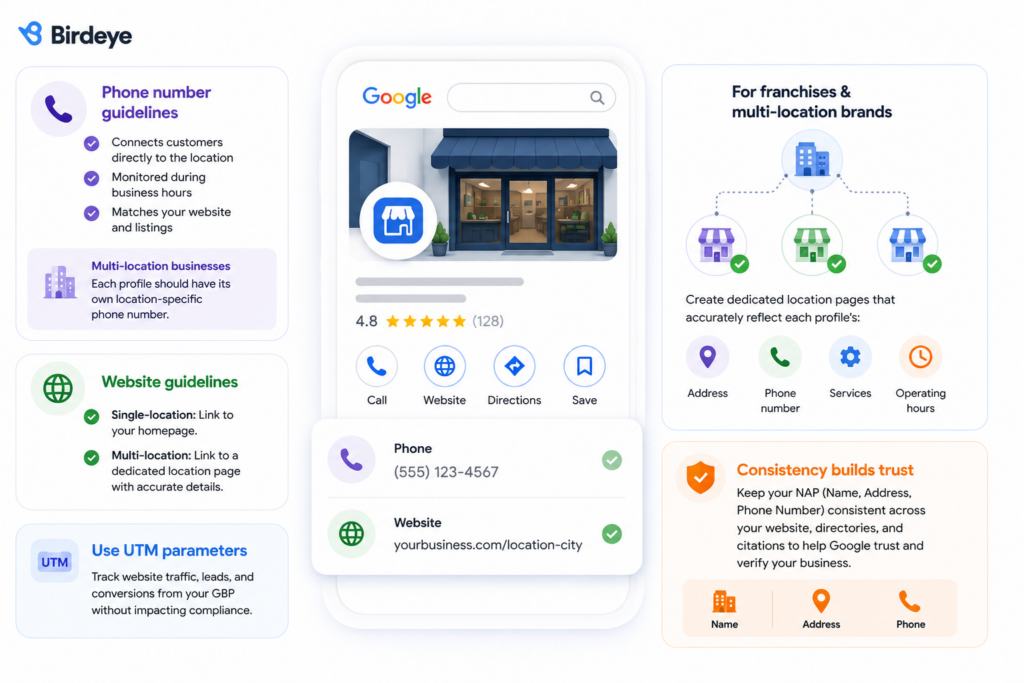
Phone number guidelines
Use a phone number that:
- Connects customers directly to the business location
- Is monitored during business hours
- Matches information displayed across your website and business listings
For multi-location businesses, each profile should ideally have its own location-specific phone number.
Website guidelines
Use the most relevant URL for the location:
- Single-location businesses can link to their homepage.
- Multi-location businesses should link to a dedicated location page with accurate contact details, hours, and services.
Should you use UTM parameters?
Yes. UTM parameters can help track website traffic, leads, and conversions generated from your Google Business Profile without affecting compliance.
What should franchises and multi-location brands consider?
Large brands often face challenges maintaining consistency across hundreds of profiles.
A common mistake is sending every profile to the same generic website page, regardless of location. Instead, businesses should create dedicated location pages that accurately reflect each profile’s:
- Address
- Phone number
- Services
- Operating hours
NAP (Name, Address, Phone Number) helps Google verify that your business information is accurate. Your business details should remain consistent across your website, directories, and local citations for Google to determine whether it can trust you. These three pieces of information form the foundation of your business identity online. Read more about it in our detailed guide about NAP for local SEO.
How should you choose business categories and attributes?
Business categories and attributes help Google understand what your business does and when it should appear in local search results.
While your business name, address, and verification establish legitimacy, categories and attributes establish relevance. They tell Google which searches your profile should be associated with and what information customers should see when comparing local businesses.
Choosing the wrong categories can limit visibility, while misleading categories and attributes may create compliance issues or confuse potential customers.
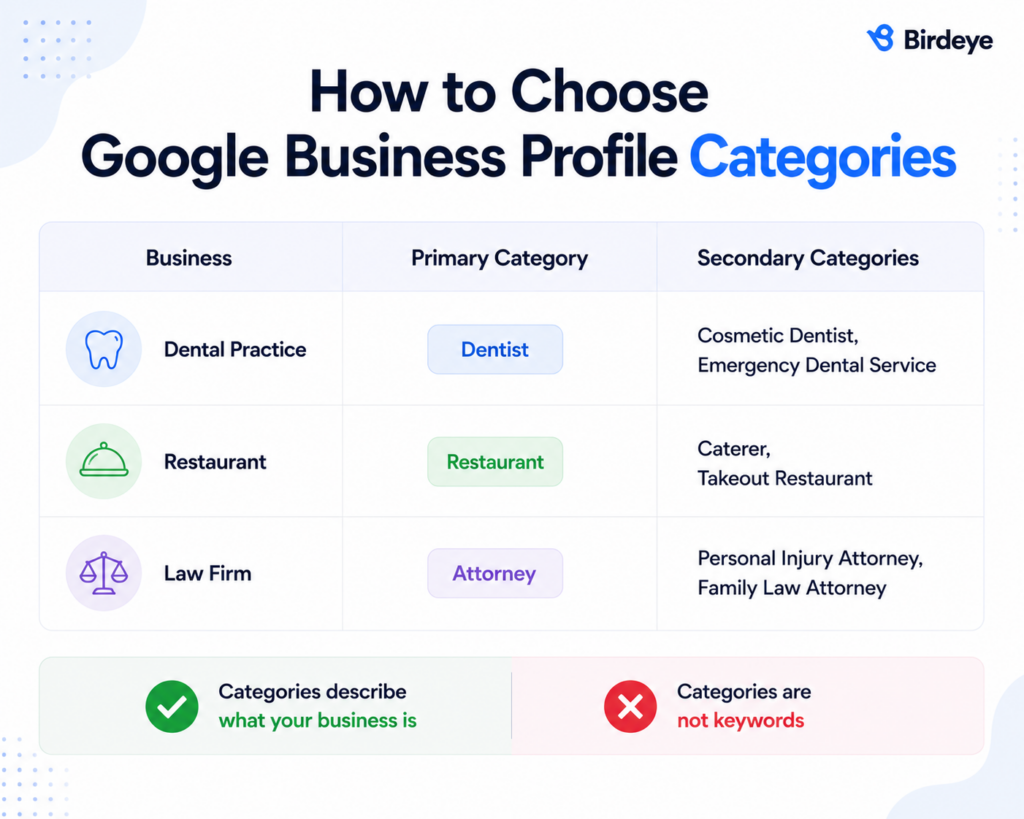
How do you choose the right primary category?
Your primary category is one of the most important ranking signals within a Google Business Profile. The primary category should represent the business’s main offering rather than a secondary service.
For instance, a dental practice that also offers cosmetic procedures should typically select Dentist as its primary category rather than Cosmetic Dentist unless cosmetic services are its primary focus.
When should you use secondary categories?
Secondary categories help provide additional context about your services. They should be added only when they accurately represent the services customers can receive from the business.
Adding unrelated categories solely to appear in more searches can hurt profile quality and confuse customers.
What category mistakes should businesses avoid?
Businesses should avoid:
- Choosing categories unrelated to their services
- Adding excessive secondary categories
- Using categories solely to target competitors’ keywords
- Frequently changing categories without a legitimate business reason
Google expects categories to reflect reality. If a customer visits your profile expecting one service but finds something entirely different, the profile may generate poor engagement signals and lose visibility over time.
How should businesses use attributes?
Google Business Profile attributes provide additional information and help businesses stand out in relevant searches. Depending on your category, Google may offer attributes such as:
- Women-owned
- Wheelchair accessible
- Online appointments
- Outdoor seating
- Free Wi-Fi
- LGBTQ+ friendly
- Veteran-owned
- Curbside pickup
However, businesses should only select attributes that accurately represent their operations. Misleading attributes may frustrate customers and undermine trust.
What are Google Business Profile business description guidelines?
Your business description gives customers a quick overview of who you are, what you offer, and why your business is relevant to them.
While it doesn’t carry the same ranking weight as categories, reviews, or proximity, it helps customers understand your business before they visit, call, or book.
Google allows businesses to customize their descriptions, but there are strict guidelines around what can and cannot be included.
Business descriptions
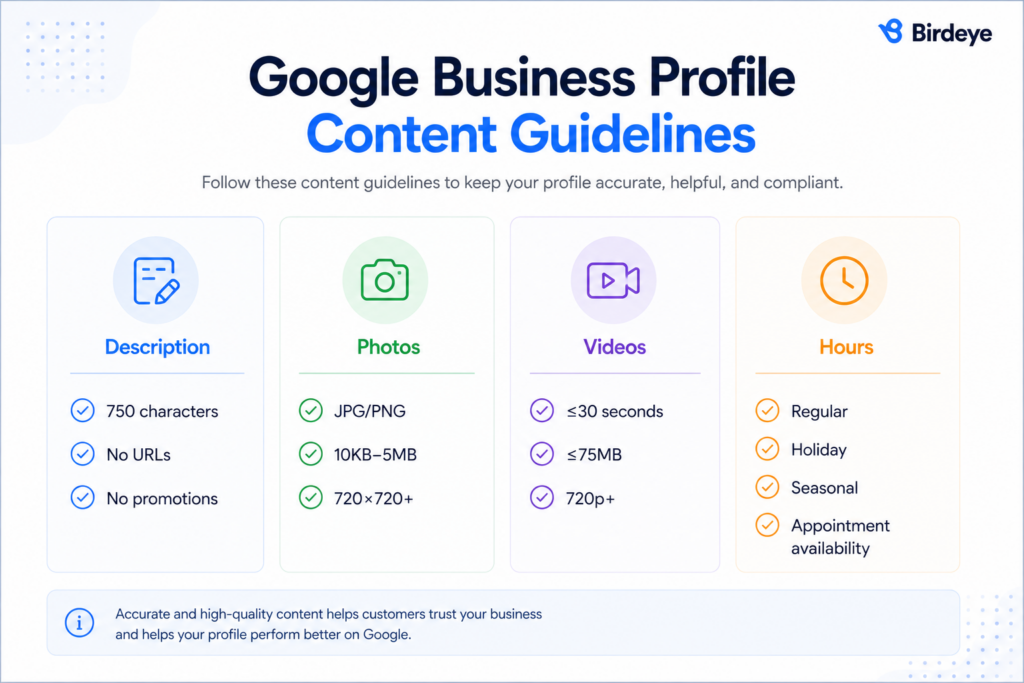
Google allows up to 750 characters in a business description. Use the space to explain:
- What your business does
- Products or services offered
- Areas of expertise
- Service areas or customer focus
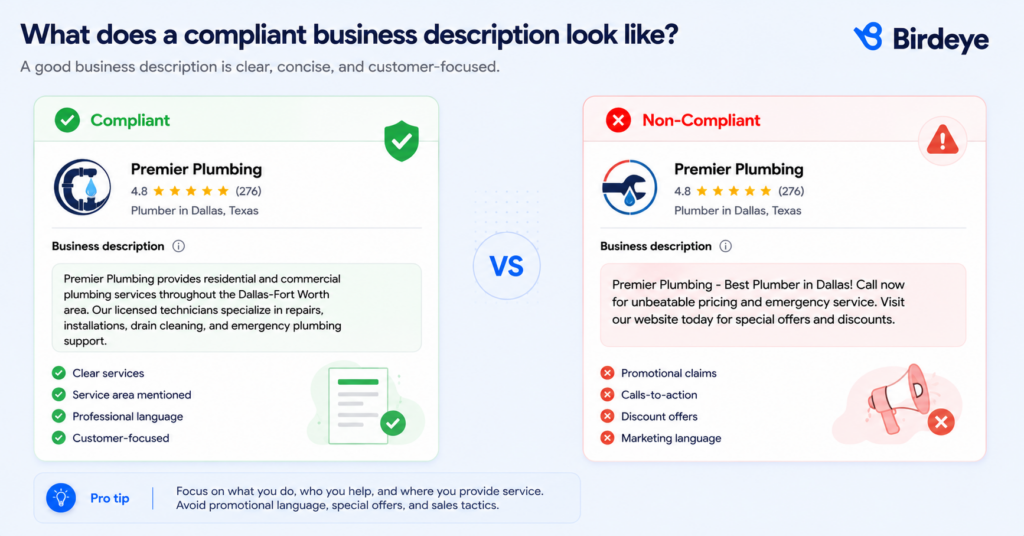
"Anderson Family Dental provides preventive, restorative, and cosmetic dental care for patients across Austin. Our team offers personalized treatment plans, advanced technology, and comprehensive oral health services for patients of all ages."
This description clearly explains what the business does without relying on promotional language.
Avoid:
- Phone numbers
- URLs
- Promotional offers
- Excessive keywords
- Misleading claims
- Special characters or emojis
The goal is to inform customers, not advertise to them.
Photos and videos
Google recommends using original photos and videos that accurately represent your business.
| Content type | Requirements |
| Photos | JPG or PNG, 10 KB–5 MB, minimum resolution of 720 × 720 pixels |
| Videos | Up to 30 seconds, 75 MB maximum, 720p or higher |
Avoid:
- Blurry or low-quality images
- Stock photos that misrepresent the business
- Excessive promotional overlays
- Copyrighted content
- Misleading AI-generated imagery
Business hours
Keep business hours accurate and up to date, including:
- Regular operating hours
- Holiday hours
- Seasonal hours
- Appointment availability
- Additional service hours (delivery, pickup, drive-through, etc.)
Google expects all profile content to accurately reflect the real-world customer experience. Misleading descriptions, visuals, or business information may trigger content removal, profile edits, or additional review.
Can businesses use AI-generated images?
If an image creates a misleading representation of the business, its location, products, or services, it can undermine customer trust and raise compliance concerns.
Visual content should accurately represent the real-world business experience. Customers should not arrive at a location expecting something substantially different from what was presented in the profile.
How should businesses manage business hours on Google?
Accurate business hours help customers know when they can visit, call, book appointments, or access services. Incorrect hours can lead to poor customer experiences, negative reviews, and lost business opportunities.
Google allows businesses to manage several types of hours:
| Hour type | When to use it |
| Regular hours | Your standard operating schedule. |
| Holiday hours | National holidays, company closures, or reduced schedules. |
| Seasonal hours | Businesses that operate on different schedules throughout the year. |
| More hours | Additional service hours, such as delivery, pickup, drive-through, or customer support. |
| Appointment hours | Businesses that serve customers by appointment only. |
Keep all hours up to date to accurately reflect business operations. Customers should never arrive at a location or attempt to contact a business only to find that the listed hours are incorrect.
What are Google Posts guidelines in 2026?
Google Posts allow businesses to share updates and schedule posts directly on their Google Business Profile. When used strategically, Google Posts can keep profiles active, improve customer engagement, and provide timely information that supports the customer journey. However, like every other element of a Google Business Profile, posts must comply with Google’s content policies.
What should businesses publish on Google Posts?
Useful, relevant content such as:
- New products or services
- Company announcements
- Events and promotions
- Seasonal updates
- Community involvement
- Educational content
- Limited-time offers
- Holiday schedules
What content does Google restrict?
Google prohibits content that violates its general content policies or creates a misleading user experience, such as:
- False or misleading claims
- Offensive content
- Spam
- Duplicate content
- Misrepresentation of products or services
- Content that violates intellectual property rights
- Excessively promotional or deceptive messaging
What are the best practices for Google Post images and content?
- Use clear, high-quality images
- Ensure visuals accurately represent the business
- Keep messaging concise and informative
- Include a clear call to action when appropriate
- Avoid excessive text overlays on images
- Use content that is relevant to the location and audience
What review practices violate Google Business Profile guidelines?
Reviews help customers evaluate businesses and are one of the most influential elements of a Google Business Profile. To maintain trust in local search results, Google prohibits businesses from manipulating reviews or misrepresenting customer sentiment. In April 2026, Google expanded its review policies by explicitly prohibiting review quotas for employees and requests that ask customers to mention specific staff members in reviews.
According to Birdeye’s State of Online Reviews 2026, 75.5% of customer reviews now receive a response, making review management a standard expectation rather than a competitive advantage.
What review practices does Google allow?
Businesses can:
- Ask customers for honest reviews
- Send review requests after a purchase or service interaction
- Respond professionally to customer feedback
- Monitor reviews for policy violations
- Report reviews that violate Google’s content policies
- Use neutral review requests that do not encourage customers to mention specific employees or provide only positive feedback
The key requirement is authenticity. Customers should be free to share genuine positive or negative experiences.
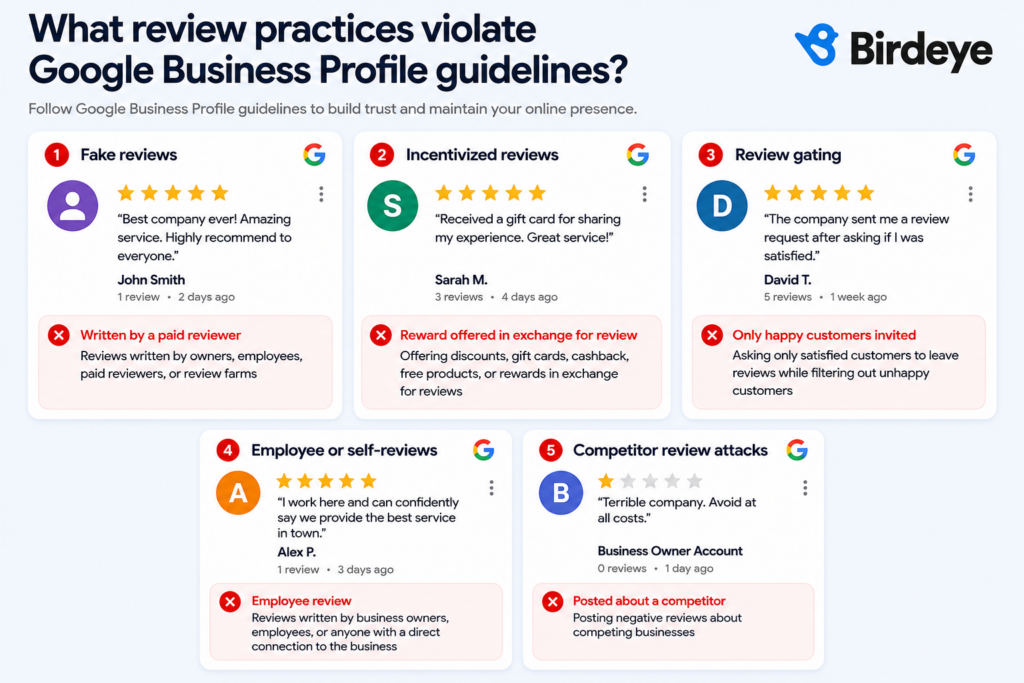
What review practices violate Google’s guidelines?
| Violation | Examples |
| Fake reviews | Reviews written by owners, employees, paid reviewers, or review farms |
| Incentivized reviews | Offering discounts, gift cards, cashback, free products, or rewards in exchange for reviews |
| Employee or self-reviews | Reviews written by business owners, employees, or anyone with a direct connection to the business |
| Competitor review attacks | Posting negative reviews about competing businesses |
| Review gating | Asking only satisfied customers to leave reviews while filtering out unhappy customers |
| Employee review quotas | Requiring employees, branches, or franchise locations to collect a minimum number of Google reviews as part of performance targets or incentives |
| Requesting staff-specific reviews | Asking customers to mention a specific employee, advisor, loan officer, or branch representative by name in their Google review |
Repeated violations, including the newer restrictions on employee review quotas and staff-specific review requests, can result in review removals, profile restrictions, or additional enforcement actions.
Is review gating against Google’s review policy?
Yes. Review gating is against Google’s review policy. Google prohibits businesses from discouraging negative reviews or selectively asking only satisfied customers to leave positive reviews. Review requests should give all customers an equal opportunity to share genuine feedback, regardless of whether their experience was positive or negative.
Can businesses remove negative reviews?
No. Businesses cannot remove legitimate negative reviews simply because they disagree with them.
2026 update: Google now expects review requests to remain neutral. Businesses should encourage honest feedback without directing customers toward specific ratings, asking them to mention individual employees, or setting review collection targets for staff. These practices may be treated as attempts to influence review authenticity.
However, reviews that violate Google’s policies can be reported. This includes content that contains:
- Spam
- Harassment
- Hate speech
- Impersonation
- Irrelevant content
- Fraudulent information
Why is responding to reviews important?
Responding to reviews shows customers that a business values feedback and takes concerns seriously. Thoughtful responses can build trust, strengthen customer relationships, and demonstrate accountability.
Google’s review policies are designed to encourage authentic customer feedback. Businesses should focus on collecting genuine reviews and responding professionally rather than attempting to influence ratings.
How does Ask Maps answer questions about your business?
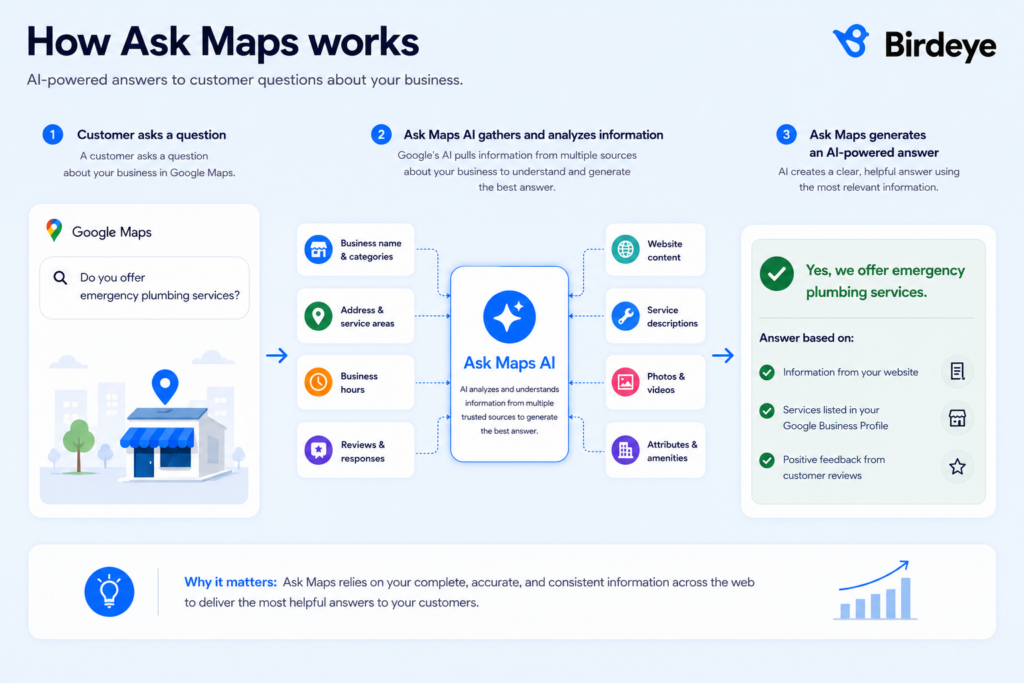
Google is replacing traditional Q&A experiences with AI-powered answers through Ask Maps. Instead of relying on manually answered questions, Google’s AI generates responses using information from your broader online presence.
When a customer asks a question, Google’s AI generates an answer using information from multiple sources associated with the business. This means businesses can no longer rely on manually answering individual questions to shape customer understanding. Instead, every piece of information published online contributes to the answers customers receive.
What information does Ask Maps use?
Ask Maps pulls information from a business’s broader digital footprint, like:
- Business name and categories
- Address and service areas
- Business hours
- Reviews and review responses
- Website content
- Service descriptions
- Photos and videos
- Attributes and amenities
How can businesses improve the answers generated by Ask Maps?
The best way to influence AI-generated responses is to maintain accurate and complete business information across every customer touchpoint.
Businesses should regularly:
- Update profile details
- Maintain accurate hours
- Add products and services
- Upload original photos
- Collect authentic reviews
- Keep website content current
Because Ask Maps relies on multiple data sources, incomplete or conflicting information can affect the accuracy of AI-generated responses.
As Google continues integrating AI into local search, businesses with complete, accurate, and trustworthy information will be better positioned to appear in AI-powered recommendations and answers.
What are the most common Google Business Profile mistakes?
Most Google Business Profile suspensions aren’t caused by intentional violations. They happen when businesses publish inaccurate information, use ineligible locations, or overlook Google’s guidelines.
The good news is that many of the most common mistakes are preventable. The table below highlights some of the most common violations businesses encounter and their potential impact.
| Mistake | Risk level | Potential outcome |
| Keyword stuffing in the business name | High | Ranking loss, suspension |
| Using a virtual office as a business address | High | Verification failure, suspension |
| Creating duplicate profiles | High | Profile removal, ranking issues |
| Publishing inaccurate business hours | Medium | Customer complaints, trust issues |
| Using incorrect categories | Medium | Reduced visibility |
| Displaying outdated contact information | Medium | Verification challenges |
| Posting misleading content | Medium | Content removal |
| Using stock images that misrepresent the business | Medium | Content moderation actions |
| Buying or incentivizing reviews | High | Review removal, policy violations |
| Ignoring profile verification requests | High | Profile restrictions or suspension |
What triggers a Google Business Profile suspension?
A Google Business Profile suspension can be triggered when a profile violates Google’s guidelines or contains information that Google cannot verify as accurate or eligible. Common causes include keyword stuffing in the business name, using an ineligible or virtual address, creating duplicate profiles, misrepresenting business information, and failing to meet verification requirements.
For multi-location brands, inconsistent business information or repeated policy violations across profiles can also increase compliance risk.
Why is keyword stuffing still one of the biggest problems?
Many businesses still attempt to improve rankings by adding keywords, locations, or promotional phrases to their business name.
Examples include:
- “Best Dentist in Chicago”
- “24/7 Emergency Plumber Dallas”
- “Top-Rated Roofing Company”
Google’s guidelines require businesses to use their actual business name rather than optimized versions created for search visibility. Keyword stuffing remains one of the most frequently reported and enforced violations within Google Business Profiles.
The best way to avoid these issues is to regularly audit your business information, categories, hours, reviews, website links, and verification status.
What happens if you violate Google Business Profile guidelines?
When businesses violate those guidelines, Google may take action to protect the quality of local search results.
Not every violation results in an immediate suspension. In many cases, Google may first limit visibility, require additional verification, or remove specific content. However, repeated violations or serious policy breaches can lead to more significant consequences.
Understanding how enforcement works can help businesses identify issues early and avoid unnecessary disruptions.
| Violation impact | What it means |
| Ranking reduction | Your profile appears less frequently in Google Search and Maps. |
| Profile edits | Google may automatically update or remove inaccurate information. |
| Re-verification | Businesses may be required to verify ownership again. |
| Content removal | Google may remove posts, photos, reviews, or other content that violates its policies. |
| Suspension | The profile is restricted or removed from public view until issues are resolved. |
How are Google Business Profile guidelines changing in 2026?
Google’s guidelines continue to evolve as the company invests more heavily in AI-powered search and fraud prevention.
Three trends are shaping Google Business Profiles in 2026:
| Trend | What it means for businesses |
| Stricter verification | Businesses should expect increased scrutiny around locations, ownership, and profile changes. |
| AI-powered moderation | Google’s systems are becoming better at detecting duplicate listings, fake reviews, misleading content, and inaccurate business information. |
| AI-generated answers | Experiences such as Ask Maps rely on profile information, reviews, website content, and business attributes to answer customer questions. |
What does the future of local search look like?
The future of local search is increasingly centered around trust. Google wants to connect users with businesses that provide accurate information, maintain active profiles, and deliver positive customer experiences.
That means successful businesses will focus less on finding shortcuts and more on maintaining:
- Accurate business information
- Consistent branding
- Authentic customer feedback
- High-quality content
- Strong location data
- Reliable customer experiences
FAQs about Google Business Profile guidelines
To qualify for a Google Business Profile, a business must interact with customers in person, either at a physical location or within a defined service area. Businesses must also comply with Google’s eligibility, verification, and representation guidelines.
Some of the most common mistakes include keyword stuffing business names, using virtual offices, creating duplicate listings, selecting incorrect categories, publishing inaccurate business information, and violating review policies.
No. Google does not allow P.O. boxes because they do not represent a physical location where customers can interact with a business. Service-area businesses should hide their address rather than use a mailing address as a substitute.
Depending on the severity of the violation, Google may reduce a profile’s visibility, require re-verification, remove specific content, suspend the profile, or remove it from search results altogether.
Google may verify businesses using methods such as video verification, business documentation, phone verification, email verification, or other verification processes, depending on the business type and risk profile.
Verification requirements vary, but businesses may be asked to provide evidence such as business licenses, utility bills, lease agreements, tax documents, storefront signage, or video proof showing business operations and location details.
Birdeye helps you stay compliant with Google Business Profile guidelines
For enterprise brands, Google Business Profile compliance doesn’t end after verification. Maintaining accurate listings, managing reviews, monitoring visibility, and responding to customer interactions across hundreds or thousands of locations requires continuous execution.
Birdeye builds AI agents for multi-location brands to maintain trust, consistency, and control at scale that work across every location:
Review Generation Agent to request reviews at the right moment and on the right platform.
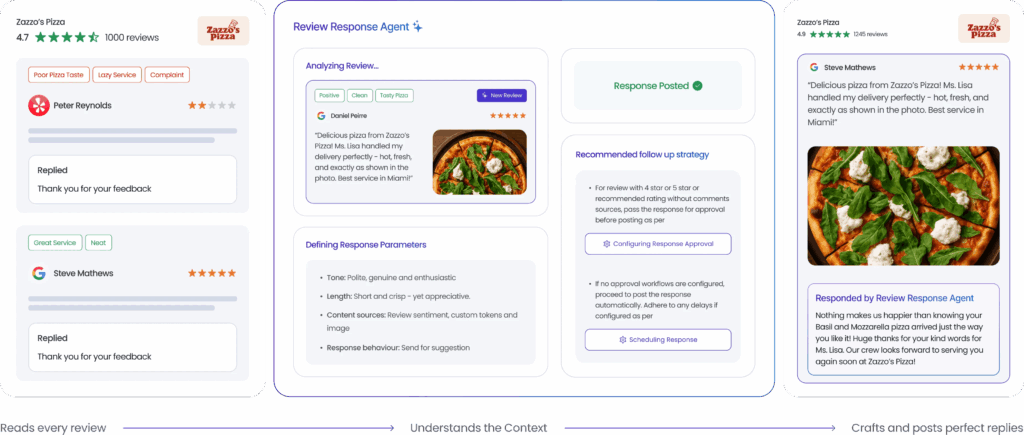
Review Response Agent to draft and publish on-brand review responses.
Reporting Agent to explain performance trends and surface actionable insights.
Listings Optimization Agent to keep business information accurate across Google and other directories.
Social Publishing Agent to create and schedule localized social content.
Social Engagement Agent to prioritize and respond to comments and messages.
Lead Generation Agent to capture, qualify, and route leads 24/7.

As Google's guidelines continue to evolve, Birdeye helps businesses with 100–10,000+ locations stay compliant, visible, and trusted across every location.
About the Author

Shruti Dugar
Birdeye
Originally published