Google local pack is the block of three local business listings that appears at the top of Google’s search results when a user searches for a nearby product or service. It pulls data from Google Business Profile and displays business names, ratings, hours, and a map, all before any organic results.
Summary
For any business competing on local search, the local pack Google surfaces is prime real estate. Appearing in the Google 3-pack can mean the difference between your phone ringing and a competitor's. According to the Birdeye State of Google Business Profiles 2026, 86% of GBP impressions come from category-based "near me" searches rather than branded ones. It means that most customers who find you on Google didn't already know your name. The same report confirms that, despite a significant drop in overall search impressions, customer actions fell by only about 5%, indicating a smaller but far more intent-rich audience appearing in the local map pack.
This blog covers everything you need to know about the local map pack: how it works, what determines Google local pack ranking, how to get your business into the 3-pack, and how to diagnose and fix common visibility problems.
Table of contents
- What is Google local pack?
- What the local pack looks like
- A brief history of the Google local pack
- How does the Google local pack work?
- How the Google local pack differs from organic results, Google Maps, and the Local Finder
- What are the Google local pack ranking factors?
- How to rank in the Google local pack
- What are the common local pack ranking problems and fixes?
- How to track your local pack performance
- How can multi-location brands improve Google local pack visibility?
- How Birdeye helps multi-location brands improve local pack visibility
- How Birdeye AI agents support local pack performance
- FAQs about Google local pack
- Winning Google local pack visibility requires continuous optimization
What is Google local pack?
The Google local pack, also known as the Local 3-Pack, Map Pack, or Snack Pack, is the group of three local business listings that Google displays at the top of the SERP when it detects local intent in a search query. Each listing in the local 3-pack shows a business name, star rating, review count, address, hours, and a link to the Google Business Profile, all anchored to an interactive map.
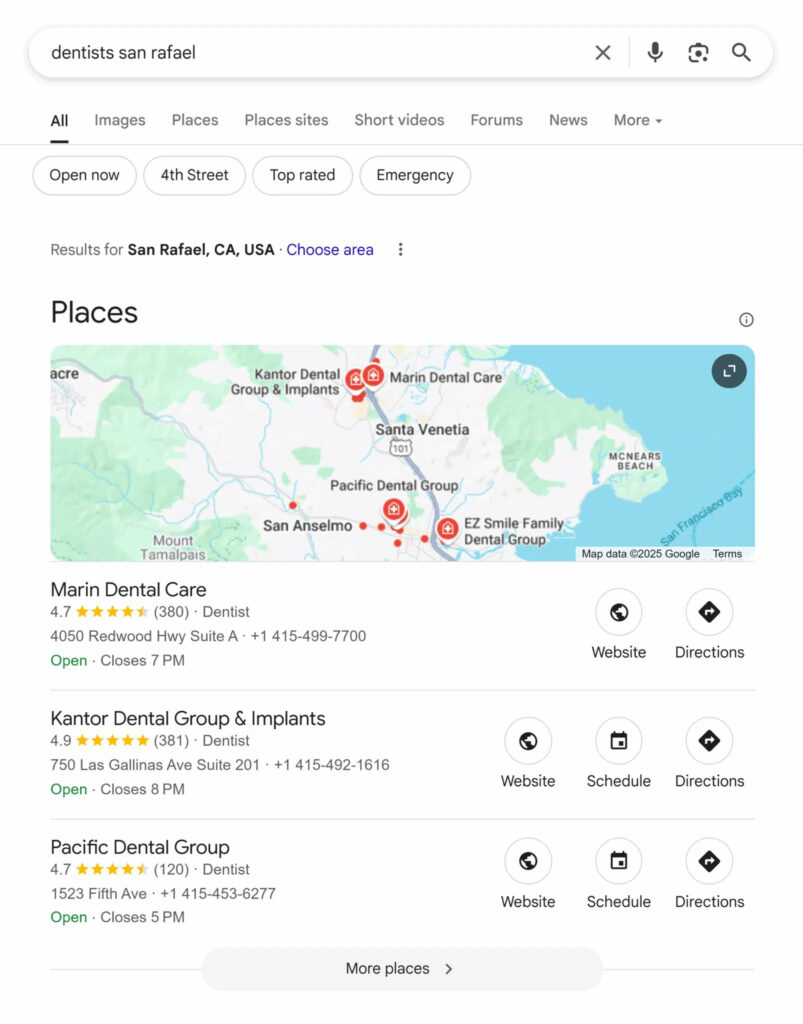
It sits above organic results and below any paid ads, making it one of the most visible positions on the page. The local pack Google generates is powered entirely by Google Business Profile (GBP) data, formerly known as Google My Business (GMB). If your GBP is incomplete, unverified, or inconsistent, your chances of appearing in this space drop significantly.
Did you know?: The local pack listings shown on the main SERP display only three results. Clicking "More places" expands into the Local Finder, a longer list of results within the same map interface. The local pack and the Local Finder are related but not the same thing, and ranking in one does not guarantee visibility in the other.
What the local pack looks like
The Google local pack does not always look the same. Depending on the search query, the SERP local pack can appear in several formats, and knowing the differences matters for both understanding your visibility and benchmarking against competitors.
Places vs Businesses Pack Labels
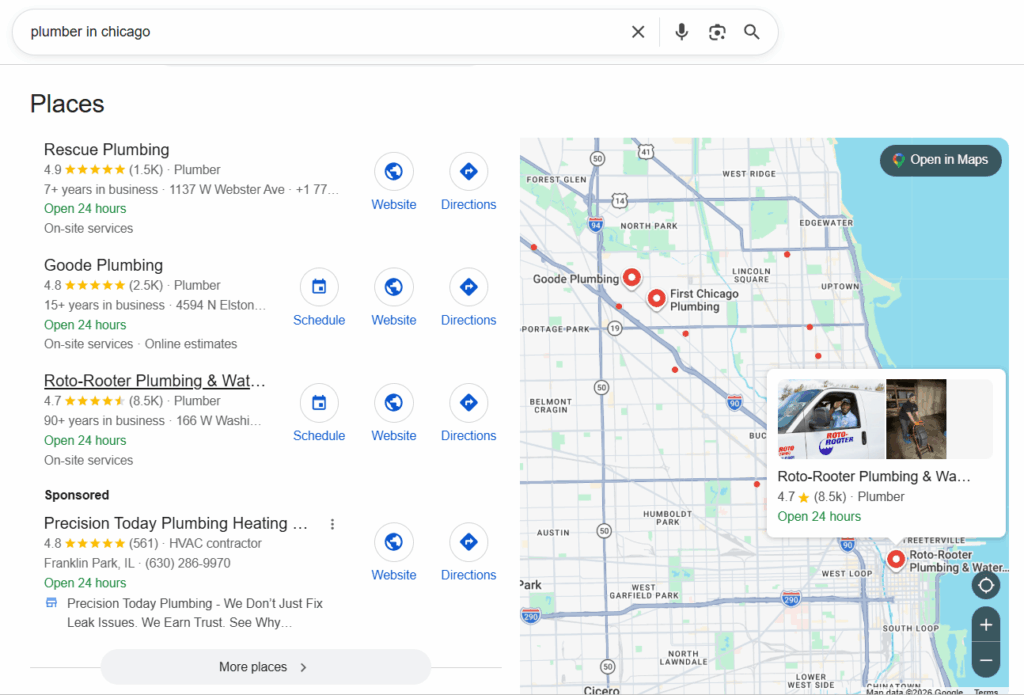
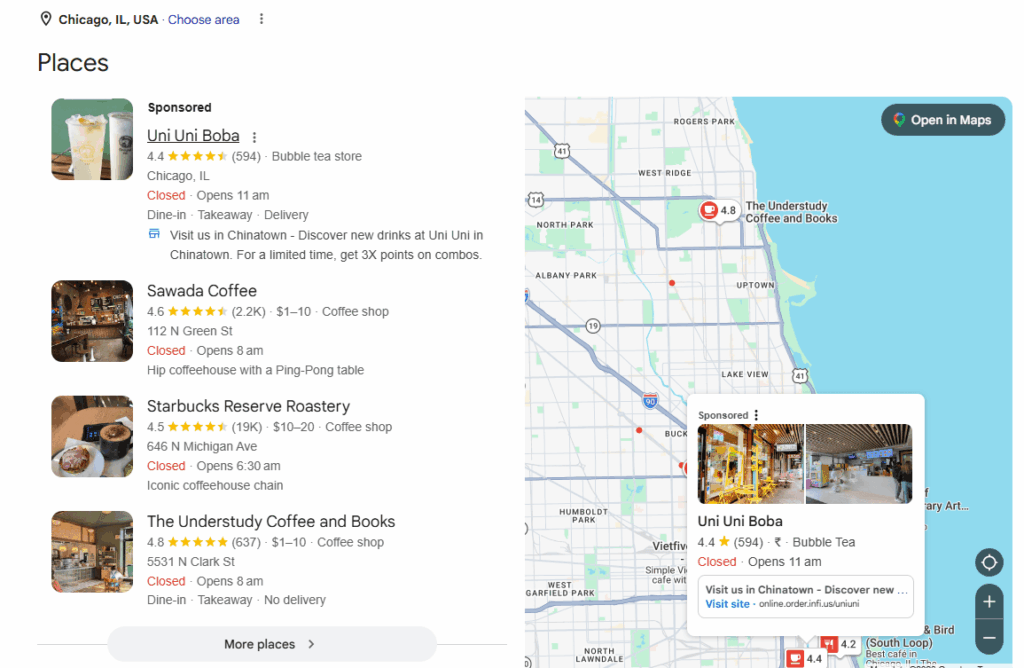
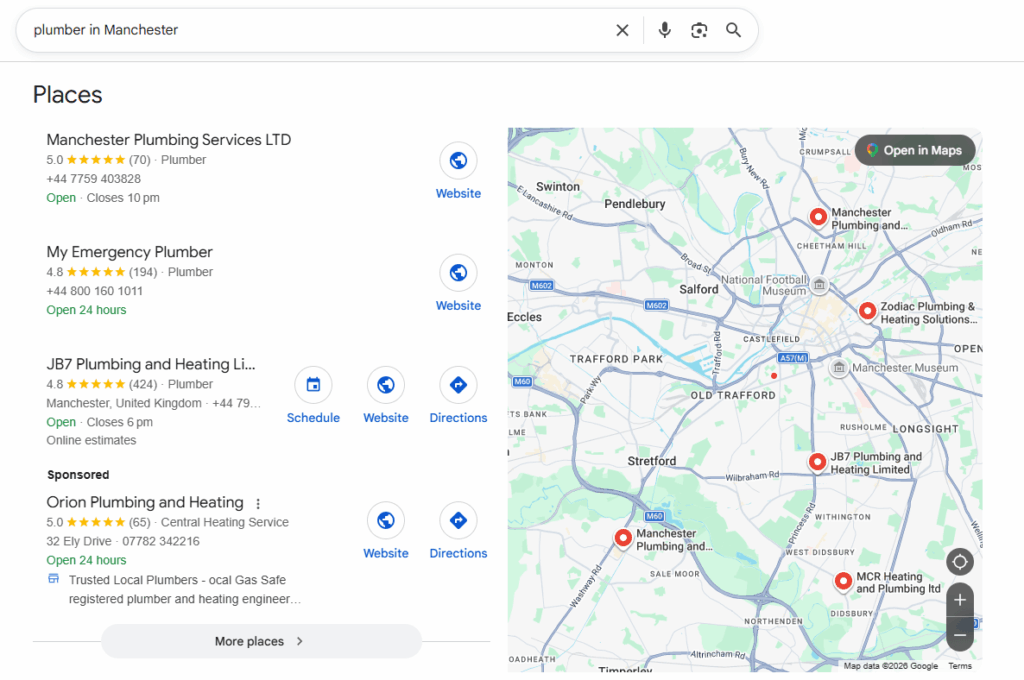
Google labels the local map pack differently based on the nature of the query. Searches for a specific type of location, such as “coffee shops near me,” tend to trigger a “Places” label at the top of the pack. Searches for a service or business type, such as “plumber in Manchester,” typically display a “Businesses” label. The underlying ranking logic is the same, but the label signals how Google has interpreted the search intent.
Below we have the screenshot showing the Places pack “Coffee shops near me.”
And here is the Businesses pack screenshot for the search “Plumber in Manchester.”
ter
Local justifications
Within local pack listings, Google sometimes surfaces a short snippet of text below the business details. These are called local justifications and are drawn from your GBP posts, website content, or reviews. They appear when Google determines that the content is relevant to the user’s search. A few common types include:
- Review justifications: A phrase from a customer review that matches the query
- Website justifications: A snippet pulled from your website that contains the search term
- Post justifications: Content from a recent GBP post that aligns with the search
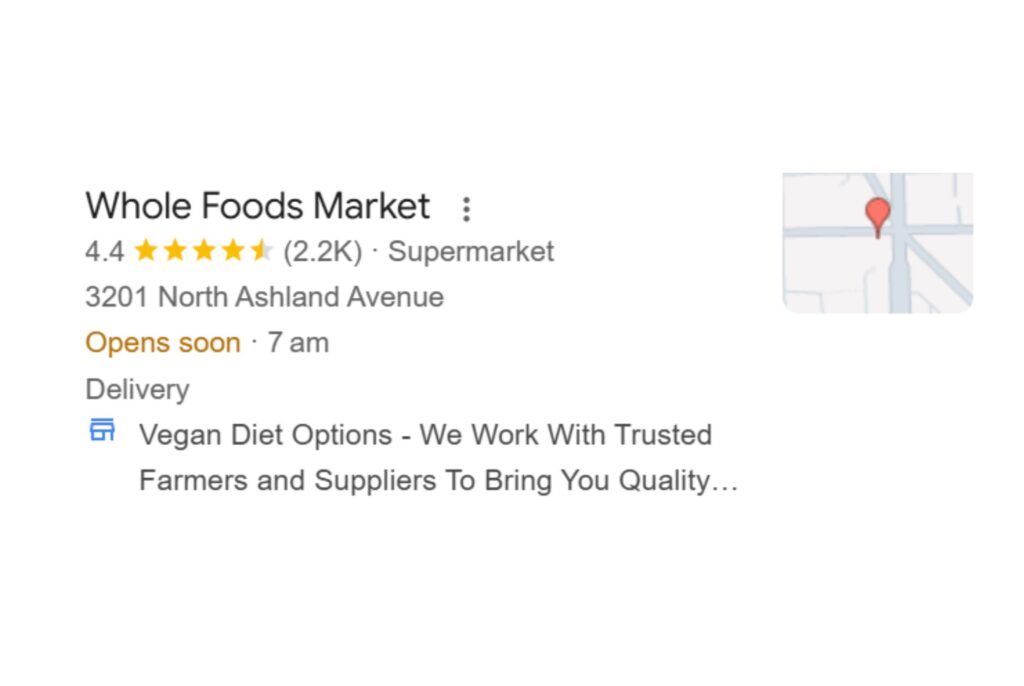
These justifications are not something you can manually add, but you can influence them by keeping your GBP posts, website copy, and review responses keyword-relevant and up to date.
LSA “Google Verified” pack vs the True local pack
It is easy to get confused with Local Services Ads (LSA) and the Google local pack, but they are two entirely separate features. The LSA unit, sometimes called the “Google Verified” pack, appears above the standard local 3-pack and is a paid placement. Businesses that qualify are screened by Google and receive a “Google Screened” or “Google Guaranteed” badge. The true local map pack, by contrast, is not a paid placement. It is earned through local SEO, GBP optimization, and proximity signals, not ad spend.
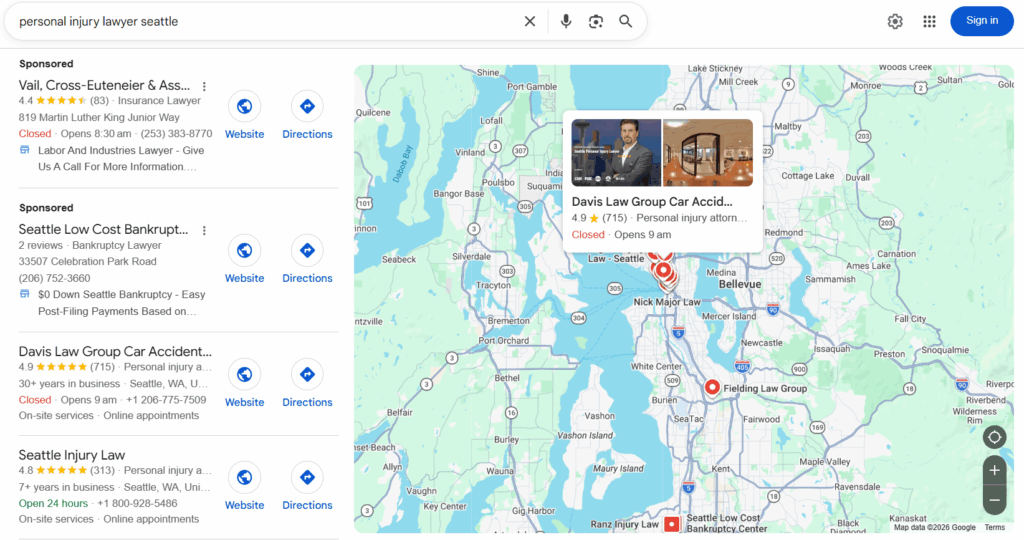
Key differences at a glance:
- LSA listings are paid; local pack listings are organic
- LSA shows a “Google Guaranteed” or “Google Screened” badge; the local pack does not
- LSA is category-limited; the local map pack covers a much broader range of businesses
- Appearing in LSA does not influence or guarantee a position in the local 3-pack
A brief history of the Google local pack
The local pack Google displays today looks nothing like what it was a decade ago. Understanding how the serp local pack has evolved helps explain why certain ranking signals carry more weight now, and why keeping up with Google’s updates directly affects your Google local pack ranking.
From the 7-Pack to the Local 3-Pack
Google’s local results have shifted from showing up to seven nearby businesses (the old “7‑pack”) to a tighter three‑result format known as the local 3‑pack. Today, visibility in these local listings is based on factors like relevance, distance, and prominence, as described in Google’s guidance on improving your local ranking on Google
Key effects of this shift included:
- Businesses previously visible in the lower positions of the 7-pack lost their organic local visibility overnight
- Competition for the three available spots in the Google 3 pack intensified significantly
- The local 3-pack moved to the number one position on the SERP for the vast majority of local queries
- Local map pack optimization became a standalone priority for any business relying on local discovery
Google My Business to Google Business Profile
Google has rebranded its local listing platform multiple times over the years. It launched as Google Places, briefly became Google+ Local, and then settled as Google My Business (GMB) for several years. Later, Google officially renamed the platform to Google Business Profile (GBP) [reflected directly in Google’s own product and Help Center pages ], with the stated goal of keeping things simple. Notable changes that came with this rebrand included:
- Profile management moved directly into Google Search and Google Maps
- The standalone Google My Business app was phased out entirely
- The existing GMB dashboard was renamed Business Profile Manager, primarily serving multi-location brands
- Businesses with single locations could manage their local pack listings directly from search results
The Diversity Update
More recently, local SEO professionals have observed greater diversity in local pack results, with fewer instances of similar businesses appearing together for the same query. While Google does not officially refer to this as a “diversity update,” its local ranking systems are based on relevance, distance, and prominence, as outlined in Google’s local ranking documentation.
Its practical effects on local pack listings include:
- More varied results across the local 3-pack in competitive categories
- Greater opportunity for independent businesses to appear alongside larger chains
- Reduced the ability for any one brand to dominate all three positions in high-density markets
Recent platform changes affecting local pack listings
Google has tightened its GBP management considerably in recent years, with several changes directly impacting local pack listings and broader serp local pack visibility. According to Google’s official tips to improve your local ranking documentation:
- Verification is now a baseline requirement, with faster suspensions for duplicate or non-compliant profiles
- AI Overviews now surface GBP data such as hours, directions, and reviews directly in search, reducing clicks even as intent stays high
- Google has shifted toward AI-generated answers drawn from structured profile data, making complete and accurate local pack listings more important than ever
- Businesses with incomplete profiles risk losing visibility at the exact moments customers are ready to act
How does the Google local pack work?
The Google local pack is not a random selection of nearby businesses. It is a highly filtered, intent-driven result that Google assembles in real time based on what the user is searching for, where they are, and how well local businesses match that moment. Understanding the mechanics behind it is the first step toward improving your local map pack visibility.
How Google detects local intent
Before Google can show the local 3-pack, it must determine that a search has local intent. According to Google’s official Search Console Help documentation, Google identifies local intent in three main ways:
- Explicit “near me” signals: The user includes phrases like “near me,” “nearby,” or “close to me” directly in the query. These are the clearest signals of local intent and almost always trigger the serp local pack.
- City or location modifiers: The user adds a specific location to their search, such as “dentist in Birmingham” or “plumber in Manchester.” The city modifier tells Google exactly which geographic area to pull local pack listings from.
- Implicit local intent: The user searches for something like “coffee shop” or “emergency locksmith” without adding a location. Google infers local intent from the query itself and the user’s device location, and surfaces the local map pack accordingly.
This distinction matters for local map pack optimization because it means your GBP needs to be relevant not just for branded or “near me” searches, but also for the far larger pool of implicit local queries that make up the majority of local search volume.
How the local pack is assembled: Step by step
Once Google detects local intent, it assembles the Google 3 pack through the following process:
Step 1: Crawling and indexing GBP data
Google pulls information directly from verified Google Business Profiles, including business name, category, address, hours, and reviews. Incomplete or unverified profiles are at a significant disadvantage at this stage.
Step 2: Filtering by relevance
Google matches local pack listings against the search query. Your primary GBP category, business description, and the keywords present in your profile all influence whether Google considers you relevant to a given search.
Step 3: Applying distance signals
Google factors in the business’s physical proximity to the searcher. For implicit local intent queries, it uses the device’s location data. For city modifier queries, the results center on the specified location.
Step 4: Assessing prominence
Google evaluates how well-known and trusted a business is by drawing on review volume, review ratings, citation consistency across the web, and overall online presence. As stated in Google’s official “How Google Search works” documentation, prominence is a core signal for ranking local results.
Step 5: Selecting and ranking the local 3-pack
Google combines relevance, distance, and prominence to select the three local pack listings it considers the best match for the query. The order of the three results reflects Google’s confidence in each listing as the most useful result for that specific search.
Step 6: Applying real-time adjustments
The SERP local pack is not static. Results can shift based on the time of day, the user’s precise location, current business hours, and recent changes to a GBP. A business that appears in the Google local pack for one user may not appear for another searching from a different street.
How the Google local pack differs from organic results, Google Maps, and the Local Finder
When people talk about ranking in local search, they often use these terms interchangeably. They are not the same thing. Understanding what separates the Google local pack from organic results, Google Maps, and the Local Finder helps you prioritize the right optimization efforts for each surface.
Local pack vs Organic results
The SERP local pack and organic results appear on the same page but serve different purposes and operate under entirely different ranking systems.
The Google local pack is powered by Google Business Profile data. It surfaces for searches with local intent and ranks businesses based on relevance, distance, and prominence. Organic results, by contrast, are driven by website authority, content quality, and traditional SEO signals. A business can rank in organic results without a GBP, but it cannot appear in the local 3-pack without one.
Key differences between the local pack and organic results:
| Factor | Local Pack | Organic Results |
| What appears | Business name, ratings, address, hours, and map listings | Page title, URL, and meta description |
| Triggered by | Searches with local intent (e.g., “dentist near me”) | Any type of search query, including informational, navigational, and transactional searches |
| Impact of proximity | Strongly influenced by the searcher’s location and proximity to the business | Not directly influenced by the searcher’s physical location |
| SERP placement | Appears in a prominent position near the top of the search results, typically above organic listings | Appears below local pack results when a local pack is shown |
| Can appear simultaneously? | Yes. A business can rank in the local pack and organic results for the same query | Yes. The same business website can appear in organic results while its Google Business Profile appears in the local pack |
Key takeaway: While organic rankings focus primarily on website relevance and authority, local pack rankings introduce an additional layer of location-based relevance, making proximity and Google Business Profile optimization important factors for local visibility.
The Google local pack is designed to help customers discover businesses they may not already know. Unlike organic search, where branded and non-branded searches often overlap, the local pack is heavily driven by category and service-based searches.
Google Maps vs the Local Finder
These two are frequently confused, even by marketers who regularly work in local SEO.
Google Maps is a standalone product, accessible at maps.google.com or via the Google Maps app. It has its own full search interface and ranking algorithm, and it displays an unlimited number of results across a scrollable map. Users who open Google Maps directly are typically in a higher-intent, actively navigating mindset.
The Local Finder is not a separate product. It is the expanded view that appears when a user clicks “More places” beneath the Google local pack on a standard Google Search results page. It shows a longer list of local businesses in the same SERP, still tied to the original search query.
Here is how the two compare:
| Feature | Google Maps | Local Finder |
| Access point | maps.google.com or Maps app | “More places” link in Google Search |
| Results shown | Unlimited, scrollable | Extended list, query-dependent |
| URL | maps.google.com | google.com/search with local parameters |
| Ranking algorithm | Maps-specific signals | Closely mirrors local pack ranking |
| User intent | Active navigation, high intent | Continued browsing from SERP |
| GBP required | Yes | Yes |
| Tied to original search | No | Yes |
Ranking well in the Google 3-pack improves your chances of appearing in both Local Finder and Google Maps results. That is because all three rely on the same Google Business Profile (GBP) data. They also share many of the same ranking signals. However, a business that ranks in position one of the local pack does not automatically rank first in Google Maps SEO, particularly for users searching from a different location or using the Maps app directly.
What are the Google local pack ranking factors?
Google does not rank local pack listings randomly. It follows a defined framework, and understanding that framework is the foundation of any serious Google local pack ranking strategy. Google groups ranking signals into three core categories: relevance, distance, and prominence.
Relevance
Relevance measures how well a local business listing matches what the searcher is looking for. Google looks at your primary GBP category, secondary categories, business description, and the keywords present across your profile. A business that has carefully chosen the right GBP categories and clearly described its services is far more likely to appear in the local map pack than one with a sparse or generic profile.
Key relevance signals for local pack listings include:
- Primary GBP category, which carries the most weight of any single profile field
- Secondary categories that reflect the full scope of services offered
- Keywords present in the business name, where they appear legitimately
- Services and products listed within the GBP
- Business description that clearly communicates what the business does and where it operates
Distance
Distance measures how far each potential local pack listing is from the location term used in the search, or from the searcher’s detected location when no location is specified. Google does not automatically favor the closest business. A more complete and prominent business located slightly further away can outrank a closer but weaker competitor.
Key points about distance in google local pack ranking:
- For “near me” queries, Google uses the searcher’s device location to calculate proximity
- For city modifier queries, Google centers distance calculations around the named location
- Proximity to the geographic centroid of a search area can improve visibility for competitive queries
- Service area businesses without a physical address remain eligible to appear in local pack listings based on the areas they serve
Prominence
Prominence reflects how well-known and trusted a business is, both online and offline. It is the most competitive of the three ranking factors and the one most directly shaped by ongoing reputation and citation activity. The Birdeye State of Google Business Profiles 2026 also found that across all verified locations, the average GBP has fewer than one photo, a striking gap given how directly visual content and profile completeness feed into the prominence signals Google weighs when assembling the Google 3 pack.
Gartner predicts that traditional search engine volume will drop 25% as AI chatbots and virtual agents take over query resolution. As overall search volume contracts, prominence becomes the deciding factor separating businesses that hold their local map pack positions from those that disappear from the serp local pack altogether.
Key prominence signals include:
- Review quantity and star rating on Google
- Review recency and velocity: how recently and consistently reviews arrive
- NAP consistency across all online directories and citations
- Citation volume across authoritative platforms
- Website authority linked to the GBP
- Engagement signals, including photo views, direction requests, and clicks from local pack listings
Top ranking factors in practice
The following specific factors consistently carry the most direct influence on local 3-pack visibility:
- Primary GBP category selection, the single most impactful profile field
- Keywords in the business name, where they appear legitimately
- Proximity of the business address to the searcher or searched location
- Review quantity and star rating on Google
- NAP consistency across citations and directories
- Overall, Google Business Profile SEO, since incomplete profiles are filtered out of competitive local pack results before distance or prominence are even considered
Google local pack ranking is not a one-time task. It is the cumulative result of a well-maintained profile, a consistent citation footprint, and a steady stream of genuine customer reviews working together over time.
How to rank in the Google local pack
Getting into the local 3-pack is never about one trick. It comes from consistently doing a few fundamentals well across your Google Business Profile (GBP), reviews, and wider local presence. The steps below focus on the actions that move the needle most from GBP setup to reputation, citations, and advanced tactics.
Step 1: Get the fundamentals right
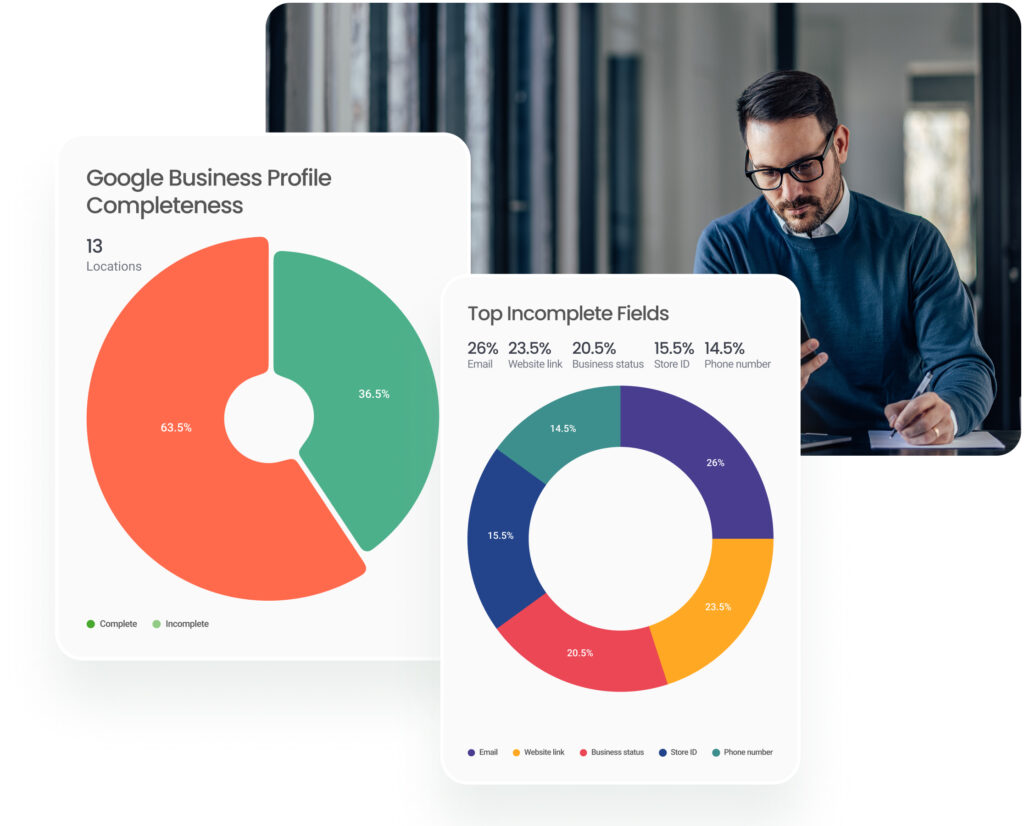
Before anything else, your GBP must be complete, verified, and accurate. According to the Birdeye State of Google Business Profiles 2026, verified profiles drive up to 4 times as many website visits as unverified ones, yet many businesses in key industries remain unverified.
Non‑negotiables:
- Verify your GBP so you’re not disadvantaged in the local pack and can use calls, directions, and messaging.
- Ensure your business name, address, and phone number (NAP) are accurate and consistent across GBP, your website, and directories.
- Set your primary GBP category with precision. It is the single most influential field in your profile.
- Add complete hours, including special hours for holidays.
- Upload high‑quality photos; most verified GBPs have very few, so this is a fast way to stand out.
Step 2: Optimize your Google Business Profile
A verified but empty GBP won’t compete in the local pack. Every section should be filled in and maintained. For Google Business Profile optimization, focus on:
- Writing a clear, keyword‑aware business description that reflects what you do and where you operate.
- Adding all relevant services and products, with descriptions and pricing where appropriate.
- Publishing GBP posts regularly (offers, events, updates) to show the profile is active.
- Enabling booking or appointment links if your category supports them.
- Adding UTM parameters to your website URL in GBP to track local pack traffic in Google Analytics.
- Proactively populating the Q&A section with accurate answers to common questions.
Step 3: Build and manage your reviews
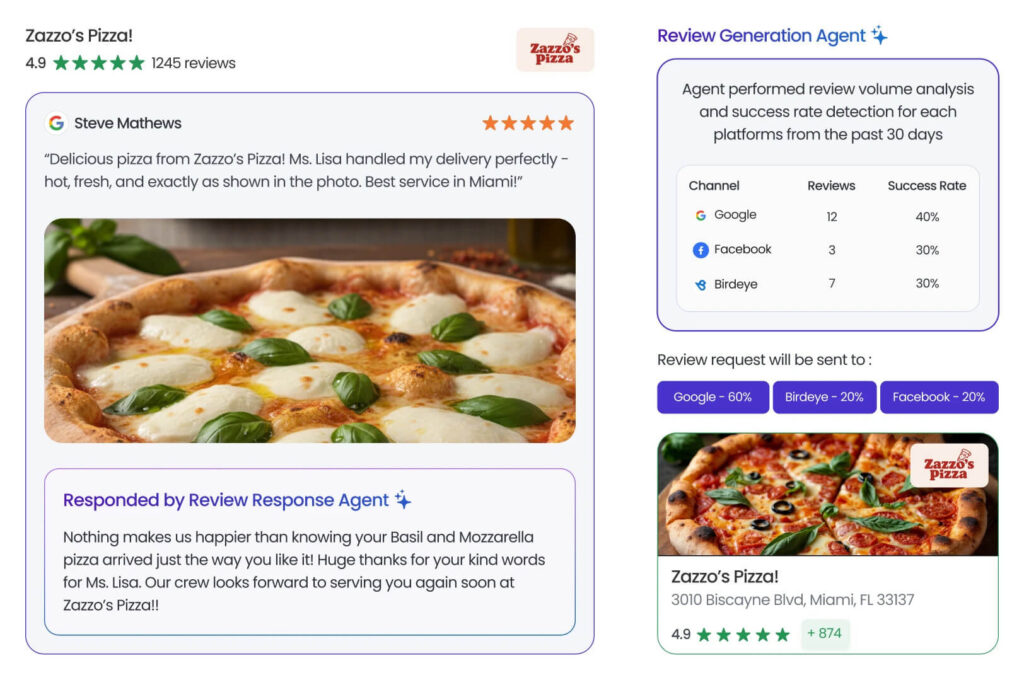
Reviews are one of the strongest prominence signals in Google’s local pack. Volume, rating, recency, and consistency all influence where you appear. Birdeye Reviews centralizes this work, automating review generation and responses across 200+ sites so you can grow your reputation without manual chasing. Core review actions:
- Ask every customer for a review consistently and systematically.
- Respond to every review, positive and negative, to signal active engagement.
- Monitor review velocity; a sudden slowdown can hurt your local pack position.
- Avoid incentives or fake reviews; Google’s enforcement has tightened, and penalties are real.
- Implement Birdeye Review Generation and Review Response agents to automatically send smart, timely requests and on‑brand replies, so your profile stays up to date without adding headcount.
Step 4: Build a consistent citation footprint
Citations (mentions of your name, address, and phone) across the web shape your prominence score and 3‑pack visibility. Focus on:
- Auditing existing citations for inconsistencies and fixing them in major directories.
- Building citations on authoritative platforms such as Apple Business Connect, Bing Places, and key industry directories.
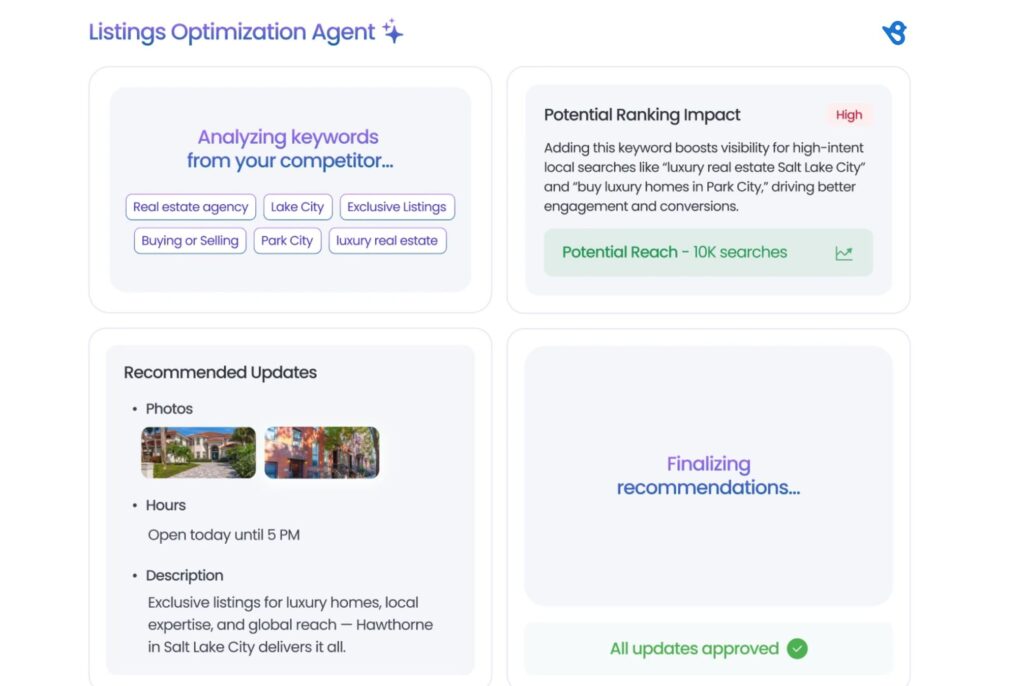
- Using Birdeye Listings along with the AI‑driven Listings Optimization Agent to keep NAP data synced and category/attribute choices optimized across platforms without one‑by‑one updates.
- Ensuring your website’s contact page mirrors your GBP NAP exactly.
Step 5: Advanced tactics for competitive markets
In crowded markets, basics alone may not secure a consistent 3‑pack position. These tactics can help:
- Create location‑specific landing pages aligned to the service areas and keywords you want to rank for.
- Embed a Google Map on your contact or location page to reinforce geographic relevance.
- Use local SEO fundamentals to build topical authority around your service area, supporting both organic and local pack visibility.
- Track how competitors appear in the Google 3‑pack across locations and times of day, then exploit gaps in their profiles that you can improve on.
Even with the right optimization in place, businesses often find themselves slipping out of the local 3-pack or struggling to appear at all. The issues below are the most common reasons local pack listings lose visibility, and what to do about each one.
What are the common local pack ranking problems and fixes?
Some of the key issues include:
Problem 1: A competitor is outranking you in the local pack
This is the most common frustration in Google local pack ranking. If a competitor is consistently appearing above you in the local map pack, the gap usually comes down to one or more of the following:
- Their primary GBP category is more precisely matched to the query than yours
- They have significantly more Google reviews, a higher rating, or more recent review activity
- Their GBP is more complete, with more photos, posts, services, and attributes filled in
- They have stronger NAP consistency and a wider citation footprint across directories
- Their physical location is closer to the geographic centroid of the search area
The fix is systematic. Audit their profile against yours across every ranking signal, identify the gaps, and close them methodically.
Problem 2: Your listing is unverified, disabled, or suspended
An unverified profile will not appear in local pack listings with full visibility. A disabled or suspended profile will not appear at all. These are distinct statuses with different causes and resolutions.
An unverified profile means Google has not confirmed that the business owner has legitimate control of the listing. Verification can be completed through the GBP dashboard via video, phone, postcard, or, in some cases, instant verification.
According to Google’s official Verify your business on Google documentation, the method available to you depends on your business type and location.
A suspended profile is more serious. Google suspends profiles that violate its guidelines, for reasons including keyword stuffing in the business name, using a virtual office address, or having a duplicate listing.
A full explanation of the causes of suspension and the reinstatement process is covered in our guide to a suspended Google Business Profile. The official reinstatement request process is documented by Google to fix a suspended Business Profile.
Problem 3: Google updates, bugs, and filtering
Sometimes, a drop in local map pack visibility is not caused by anything the business has done wrong. Google regularly updates its local search algorithm, and these updates can cause temporary or permanent ranking shifts across the serp local pack. A few known causes include:
- Core algorithm updates that reweight proximity, relevance, or prominence signals
- The diversity update filtering out listings when too many similar businesses appear in the same area
- Google Maps and GBP bugs that temporarily suppress listings or display incorrect information
- Proximity filtering, where Google adjusts which listings appear based on the precise location of the searcher rather than a fixed geographic centre
If your local pack listings drop suddenly without any changes to your profile, checking Google’s official Google Business Profile Help Community is the most reliable way to identify whether a wider update or a known bug is responsible.
How to track your local pack performance
Tracking your Google local pack performance helps you understand whether your local SEO efforts are improving visibility, engagement, and conversions. There are many local SEO tools to help you identify which locations, keywords, or listings need optimization to improve Google local pack ranking.
Monitor performance with GBP Insights
Google Business Profile Insights shows how customers discover and interact with your listing. Key metrics include:
- Searches where your business appeared
- Calls, website clicks, and direction requests
- Photo views and engagement
- Keywords customers used to find your business
These insights help measure visibility in the local map pack and identify trends across locations.
Use map and grid, rank trackers
Traditional rank-tracking tools do not accurately reflect Google local pack results because rankings vary with proximity and search intent. Map/grid tracking tools solve this by showing rankings across different parts of a city.
They help brands:
- Track Google 3 pack visibility by ZIP code or neighborhood
- Compare rankings against competitors
- Monitor fluctuations after Google updates
- Measure local map pack optimization efforts
This is especially important for multi-location businesses competing in crowded local markets.
Add UTM tagging for better attribution
UTM parameters help track traffic and conversions coming from local pack listings inside Google Analytics.
By tagging your Google Business Profile links, you can measure:
- Website visits from GBP
- Leads and form submissions
- Calls generated from the local 3 pack
- Conversion performance by location
This gives a clearer picture of how the serp local pack contributes to revenue.
Track local search queries in Google Search Console
Google Search Console helps identify which local keywords trigger impressions and clicks. Businesses can monitor:
- Branded vs non-branded local searches
- City-based keyword performance
- Click-through rates from local intent searches
- Landing pages driving local visibility
Combining GSC data with GBP Insights gives a more complete view of local SEO performance.
Centralize reporting with Birdeye
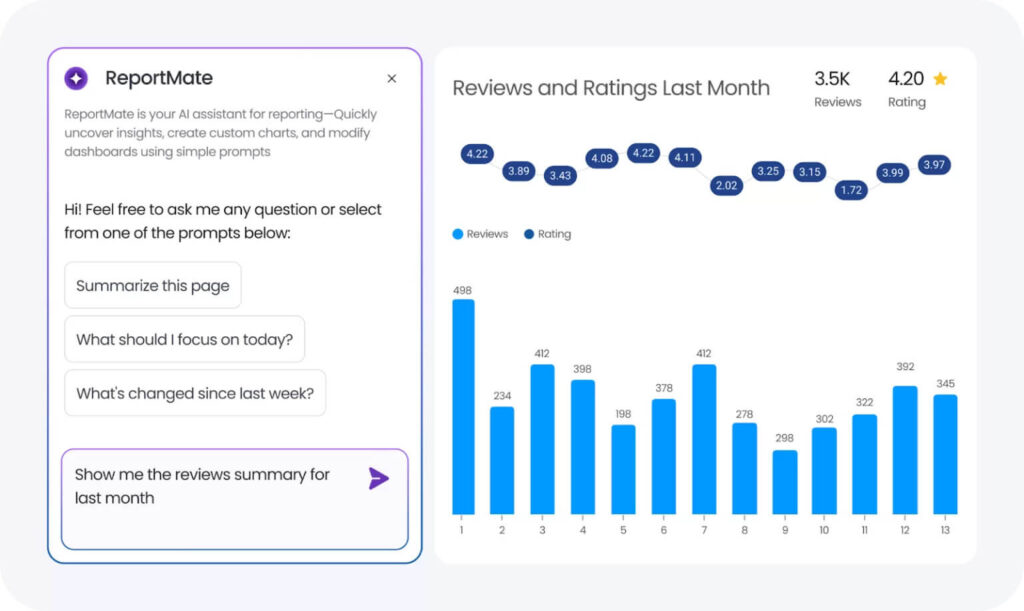
For businesses managing multiple locations, tracking Google local pack performance manually becomes difficult at scale. Birdeye Listings and Birdeye Reviews centralize reporting across listings, reviews, rankings, and customer engagement in one dashboard.
Businesses can:
- Monitor local pack rankings across 100-10,000+ locations
- Track review growth and sentiment trends
- Identify listing inconsistencies affecting visibility
- Measure engagement and conversion metrics
Also, Birdeye Listings Optimization Agent helps businesses improve local map pack visibility with AI-driven recommendations for listings, categories, keywords, and profile completeness. While the Birdeye Reporting Agent automatically surfaces ranking trends, performance changes, and key insights across locations. It helps teams track improvements in Google local pack rankings more efficiently.
Tracking performance helps identify where visibility is improving and where locations need attention. For multi-location brands, the bigger challenge is maintaining the signals that influence Google Local Pack rankings across every location.
How can multi-location brands improve Google local pack visibility?
For businesses with dozens, hundreds, or even thousands of locations, local map pack optimization depends on consistency. Every location needs an accurate, verified, and actively managed Google Business Profile to compete for visibility in its local 3 pack.
The Birdeye State of Google Business Profiles 2026 also found that GBP verification rates range from 63% to 89% across industries. That means many businesses still have locations with incomplete or unverified profiles, creating gaps in local pack listings and customer engagement.
Common challenges include:
- Inconsistent NAP information across locations and directories
- Unverified or incomplete Google Business Profiles
- Low review volume for certain locations
- Outdated business details, hours, or categories
- Generic profiles that lack location-specific information
How Birdeye helps multi-location brands improve local pack visibility
Ranking in the Google Local Pack requires businesses to manage hundreds or thousands of location profiles, maintain accurate business information, generate reviews consistently, and respond quickly to changes in local search performance.
Birdeye builds AI agents for multi-location brands to manage Reviews, Listings, Social, Messaging, and Marketing Automation into a single platform. With 3,000+ integrations across CRM, POS, and business systems, teams can manage the entire customer journey from awareness to advocacy without relying on disconnected tools.
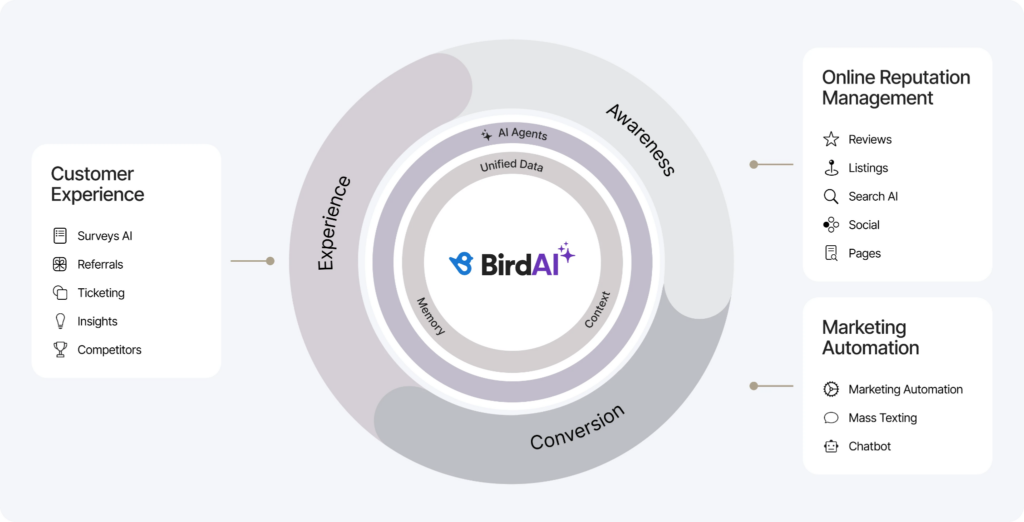
Powered by unified customer profiles and location intelligence, Birdeye helps businesses think beyond rankings to understand the customer, reputation, and operational signals that influence visibility across locations.
AI agents then help organizations act by optimizing listings, generating reviews, engaging customers, monitoring competitors, and identifying opportunities to improve local pack performance while maintaining brand consistency and governance across every location.
Listings AI
Listings accuracy is one of the strongest foundations of local pack visibility. For multi-location brands, maintaining accurate information across hundreds of profiles can quickly become an operational challenge.
Birdeye Listings helps businesses consolidate listing management across Google Business Profile, Apple Business Connect, and 100+ directories from a single platform.
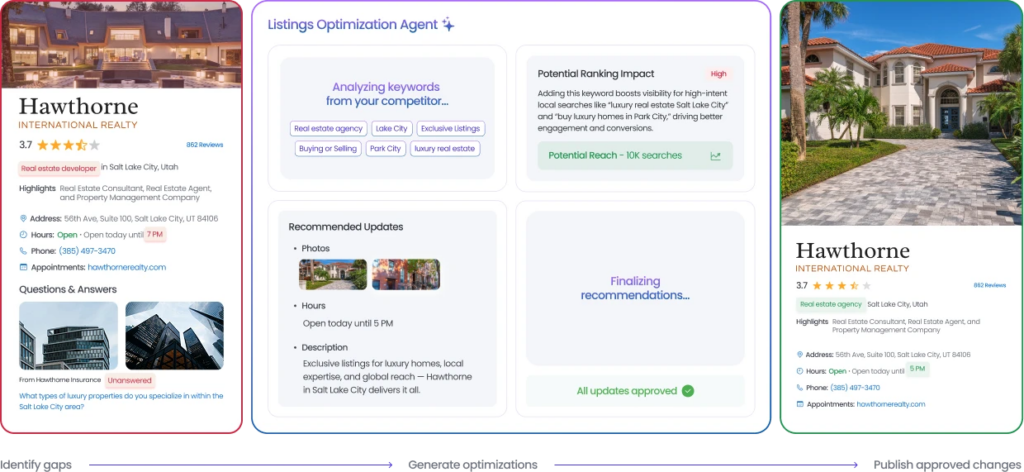
The Listings Optimization Agent helps businesses:
- Monitor listing accuracy and profile completeness
- Identify optimization opportunities that impact local visibility
- Recommend category, attribute, and profile updates
- Manage business information across locations from one platform
- Maintain consistent brand information across every customer touchpoint
By improving listing accuracy and consistency at scale, businesses strengthen the relevance signals that influence local pack rankings.
Birdeye Reviews
Reviews remain one of the strongest prominence signals in Google’s local pack algorithm. However, generating and managing reviews consistently across multiple locations requires a scalable process.
Reviews helps businesses act on customer feedback while maintaining a consistent brand experience across locations.
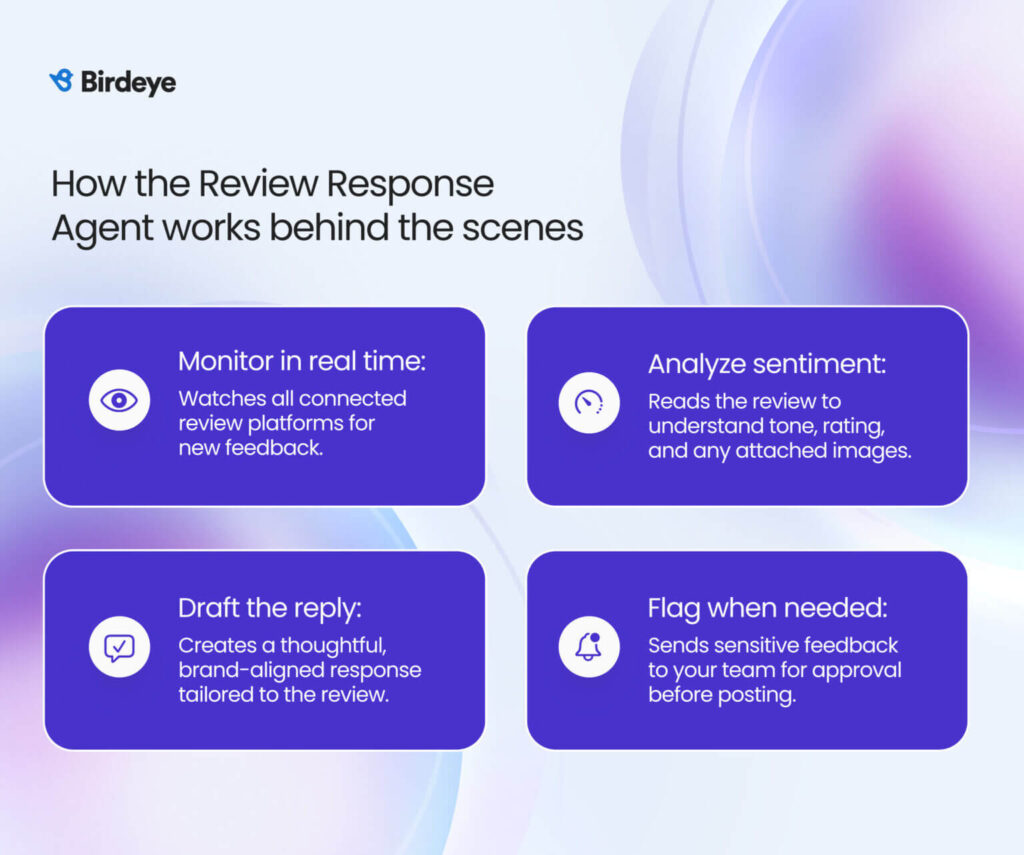
Reviews Agents help businesses:
- Generate more authentic reviews with the Review Generation Agent
- Draft contextual responses with the Review Response Agent
- Monitor customer feedback across 200+ review sites
- Identify reputation trends and customer sentiment
- Maintain active engagement across locations
- Strengthen the trust signals that influence local pack visibility
Together, these capabilities help businesses improve prominence, customer trust, and local search performance.
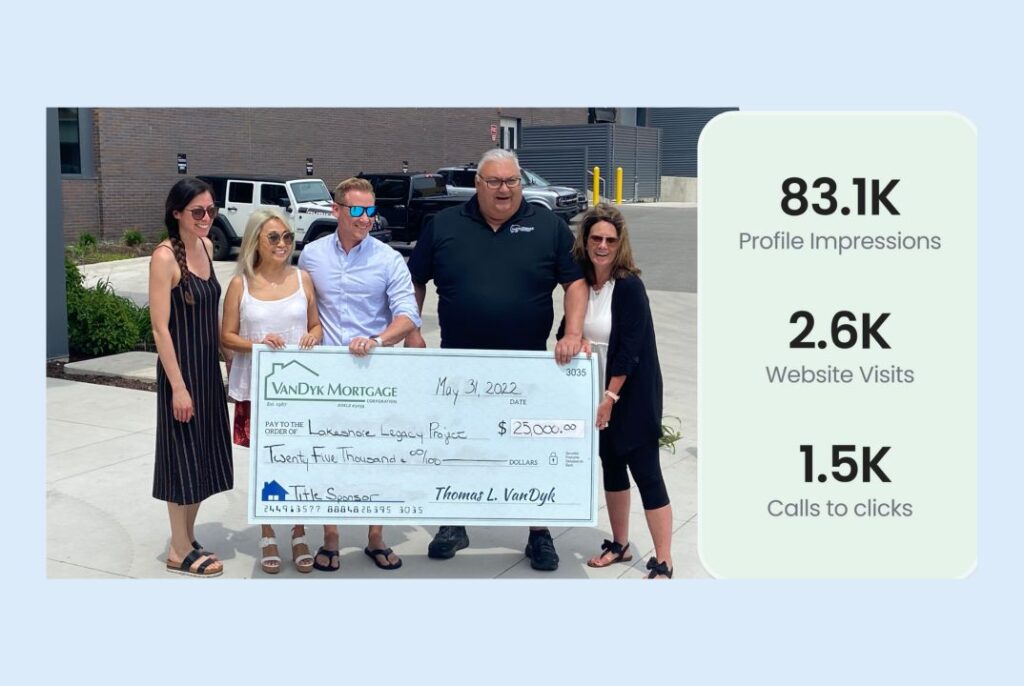
For example, VanDyk Mortgage, a lender with more than 100 locations, used Birdeye to improve listings management and review generation across its branches. Results included:
- 1,600+ new reviews generated in six months
- Improved listing consistency across locations
- Better visibility in local search results
- Stronger online reputation across branches
- Increased customer engagement and feedback volume
- More efficient management of location profiles
- Greater brand consistency across local markets
As Adam Morolla, Marketing Technology Specialist at VanDyk Mortgage, shared,
“A big reason why we switched over to Birdeye was that our past vendor didn’t really send Google review requests; it was kind of an afterthought situation.”
He further adds:
“With Birdeye, it was pretty easy to just set up our listings. Honestly, the Birdeye team did most of the work for us, and it was a big help in standardizing our information.”
Together, Birdeye Listings and Reviews help businesses strengthen relevance, prominence, and visibility across local pack listings, improving their ability to compete in the Google Local Pack across multiple markets.
Local SEO: How to Land in the Google Local Pack
Want to see the impact of Birdeye on your business? Watch the Free Demo Now.
How Birdeye AI agents support local pack performance
Improving local pack visibility requires more than optimizing a single Google Business Profile. Businesses need a system that can consolidate customer signals, uncover location-level insights, and act on opportunities across every location.
Birdeye helps organizations follow this framework:
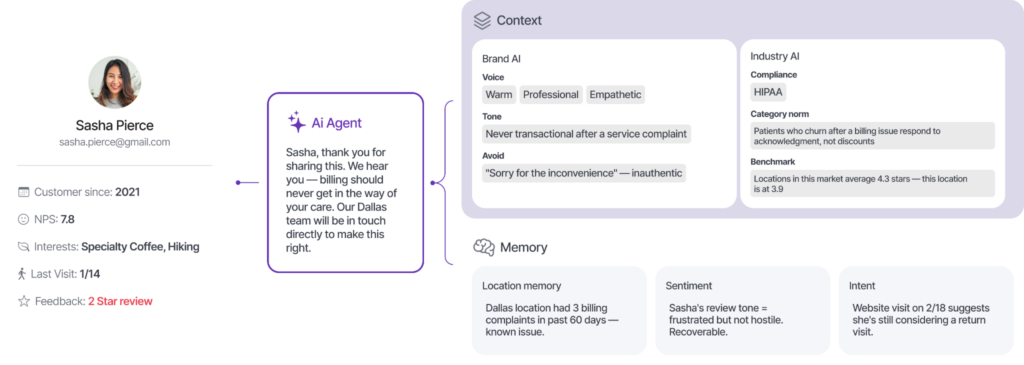
Birdeye builds AI agents for multi-location brands that need trust, consistency, and control at scale. The company provides AI coworkers at every location — Jay for marketing, Robin for operations, Myna for customer experience — that go far beyond basic monitoring.
Its agents handle complex local workflows by continuously running a synchronized loop: consolidating every signal from every system, reasoning with brand and industry context, and acting across reviews, listings, social, messaging, surveys, and AI search visibility — from 100 to 10,000+ locations.
With coverage across 200+ review sites and 3,000+ integrations including Salesforce, HubSpot, and QuickBooks Online, Birdeye is trusted by the largest enterprise brands globally — Sutter Health, Sun Auto, Caesars Entertainment, and Aspen Dental among them.
Listings Optimization Agent: Relevance and NAP Consistency
Relevance and prominence both depend on your business information being accurate, consistent, and complete across every platform Google cross-references. Birdeye Listings manages this across Google Business Profile, Apple Business Connect, and dozens of other directories from one place.
It uses AI to generate location-specific SEO descriptions that strengthen relevance signals for individual local pack listings, and it detects and corrects inaccuracies before they affect your Google 3 pack visibility. For businesses that have never audited their listing data, Birdeye’s listing scan surfaces gaps across all locations immediately.
Key listing capabilities that directly support local map pack optimization:
- Maintain accurate NAP information across platforms
- Identify incomplete profiles and missing GBP attributes
- Optimize categories and listing content
- Monitor listing health across locations
- Improve consistency signals that support local pack visibility
Reviews Agents: Prominence and trust
Reviews are one of the strongest prominence signals in Google local pack ranking. Birdeye’s review management software automates review generation, monitoring, and response across 200-plus sites. The Review Response Agent uses AI to generate on-brand replies to incoming reviews across thousands of locations, ensuring no review goes unanswered. This matters because active review engagement is itself a signal of profile health that feeds into local pack listings visibility.
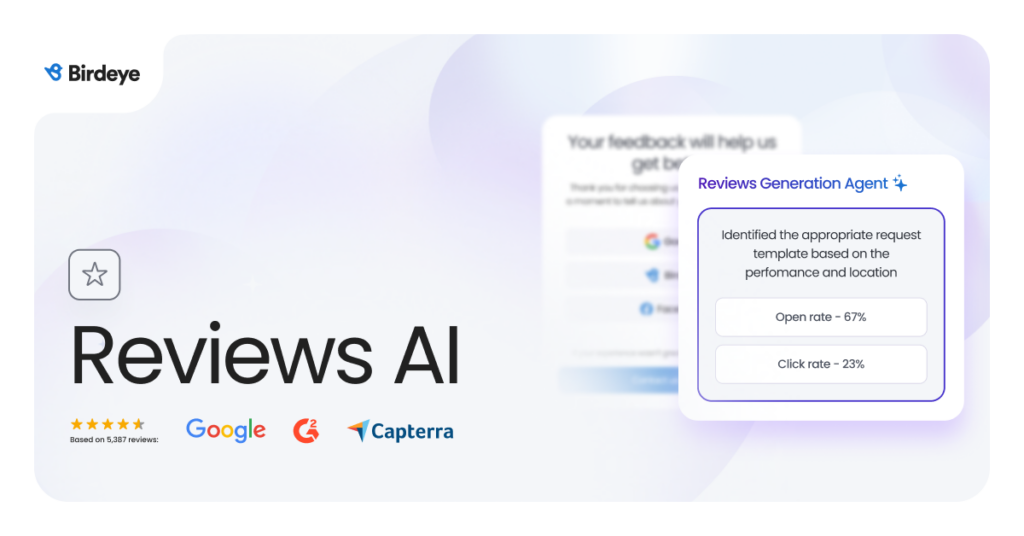
The Birdeye State of Google Business Profiles 2026 further found that customer actions across GBP profiles declined by only around 5% despite a 53.8% drop in search impressions per location, indicating that the audience reaching businesses through the serp local pack is smaller but significantly more intent-driven. For businesses with strong review profiles and complete listings, that is a competitive advantage, not a threat.
Key review capabilities that support local map pack visibility:
- Generate reviews through automated review requests
- Draft brand-aligned responses with the Review Response Agent
- Monitor customer sentiment and reputation trends
- Maintain active engagement across locations
- Strengthen prominence signals that influence local pack rankings
- Build customer trust through consistent review management
FAQs about Google local pack
The Google local pack is the block of three local business listings Google displays at the top of the SERP when it detects local intent in a search query. It is called the local 3-pack because Google reduced its local results from seven listings to three, making the three remaining spots significantly more competitive and more visible than before.
The Google local pack appears within the standard Google Search results page and shows three listings. The Local Finder is the expanded view accessed by clicking “More places” beneath the local pack. Google Maps is a separate product entirely, accessible via maps.google.com or the Maps app, with its own search interface and unlimited scrollable results. All three draw from GBP data but serve users in different contexts and with different levels of intent.
There is no fixed timeline. Businesses with a verified, complete GBP in a less competitive market can see local map pack visibility within a few weeks. In competitive markets, building the review volume, citation consistency, and profile strength needed to rank in the local 3-pack can take several months of consistent effort.
Yes. Service-area businesses that do not display a physical address are still eligible to appear in local pack listings. Google uses the service areas defined in the GBP to determine relevance and proximity for these businesses.
Google ranks local pack listings based on three core factors: relevance, distance, and prominence. In practice, the most influential signals are the primary GBP category, review quantity and rating, NAP consistency, citation volume, proximity to the searcher, and overall profile completeness.
The most common reasons a competitor outranks you in the local map pack are a more precisely set primary GBP category, a higher volume of recent Google reviews, a more complete profile, stronger NAP consistency across directories, or a location closer to the geographic centroid of the search area.
No. Google Local Services Ads is a paid placement that appears above the organic local 3-pack. LSA listings carry a “Google Guaranteed” or “Google Screened” badge and are purchased through a separate advertising program. The Google local pack is an organic result earned through local SEO, not ad spend.
Yes, provided you are set up as a service-area business in your GBP. You will not display a street address publicly, but Google will still consider your listing for local pack listings within the service areas you have defined
Winning Google local pack visibility requires continuous optimization
The Google local pack has become one of the most valuable placements in local search. Positioned above most organic results, it connects businesses with customers who are actively looking for nearby products and services. For businesses that rely on local demand, strong local map pack visibility can have a direct impact on calls, website visits, and foot traffic.
Businesses that consistently appear in the local 3 pack rarely succeed because of a single ranking factor. More often, their advantage comes from getting the fundamentals right: choosing the correct GBP categories, maintaining accurate business information, earning a steady flow of reviews, and keeping profiles updated as their business evolves.
As AI Overviews and zero-click search continue to change how customers discover businesses, visibility in the serp local pack will become even more important. Businesses with accurate listings, strong reputation signals, and well-optimized profiles will be in the best position to compete for local search visibility.
If you’re looking to strengthen your Google local pack ranking, Birdeye helps multi-location brands manage listings, generate and respond to reviews, monitor performance, and identify optimization opportunities across 100-10,000+ locations. Start with a free demo to uncover issues that may be limiting your visibility in local search.

About the Author

Shruti Dugar
Birdeye
Originally published