If your Google Business Profile disappeared from Google Search or Maps, your listing may be suspended. A Google Business Profile suspension can immediately reduce calls, website visits, direction requests, and local visibility, especially for businesses that rely heavily on Google for leads.
Summary – Birdeye’s State of Google Business Profile 2026 report found that verified profiles drive up to 4× more website visits than unverified listings, while Google’s stricter enforcement now triggers immediate suspensions for incomplete, duplicate, or inconsistent business information. When a Google Business Profile suspended warning appears, businesses can lose visibility during some of the highest-intent moments in local search.
The good news is that most suspended Google Business Profiles can be recovered. This guide explains the key reasons for identifying the actual cause of the suspension and following Google’s reinstatement process carefully.
Table of contents
- Am I actually dealing with a Google Business Profile suspension?
- What does a Google Business Profile suspension mean?
- What are the different types of Google Business Profile suspensions?
- Why was your Google Business Profile suspended?
- How can you confirm that your Google Business Profile is suspended?
- How do you fix a suspended Google Business Profile?
- How can businesses prevent Google Business Profile suspensions?
- How do Google Business Profile suspensions affect AI search visibility?
- How can large multi-location brands manage Google Business Profile suspensions at scale?
- How does Birdeye help businesses prevent Google Business Profile suspensions?
- FAQs about Google My Business suspension
- Birdeye helps multi-location brands manage their Google Business Profile efficiently
Am I actually dealing with a Google Business Profile suspension?
Not every visibility issue means your listing has been suspended. Businesses often confuse ranking drops, verification requests, or profile glitches with a Google Business Profile suspension.
Before starting the reinstatement process, confirm whether your profile is actually suspended.
Quick checks to identify a suspended Google Business Profile
| What to check | What it usually means |
| Your profile disappeared from Google Search or Maps | Possible hard suspension |
| You see a “Suspended” notification inside your GBP dashboard | Confirmed Google Business Profile suspension |
| Your business appears on Maps, but you cannot manage it | Possible soft suspension |
| Reviews, posts, or edits | Feature restriction or partial suspension |
| Your ranking dropped, but your profile is still visible | Likely an SEO or visibility issue, not a suspension |
A suspended Google Business Profile typically limits your ability to manage the listing or removes the business entirely from Google Maps and local search results. In some cases, Google may suspend only specific profile features rather than disable the entire listing.
Google may also send an email explaining that the listing violated Google Business Profile guidelines. However, the explanation is often vague, making it difficult to identify the exact reason for the suspension.
This is why businesses should avoid making repeated edits or creating duplicate listings immediately after a suspension notice appears. Incorrect recovery attempts can further delay reinstatement.
If your profile is confirmed as suspended, the next step is to understand what a Google Business Profile suspension actually means and how Google categorizes different suspension types.
What does a Google Business Profile suspension mean?
A Google Business Profile suspension means Google has restricted or removed your business listing because its automated trust and policy systems detected potential guideline violations, verification inconsistencies, or suspicious activity associated with the profile.
When a Google listing suspended warning appears, in many cases, businesses first notice:
- A sudden drop in calls or direction requests
- Disappearing Maps visibility
- Reduced local rankings
- Loss of profile management access
- Restricted profile features
The impact can be immediate because Google Business Profiles now influence some of the highest-intent local searches. Birdeye’s State of Google Business Profile 2026 report found that 86% of GBP impressions come from category-based and “near me” searches.
Google Business Profile suspensions usually happen when Google detects:
- Inconsistent business information
- Suspicious profile activity
- Duplicate listings
- Keyword stuffing
- Fake or virtual office addresses
- Policy violations
- Verification issues
In recent years, Google has also tightened enforcement across Business Profiles. Birdeye’s research found that incomplete, duplicate, and non-compliant profiles now face significantly higher suspension risk due to stricter verification and trust checks.
Our customers, their stories:

Someone recently asked me how we manage so many reviews and so many locations. Birdeye is a platform that has helped us effectively manage not only reviews, but also guest responses, insights, and Net Promoter Tracking! With 30+ locations and business listings management on a variety of platforms, Birdeye has helped us manage reviews and online presence in a much simpler manner.

– Carissa Newton, Cunningham Restaurant Group
A Google Business Profile suspension does not always mean the business itself is illegitimate. Many suspensions are triggered automatically by Google’s spam-detection and verification systems, especially after major profile edits, ownership changes, category updates, or address modifications.
Understanding the exact type of suspension is important because recovery steps can vary depending on the severity of the profile’s restriction.
What are the different types of Google Business Profile suspensions?
Google can apply different levels of restrictions depending on the severity of the issue, the type of policy violation, and the level of trust associated with the listing.
Understanding the suspension type is important because recovery timelines and reinstatement steps can vary significantly.
| Suspension type | What happens | Severity level | Can customers still see the listing? |
| Soft suspension | Profile remains visible, but the owner loses management access | Moderate | Yes |
| Hard suspension | Listing is removed from Google Search and Maps | High | No |
| Feature restriction | Certain GBP features are disabled or limited | Lower to moderate | Usually yes |
Soft suspension
A soft suspension usually means Google still displays the business publicly, but the profile owner can no longer manage the listing inside the Google Business Profile dashboard.
Businesses often discover a soft suspension when they:
- Lose editing access
- Cannot respond to reviews
- Cannot publish posts
- Lose profile ownership permissions
Soft suspensions are commonly linked to:
- Ownership conflicts
- Verification inconsistencies
- Suspicious account activity
- Policy violations tied to profile management
Hard suspension
A hard suspension is more severe. Google removes the business listing from Search and Maps entirely until the issue is resolved and the profile is reinstated.
Hard suspensions are often triggered by:
- Fake addresses
- Duplicate listings
- Keyword stuffing
- Ineligible business categories
- Repeated guideline violations
- High-risk suspicious activity signals
This is the most damaging type of Google Business Profile suspension because the business effectively disappears from local discovery until reinstatement is approved.
Feature restriction suspension
Google increasingly applies partial restrictions instead of full suspensions. In these cases, the listing remains active, but certain features become limited.
Businesses may temporarily lose access to:
- Review responses
- Posting capabilities
- Messaging
- Profile edits
- Q&A features
These restrictions are often triggered by trust concerns, rapid profile edits, moderation reviews, or suspicious activity patterns that do not yet justify a full suspension.
In many cases, feature restrictions act as early warning signals before more serious enforcement actions occur.
Has your Google Business Profile account been suspended? Don’t panic! Here’s what to do!
Want to see the impact of Birdeye on your business? Watch the Free Demo Now.
Why was your Google Business Profile suspended?
Google rarely provides businesses with a detailed explanation of a suspension. In most cases, listings are flagged automatically by Google’s spam detection, verification, and trust systems after they identify unusual activity or guideline violations.
This is why many businesses searching for “why was my Google Business Profile suspended” or “Google Business Profile suspended for suspicious activity” often receive vague notifications without a clear cause.
Below are the most common reasons for Google Business Profile suspensions in 2026.
| Common suspension reasons | Why Google flags it |
| Keyword stuffing in business name | Violates Google naming guidelines |
| Fake or virtual office addresses | Misrepresents physical business presence |
| Duplicate business listings | Creates trust and ownership conflicts |
| Service-area business violations | Hidden addresses or inaccurate service areas |
| Suspicious profile edits | Rapid or inconsistent changes trigger spam checks |
| Verification inconsistencies | Business details do not match supporting documents |
| Shared accounts or agency misuse | Multiple risky listings tied to one account |
| Ineligible business category | Business does not qualify for a GBP |
| Repeated policy violations | Previous enforcement history increases risk |
1. Keyword stuffing
Adding extra keywords to your business name remains one of the most common causes of Google My Business suspension issues.
For example:
- “ABC Dental”
vs - “ABC Dental Best Cosmetic Dentist London Emergency Implants”
Google expects your business name to match real-world branding and official documentation.
2. Fake addresses and virtual offices
Google has significantly tightened enforcement against:
- virtual offices
- coworking spaces
- PO boxes
- fake storefronts
- ineligible service-area business addresses
Businesses without legitimate customer-facing locations are far more likely to face hard suspensions.
3. Duplicate listings
Multiple listings for the same business location can create trust conflicts inside Google’s local systems. Duplicate profiles often appear after:
- ownership transfers
- agency changes
- rebranding
- accidental re-verification attempts
Google may suspend one or all associated listings until ownership and legitimacy are clarified.
4. Suspicious activity and rapid profile edits
One of the fastest-growing causes of suspension is suspicious profile behavior.
Google may flag:
- Repeated edits within short periods
- Major category changes
- Address changes
- Sudden ownership transfers
- Login activity from unusual locations
- Bulk edits across multiple locations
This is why businesses often receive a “Google Business Profile suspended for suspicious activity” notice even when they believe the profile itself is legitimate.
5. Verification and consistency problems
Google increasingly cross-checks business information against:
- websites
- directories
- legal records
- utility documents
- public citations
Inconsistent phone numbers, addresses, categories, or business names can weaken trust signals and trigger manual or automated reviews.
6. Shared account and agency risks
Listings managed through large agency networks or shared accounts can sometimes inherit trust issues from other connected profiles. If multiple suspicious listings are associated with the same manager account, Google may apply broader enforcement actions.
For multi-location brands, centralized governance and permission controls have become increasingly important to reduce suspension risk across locations.
7. Service-area business violations
Google applies stricter rules to service-area businesses because these listings are frequently abused for spam. Businesses may be suspended for using fake storefronts, virtual offices, inaccurate service areas, or incorrectly displaying residential addresses while trying to rank across multiple locations.
8. Repeated policy violations
Repeated guideline violations can weaken Google’s trust in a business profile over time. Listings that repeatedly use keyword stuffing, duplicate profiles, misleading categories, or inaccurate information are more likely to face stricter verification checks, longer reinstatement reviews, or full suspensions of Google Business Profiles.
How can you confirm that your Google Business Profile is suspended?
Google does not always make suspensions obvious. In many cases, businesses first notice sudden changes in visibility, access, or profile functionality before seeing an official suspension notice.
Here’s how to confirm whether your Google Business Profile has actually been suspended.
| Sign | What it usually indicates |
| “Suspended” status inside GBP dashboard | Confirmed suspension |
| Listing no longer appears on Google Maps | Possible hard suspension |
| Profile visible publicly but inaccessible to owner | Possible soft suspension |
| Certain features suddenly disabled | Feature restriction |
| Google requests reverification unexpectedly | Trust or verification review triggered |
Step 1: Check your Google Business Profile dashboard
Log in to your Google Business Profile account and look for:
- Suspension notifications
- Warning banners
- Reverification requests
- Restricted access messages
Google usually places suspension alerts directly inside the dashboard interface.
Step 2: Search for your business on Google Maps
Search your exact business name on:
- Google Search
- Google Maps
- mobile Maps app
If the listing no longer appears publicly, the profile may be under a hard suspension.
If the profile still appears but management access is restricted, the business may be experiencing a soft suspension instead.
Step 3: Check your email for policy notices
Google often sends automated policy emails explaining that the profile violated Google Business Profile guidelines. These notices may reference:
- Suspicious activity
- Misleading content
- Unsupported business models
- Verification failures
- Ownership conflicts
However, Google rarely identifies the exact violation clearly.
Step 4: Identify recent changes made to the profile
Before the suspension occurred, review whether your team recently changed:
- Business name
- Address
- Primary business category
- Phone number
- Website URL
- Ownership permissions
- Service areas
Many Google listing suspended cases happen shortly after major profile edits or bulk updates.
Step 5: Check whether it is not a visibility or verification issue
A ranking drop alone does not always mean suspension. Businesses often mistake the following issues for a suspension:
- Temporary ranking drops
- Google Maps bugs
- Profile verification reviews
- Duplicate listing filtering
- Review-related moderation
If your profile is still visible publicly but performing poorly, the issue may be related to rankings or verification rather than an actual suspension.
Confirming the exact issue before submitting a reinstatement request is important because unnecessary submissions or repeated edits can sometimes delay recovery further.
Our customers, their stories:

Birdeye Listings AI has allowed us to automate and streamline our online listings across all our locations. As a result of Birdeye's platform, our online reputation and presence has increased by 450% year over year.

Martin Schroder, Manager of Web & Creative Development, Choice Wireless

How do you fix a suspended Google Business Profile?
Recovering a suspended Google Business Profile starts with identifying the actual cause of the suspension before making additional edits. Many businesses delay reinstatement by creating duplicate listings or by repeatedly editing profile information too quickly after suspension.
The safest approach is to audit the profile carefully, correct potential policy violations, and then submit a reinstatement request with supporting evidence.
Step 1: Review Google Business Profile guidelines
Before making changes, review Google’s Business Profile policies and compare them against your current listing.
Most Google Business Profile suspensions are due to trust and verification issues rather than intentional spam. Pay close attention to:
- Business name formatting
- Address eligibility
- Service-area settings
- Category selection
- Ownership permissions
- Duplicate listings
- Website consistency
Step 2: Correct profile violations and inconsistencies
Google increasingly cross-checks business data across websites, directories, and public citations to validate legitimacy. Audit the profile for common suspension triggers such as:
- Keyword stuffing
- Fake locations
- Coworking or virtual office addresses
- Duplicate profiles
- Inaccurate business categories
- Inconsistent phone numbers or URLs
Step 3: Gather supporting business documents
Google may request proof that the business is legitimate and operates at the listed location.
Common reinstatement documents include:
| Document type | Why Google may request it |
| Business license | Verify legal business existence |
| Utility bill | Confirm physical address |
| Storefront signage photos | Validate customer-facing presence |
| Website ownership | Match business identity |
| Tax or registration documents | Verify operational legitimacy |
| Vehicle branding photos | Support service-area businesses |
Make sure:
- Names match exactly
- Addresses remain consistent
- Documents are recent and readable
Step 4: Submit a reinstatement request
Once the profile is corrected, submit a Google Business Profile reinstatement request through Google support.
In this form section, fill out the requested information and click submit.
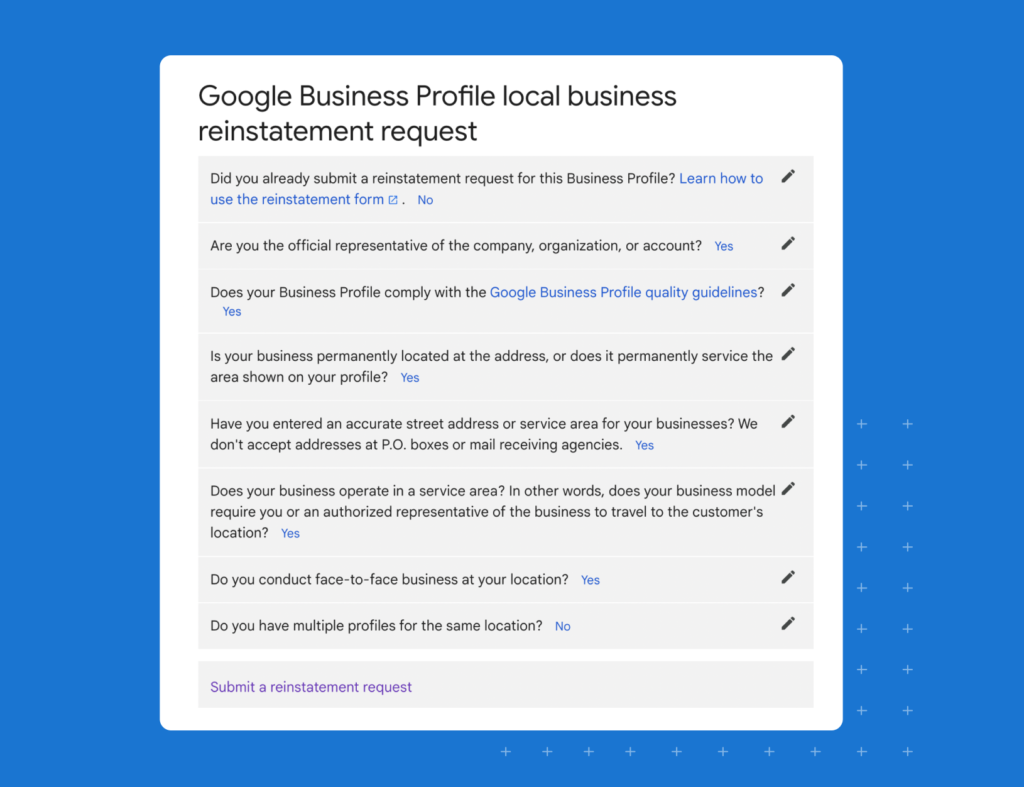
Then submit a reinstatement request.
In this section of the form, fill out the requested information and click submit.
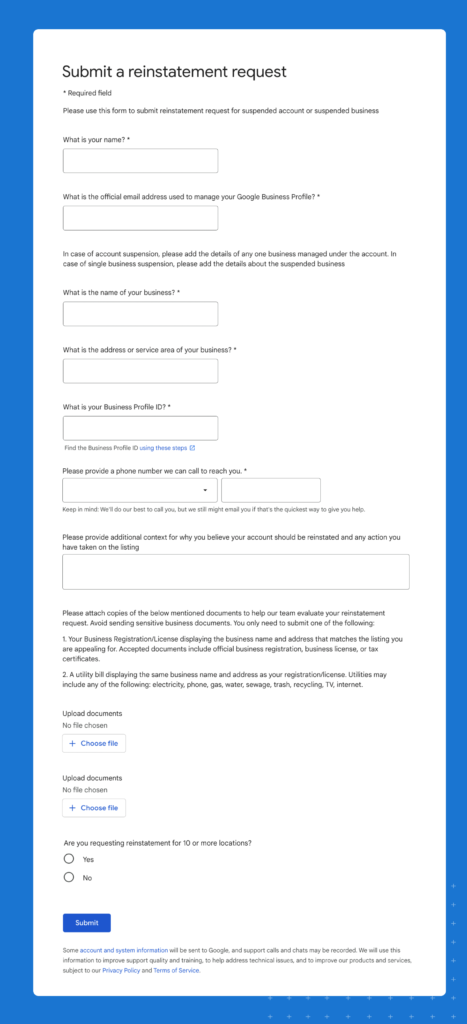
Provide:
- A clear explanation of the issue
- Corrected business details
- Supporting documentation
- Screenshots if necessary
Avoid submitting multiple requests for the same suspension unless Google explicitly asks for additional information.
Step 5: Wait for Google’s review process
Reinstatement timelines can vary depending on:
- Suspension severity
- Verification complexity
- Documentation quality
- Account history
| Recovery stage | Typical timeline |
| Profile audit and corrections | 1–2 days |
| Reinstatement submission | Same day |
| Google review process | Several days to 2 weeks |
| Additional verification requests | Varies by case |
Businesses managing multiple locations may experience longer review periods if Google performs broader trust or ownership checks.
What should you avoid during reinstatement?
Some recovery attempts can make the situation worse.
Avoid:
- Creating duplicate listings
- Submitting repeated reinstatement forms
- Making continuous profile edits
- Changing ownership repeatedly
- Using fake addresses or temporary locations
- Keyword stuffing the business name during recovery
These actions can exacerbate trust issues and further delay reinstatement.
Birdeye’s State of AI Search 2026 report found that AI tools increasingly reward structured, consistent, and verified business information across owned websites and profile ecosystems. Maintaining accurate business information during reinstatement is now important for broader AI-driven local discovery systems.
Want to know how to reinstate a suspended Google Business Profile? Read the blog!
How can businesses prevent Google Business Profile suspensions?
Preventing a Google Business Profile suspension is much easier than recovering from one. As Google tightens verification, trust, and spam-detection systems, businesses now need to treat GBP management as an ongoing operational process rather than a one-time setup task.
The strongest protection against suspension is maintaining accurate, consistent, and trustworthy business information across every customer-facing touchpoint.
Follow Google’s Business Profile guidelines closely
Many suspensions happen because businesses unknowingly violate Google’s policies.
Common issues include:
- Keyword stuffing business names
- Using virtual offices
- Creating duplicate listings
- Selecting misleading categories
- Hiding service-area information incorrectly
Google increasingly prioritizes authenticity and real-world business verification.
Keep business information consistent everywhere
Google cross-checks your GBP details against:
- Your website
- Directories
- Legal registrations
- Social profiles
- Public citations
Inconsistent:
- Names
- Addresses
- Phone numbers
- Website URLs
can weaken trust signals and increase the risk of suspension.
Birdeye’s State of Google Business Profile 2026 report found that Google has significantly increased enforcement around incomplete, duplicate, and inconsistent business information.
Avoid making large profile edits too frequently
Rapid profile changes can trigger automated spam and suspicious activity checks.
Be especially careful when updating:
- Primary categories
- Business names
- Ownership permissions
- Addresses
- Service areas
If major updates are necessary, make them carefully and ensure all supporting business information remains aligned.
Maintain a complete and active profile
Google increasingly favors profiles that demonstrate ongoing legitimacy and activity.
Keep your profile updated with:
- Accurate business hours
- Fresh photos
- Recent reviews
- Updated services
- Correct categories
- Complete business descriptions
Birdeye’s research found that complete, actively maintained profiles consistently outperform in visibility and engagement metrics.
Monitor account access and permissions
Shared access across agencies, franchises, or multiple team members can sometimes create ownership and trust conflicts.
To reduce risk:
- Limit unnecessary admin access
- Remove inactive users
- Review ownership permissions regularly
- Centralize profile governance where possible
This is especially important for multi-location brands managing large numbers of profiles simultaneously.
Treat your Google Business Profile as a long-term trust asset
Google Business Profiles now influence visibility across:
- Google Maps
- Local search
- “Near me” discovery
- AI-generated local search experiences
Our customers, their stories:

We start with Birdeye because it takes care of our keywords. It takes care of all of our listings reports, and we can control everything from there, including Google my business and Facebook. I mean, everything that we need to do to tell the message from the very beginning, we can start there and everything else kind of trickles in.

– Nicole Woody, Owner, Orange Fish
How do Google Business Profile suspensions affect AI search visibility?
Google Business Profiles now influence more than just Google Maps rankings. AI-powered search experiences increasingly rely on trusted business data pulled from:
- Google Business Profiles
- Websites
- Reviews
- Directories
- Citations
When a Google Business Profile is suspended, those trust signals can weaken across local search ecosystems.
Birdeye’s State of AI Search 2026 report found that AI engines prioritize structured, verified, and consistent business information when generating local recommendations and search answers.
At the same time, Birdeye’s State of Google Business Profile 2026 report found that GBP impressions declined significantly while customer actions remained relatively stable, reflecting the rise of AI-assisted and zero-click local discovery experiences.
As AI-powered search continues evolving, maintaining accurate, verified, and consistent Business Profile information is becoming important not only for local SEO but also for broader digital visibility.
How can large multi-location brands manage Google Business Profile suspensions at scale?
Managing one suspended listing is difficult enough. For large multi-location brands managing hundreds or thousands of profiles, suspension risks can quickly become operational challenges.
Common issues include:
- Inconsistent business information across locations
- Duplicate listings
- Bulk edit errors
- Ownership conflicts
- Unauthorized profile changes
- Location-level compliance gaps
These problems often increase when multiple teams, agencies, or franchise operators manage listings independently.
| Multi-location challenge | Why it increases suspension risk |
| Bulk profile edits | Can trigger suspicious activity checks |
| Inconsistent NAP details | Weakens trust signals |
| Shared account access | Creates ownership and verification conflicts |
| Duplicate location listings | Confuses Google’s local systems |
| Decentralized management | Makes compliance harder to monitor |
Google’s stricter verification and trust systems now require enterprise brands to maintain tighter governance across all location data. For enterprise brands, preventing suspensions is no longer just a local SEO task. It is now part of broader operational governance, review management, and digital visibility strategy.
How does Birdeye help businesses prevent Google Business Profile suspensions?
Managing Google Business Profiles becomes increasingly complex as businesses scale across locations, teams, and platforms. Even small inconsistencies in business information, duplicate listings, or unmanaged edits can increase the risk of suspension under Google’s stricter verification systems.
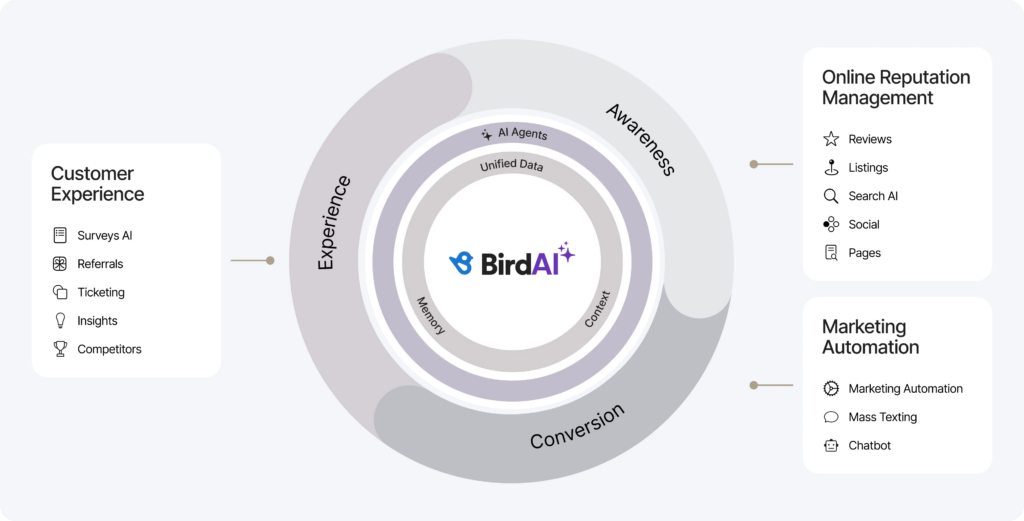
As the #1 full-cycle Agentic Marketing Platform for multi-location brands, Birdeye Listings AI helps businesses consolidate listings management, monitor profile accuracy, and maintain stronger governance across Google and 100+ directories.
| Birdeye’s agentic capability | Why it matters for GBP suspension prevention |
| Listings management across 100+ directories | Helps maintain consistent business information everywhere |
| Centralized governance workflows | Reduces unauthorized or risky profile edits |
| Location-level monitoring | Detects duplicate listings and data inconsistencies faster |
| Brand-safe approval workflows | Helps teams review updates before publishing |
| Role-based access controls | Reduces ownership and permission conflicts |
| Unified customer and location data | Strengthens consistency across digital touchpoints |
Instead of relying on disconnected workflows or manual spreadsheets, brands can manage listings, reviews, messaging, and customer interactions in a single centralized platform.
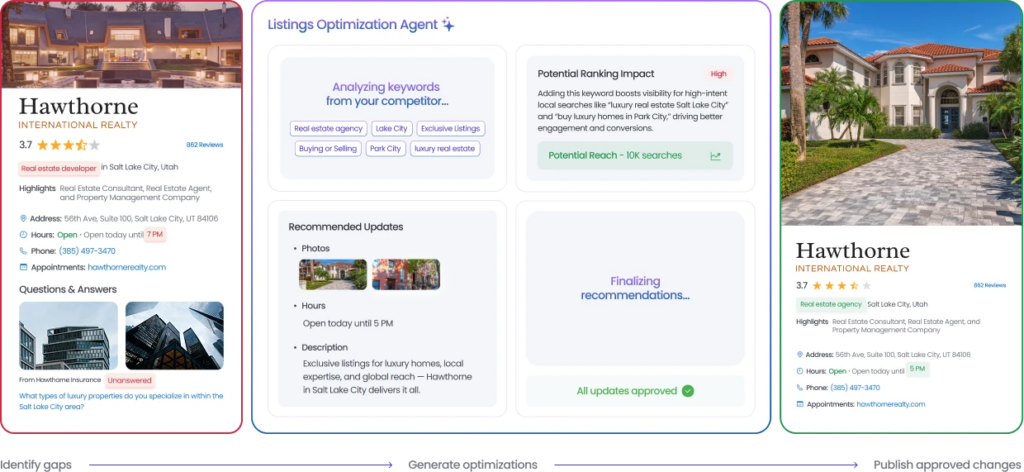
1. Consolidate: Lock in real-time accuracy across 100+ directories
Google’s spam-detection algorithms constantly cross-reference your GBP details against secondary directories. Inconsistent phone numbers, addresses, or hours appear fraudulent and trigger immediate suspensions.
- The Birdeye outcome: Birdeye Listings Agent automatically syncs your exact business details across 100+ deep-link directories simultaneously.
- The value: Building an identical, unshakeable data footprint feeds Google’s trust engine the clean, verified signals required to keep your listings live.
2. Think: Catch rogue changes before algorithms trigger a suspension
Well-meaning local managers or franchise operators frequently trigger hard suspensions by stuffing keywords into titles, altering categories, or rapidly swapping local phone numbers.
- The Birdeye outcome: Continuous local-level monitoring across 100-10,000+ locations instantly alerts corporate teams to data inaccuracies and unauthorized profile changes.
- The value: You catch high-risk profile issues before Google’s automated enforcement loops can pull your listings from search maps and drop local leads to zero.
3. Act: Deploy enterprise governance with human-in-the-loop controls
Managing updates across hundreds to thousands of locations shouldn’t feel like playing Russian roulette with policy compliance. Brands need to push local updates without risking corporate compliance penalties.
- The Birdeye outcome: Multi-tiered, brand-safe approval workflows enable regional teams to update neighborhood details while maintaining strict corporate boundaries.
- The value: Corporate maintains absolute control over sensitive, suspension-triggering fields (like primary categories and core addresses) while empowering local flexibility.
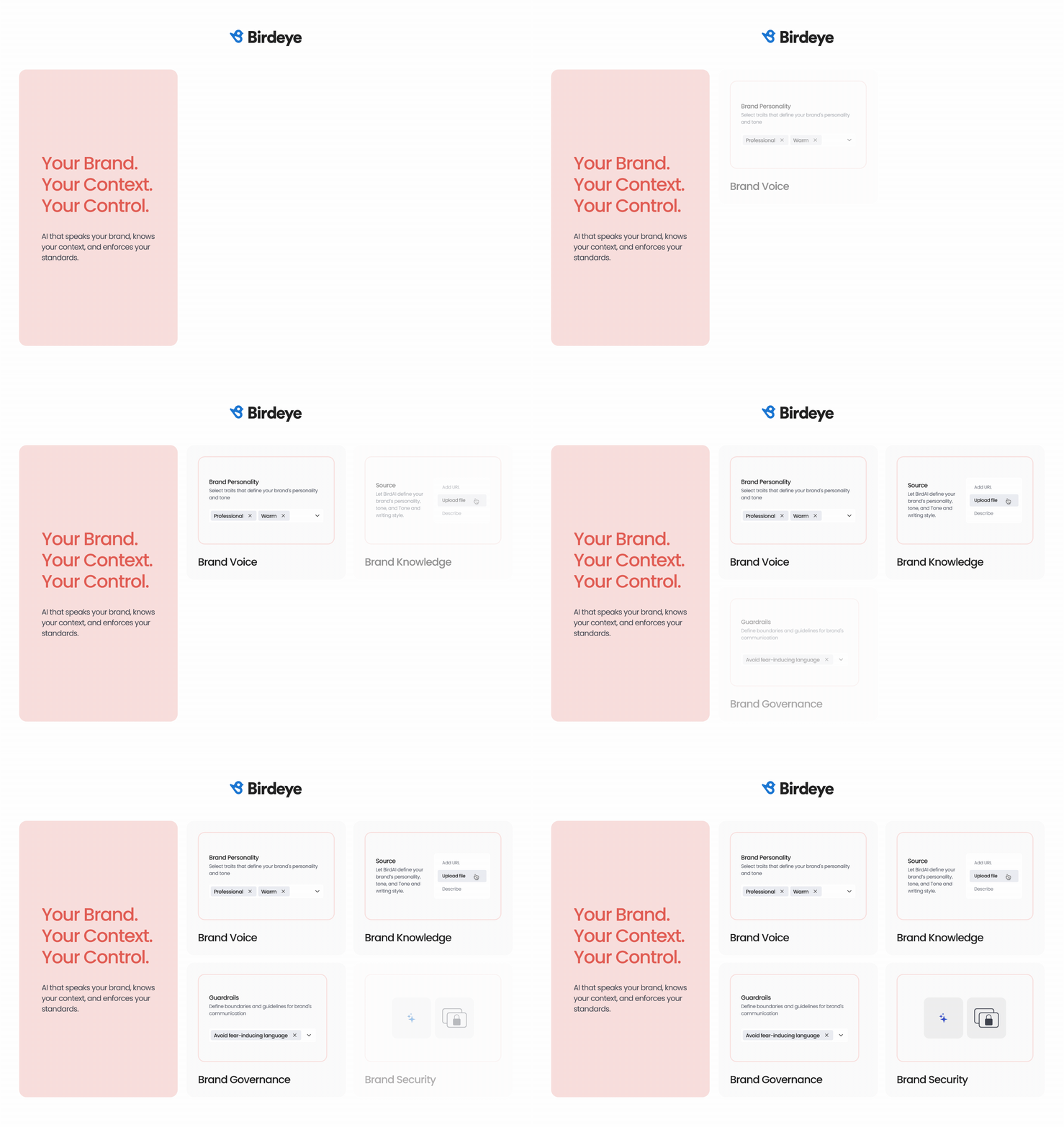
Birdeye also supports human-in-the-loop workflows through Brand AI and Industry AI guardrails. Teams can maintain brand consistency, approval controls, and compliance standards while managing updates safely across locations.
FAQs about Google My Business suspension
Common reasons your Google listing can get suspended include violating Google’s terms of service, having duplicate listings or outdated or inaccurate listings, keyword stuffing, or offensive language or pictures.
Yes, if your Google My Business account has been suspended, you can appeal the suspension once you’ve fixed the problems with your listing. To appeal the suspension, go to the Google Business Profile Help Center and fill out the reinstatement request form.
When Google suspends your account, you will no longer be able to access or manage your Google My Business listing.
No, suspended Google My Business accounts do not get deleted. However, if the account remains suspended for an extended period of time, Google may delete the account on its own accord. If this happens, you will not be able to restore or re-activate the listing in any way.
A Google My Business suspension typically lasts for a minimum of 30 days. Depending on the severity of the violation, it can last up to 90 days or longer. If the violation is severe enough, Google may permanently delete the account.
Yes. Creating duplicate profiles after a suspension can exacerbate trust issues and further delay reinstatement. Businesses should focus on fixing the original listing rather than creating replacement profiles.
Yes. AI-powered search engines increasingly rely on verified, consistent business information sourced from Google Business Profiles, websites, reviews, and citation networks.
A suspension can weaken local trust signals and reduce visibility across AI-assisted local discovery experiences.
Birdeye helps multi-location brands manage their Google Business Profile efficiently
Recovering from a single Google Business Profile suspension is exhausting. Google’s 2026 automated trust checks are harsher than ever. But for brands managing hundreds to thousands of locations, manual profile remediation isn’t just slow, it’s a massive operational risk.
To protect your brand’s digital footprints, you must move away from fragmented workflows, rogue local edits, and disconnected point solutions.
Birdeye’s full-cycle agentic marketing platform unifies your entire local presence into a single, governed ecosystem, helping you prevent suspensions before they freeze your local revenue.


This blog post is part of our Complete Google My Business Guide:
Google Business Profile
Google My Business Related Training
About the Author

Shruti Dugar
Birdeye
Originally published